
That gap is where most guides on CPM vs RPM on YouTube go wrong. Many of them turn CPM into RPM by multiplying it by 0.55, so a $10 CPM becomes a $5.50 RPM. That shortcut skips the views that carry no ad, which is close to half of all views on a typical channel. It also misses the niche where RPM ends up higher than CPM, which our data shows too.
Key takeaways
- CPM is the advertiser's price per 1,000 ad impressions before YouTube's share. RPM is your revenue per 1,000 views after it.
- RPM is usually lower because many views carry no ad. In our research of 300 channels, the median channel showed an ad on 53% of its views.
- RPM can beat CPM. Education & Science channels had a $5.91 median CPM in YouTube Studio and a $10.22 median RPM in the same research.
- To plan income, divide your monthly goal by your RPM and multiply by 1,000. At the $2.30 median RPM, $2,000 a month takes about 870,000 views.
RPM dropped this month?
Start with the real reason your RPM dropped and what you can do about it. If MilX guides help you, add MilX to your preferred sources in Google.
What is CPM on YouTube?
CPM stands for cost per mille, and mille is Latin for a thousand. On YouTube, CPM is what an advertiser pays for 1,000 ad impressions, and YouTube's ad revenue analytics guide counts an impression every time an ad is displayed. One view can carry two ads or none, so CPM is never a price per 1,000 views.
The price comes from the Google Ads auction. It moves with the season, the viewer's country, the topic of the video, and the ad format, and it's counted before YouTube's share. So the CPM meaning on YouTube is simple. It shows how much advertisers value your audience, not what lands in your account.
You'll also meet the term eCPM, short for effective CPM. Ad networks and AdSense for websites use it for earnings per 1,000 impressions, and YouTube Studio doesn't show a metric with that name. The CPM vs CPM question on YouTube is mostly about wording. Lists of high CPM countries mean the same thing as YouTube CPM by country, which MilX tracks in the countries with the highest CPM.
What is RPM on YouTube?
RPM stands for revenue per mille. YouTube Help's official definition of RPM is how much money you've earned per 1,000 video views. The same guide lists the revenue that goes into it, which is ads, channel memberships, YouTube Premium revenue, Super Chat and Super Stickers.
That's the RPM meaning on YouTube that matters for planning. RPM is counted after YouTube's share, and it's divided by all your views, with ads or without. A YouTube Premium member watches without ads, and that view still earns you a share of their subscription, so it counts in RPM even though it never shows up in CPM.
So what is RPM in YouTube Analytics, in one line? It's the rate at which your audience turns into money, whoever pays for it. That's why it's counted per view and not per ad. Your income depends on every viewer, not only on the ones who saw an ad.
One more thing changed this year. Since August 24, 2026, YouTube counts a public view as soon as a video starts to play, while the ad revenue guide says RPM is calculated per 1,000 engaged views. So take your views and your revenue from the same YouTube Analytics report, not from the counter under the video.
CPM vs RPM difference at a glance
The RPM vs CPM difference comes down to whose money you count. CPM is the advertiser's cost, and RPM is your revenue, so both describe the same ads from opposite ends.
|
Parameter |
CPM |
RPM |
|---|---|---|
|
Whose number |
The advertiser's |
Yours |
|
Counted per |
1,000 ad impressions |
1,000 views, with or without ads |
|
Before or after revenue share |
Before |
After YouTube's share (55% of long-form ad revenue goes to you) |
|
Revenue it counts |
What advertisers pay for ads |
Ads, YouTube Premium, channel memberships, Super Chat, Super Stickers |
|
What moves it |
The Google Ads auction |
Your audience, your formats and how many views carry ads |
A brand bids in Google Ads, and the winning price becomes your CPM. YouTube Analytics then takes out YouTube's share, adds your other revenue, and spreads the total over all views. That result is your YouTube RPM, and it's the number that reaches AdSense.
CPM is not the cost per 1,000 views. It's the cost per 1,000 ad impressions, and one view can carry several ads or none at all.
Where to find CPM and RPM in YouTube Analytics
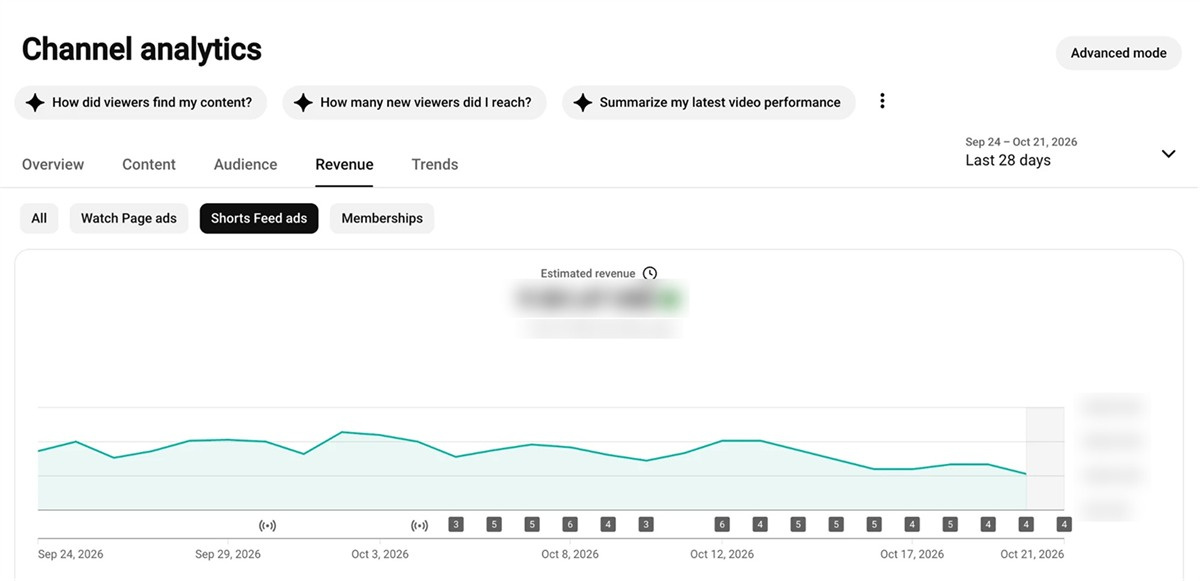
Both live in YouTube Studio under Analytics → Revenue. RPM sits on the Revenue tab, and CPM, playback-based CPM, ad impressions, and monetized playbacks are one click deeper, in Advanced mode.
Here's where to find RPM in YouTube Studio and the metrics next to it.
- Open YouTube Studio and select Analytics in the left menu.
- Open the Revenue tab. The RPM card shows your revenue per 1,000 views for the period you picked.
- Click Advanced mode in the top right corner.
- Add CPM, playback-based CPM, ad impressions and estimated monetized playbacks as columns, and break the table down by video or by geography.
|
Metric |
Where in YouTube Analytics |
What it shows |
How to improve it |
|---|---|---|---|
|
RPM |
Revenue tab |
Your income per 1,000 views |
Raise the share of views with ads, add non-ad revenue |
|
CPM |
Advanced mode |
Advertiser price per 1,000 impressions |
Advertiser-friendly videos, viewers in high-CPM countries |
|
Playback-based CPM |
Advanced mode |
Advertiser price per 1,000 playbacks with ads |
8+ minute videos with mid-rolls |
|
Estimated monetized playbacks |
Advanced mode |
How many views carried at least one ad |
Fix limited-ads icons, set the audience correctly |
|
Ad impressions |
Advanced mode |
How many ads were served |
Mid-rolls at natural breaks |
|
Revenue sources |
Revenue tab |
Mix of ads, Premium, memberships and Supers |
Memberships, Supers on live streams |
|
Revenue by geography |
Advanced mode, Geography |
Countries that fund your RPM |
Translated titles and descriptions |
🎯 Practical tip. Build one Advanced mode table with views, monetized playbacks, CPM, playback-based CPM and RPM per video, and check it every Monday. The videos with the lowest share of monetized playbacks are your quickest wins.
How to calculate CPM, RPM, and playback-based CPM
Four formulas cover the whole chain, and all of them follow one pattern. That's amount ÷ units × 1,000.
- CPM = advertiser spend ÷ ad impressions × 1,000
- Playback-based CPM = advertiser spend ÷ monetized playbacks × 1,000
- RPM = your total revenue ÷ views × 1,000
- Monetized playback rate = monetized playbacks ÷ views × 100%
Here's how to calculate RPM on YouTube from the bottom up, for 100,000 views.
|
Step |
Number |
Calculation |
|---|---|---|
|
1. Views |
100,000 |
From YouTube Analytics |
|
2. Monetized playbacks |
55,000 |
55% of views showed at least one ad |
|
3. Ad impressions |
90,200 |
1.64 ads per monetized playback |
|
4. Advertiser spend |
$359 |
90,200 impressions at a $3.98 CPM |
|
5. Playback-based CPM |
$6.53 |
$359 ÷ 55,000 × 1,000 |
|
6. Your ad revenue |
$197.45 |
55% of $359 |
|
7. Ad RPM |
$1.97 |
$197.45 ÷ 100,000 × 1,000 |
Every input is a median for entertainment channels in our research of 300 channels by MilX and AIR Media-Tech, from May 2025 to May 2026.
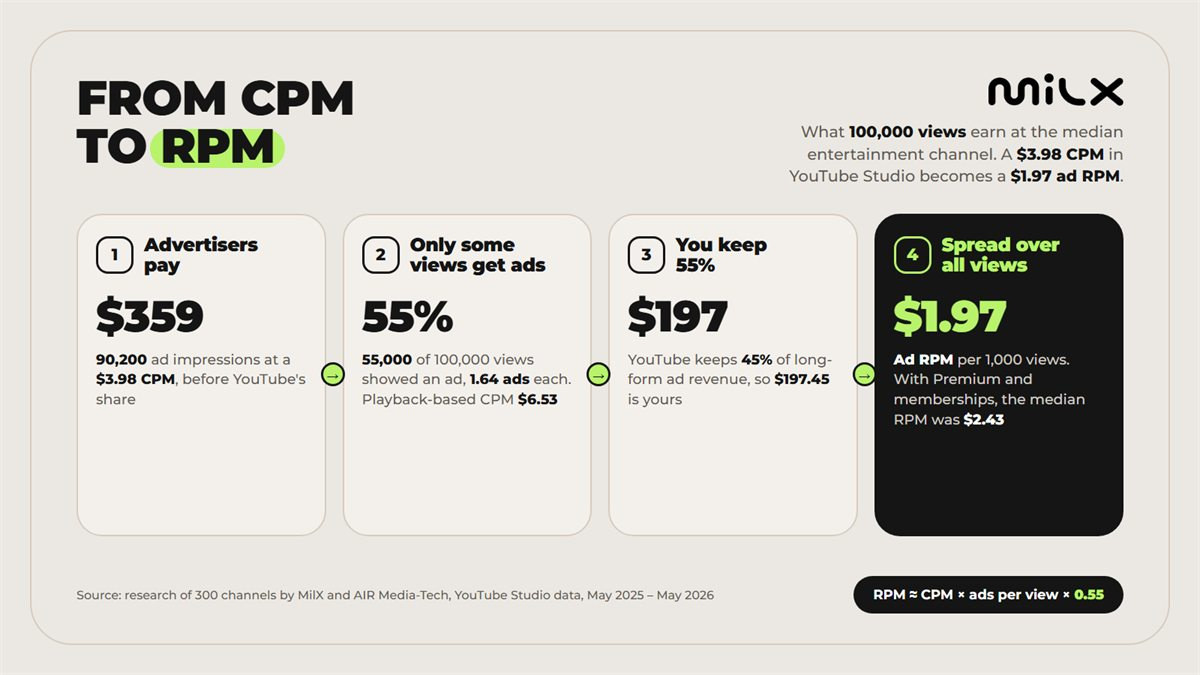
The shortcut that ties it together is RPM ≈ playback-based CPM × monetized playback rate × 0.55 + other revenue per 1,000 views. In the example, $6.53 × 55% of views with ads × 55% creator share gives $1.97 from ads alone. The median entertainment channel in the same research had a $2.43 RPM, because RPM also counts Premium, memberships, and Supers, and medians of separate metrics never multiply out cleanly.
If you only have CPM, use ad impressions per view instead. RPM ≈ CPM × (ad impressions ÷ views) × 0.55 + other revenue per 1,000 views. That's how to calculate RPM from CPM without guessing, and it's where two popular shortcuts break.
- CPM × 0.55 assumes one ad on every view. At the medians from our research, ads on 53% of views and 1.55 ads on each of them, a $10 CPM gives about $4.52 of ad RPM, not $5.50.
- RPM is already after YouTube's share. Some calculators take 45% off RPM a second time, which cuts your forecast almost in half.
To turn RPM into a monthly view target, divide your income goal by your RPM and multiply by 1,000. We worked it through for $1,000 to $10,000 a month in how much YouTube pays per view.
Need an editor or new gear before the next payout?
Your RPM tells you what the next few months will bring. If your channel qualifies, MilX Active Funds gives you up to 4 months of future YouTube revenue upfront. Enter your last 3 months of revenue to see your offer.
Check if your channel qualifiesWhy your RPM is usually lower than your CPM
YouTube names two reasons. RPM is counted after YouTube's revenue share, and it includes views that weren't monetized.
- Revenue share. On long-form videos, YouTube pays creators 55% of net ad revenue, according to the YouTube partner earnings overview. On Shorts, creators keep 45% of the revenue allocated to them.
- Views with no ads. Ad blockers, markets with little advertiser demand, limited-ads videos, and made-for-kids settings all create views with no ads. Each one lowers RPM and leaves CPM untouched. In our research of 300 channels, Education & Science channels showed an ad on 77% of their views, Gadgets & Tech channels on 34%, and Kids & Teens channels on 32%.
Playback-based CPM and why it's higher than CPM
Take a 20-minute video with three mid-rolls and a 6-minute video with one pre-roll. They can share a $10 CPM and still earn very different amounts per viewer, because CPM prices each ad, not each viewer. Playback-based CPM is what advertisers pay per 1,000 playbacks that showed at least one ad, so it captures how many ads each viewer saw.
YouTube's own example in the ad revenue analytics guide gives a $3.50 CPM and a $4.67 playback-based CPM for the same video. Divide one by the other, and you get the average number of ads per monetized playback, 1.33 in that example. In our research of 300 channels, a monetized playback carried 1.55 ads at the median.
🎯 Practical tip. A playback-based CPM close to your CPM means one ad per viewer, usually because your videos run under 8 minutes.
When RPM is higher than CPM
"RPM is always lower" is close, but not quite right. In our research of 300 channels, Education & Science channels had a $5.91 median CPM in YouTube Studio and a $10.22 median RPM. Those viewers saw ads on 77% of their views; long videos carried several ads each, and Premium and memberships added money that never passes through the ad auction.
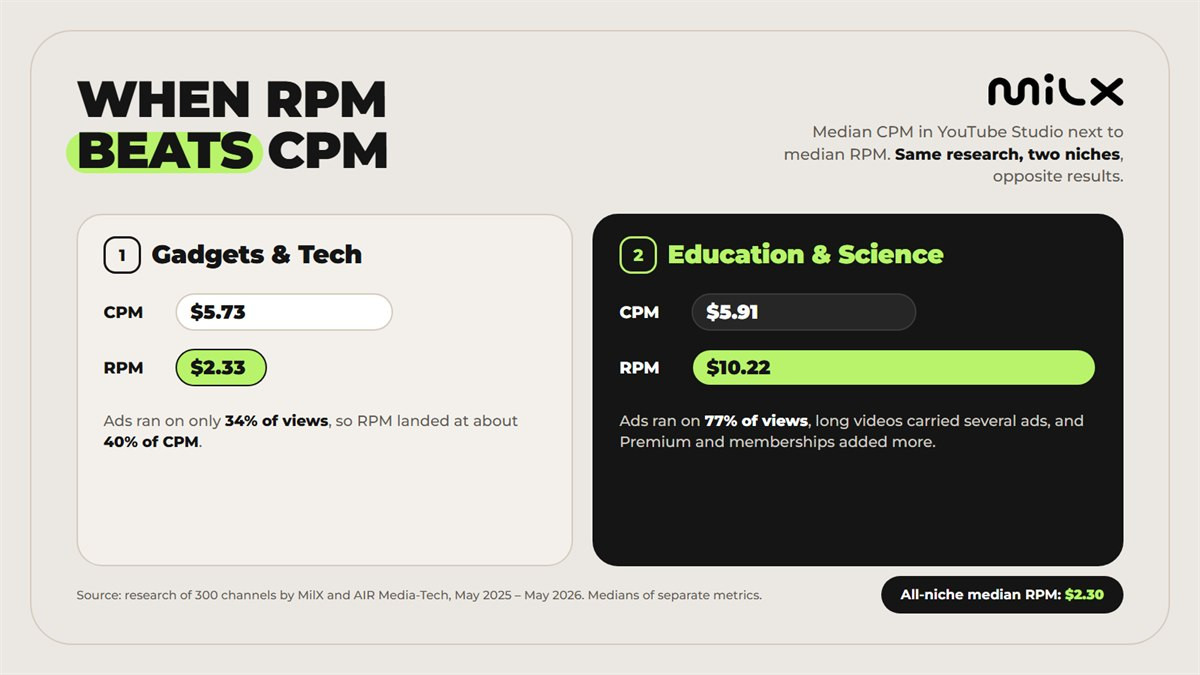
These are medians of separate metrics across channels, so they don't describe one channel. On your own channel, RPM tops CPM when several ads run on most views or when non-ad income makes up a big share of revenue.
RPM also leaves some of your income out. The ad revenue guide says it doesn't include merch shelf sales, brand deals and sponsorships (other than YouTube Creator Partnerships), or money YouTube brings you indirectly, such as consulting.
What affects CPM and RPM
Some of these factors you can change, and some you can only plan around. Each one below comes with a number from our research of 300 channels (May 2025 to May 2026).
- Season. The median RPM peaked at $2.35 in November and fell to $1.56 in January, about a third lower.
- Audience country. Advertisers pay many times more to reach viewers in the US than in India for the same video. The full ranking is in YouTube CPM by country.
- Niche. Education & Science channels had a $10.22 median RPM and Kids & Teens channels $0.33. Every niche is in MilX's 2026 CPM and RPM rates by niche.
- Share of views with ads. The median channel showed an ad on 53% of its views. That's how a $5.73 tech CPM turns into a $2.33 RPM.
- Ads per view. A monetized view carried 1.55 ads at the median. Videos of 8 minutes or longer can run mid-roll ads, which raises this number.
What is a good RPM on YouTube?
The median RPM across all 300 channels in our research was $2.30 from May 2025 to May 2026, about $2,300 for every million views. But a good RPM depends on your niche and your audience's country first, so one number for everyone tells you little.
Compare yourself with your own niche in three steps. Find its bottom quarter, its median, and its top quarter, then see where your RPM falls. Inside one niche, the top quarter of channels earns 3 to 8 times what the bottom quarter does.
Take Gaming as an example. The bottom quarter of gaming channels in our research sat at $0.70, the median at $2.05, and the top quarter at $3.62. A gaming channel at a $3.70 RPM is already in its top quarter, even though it's far below the Education median.
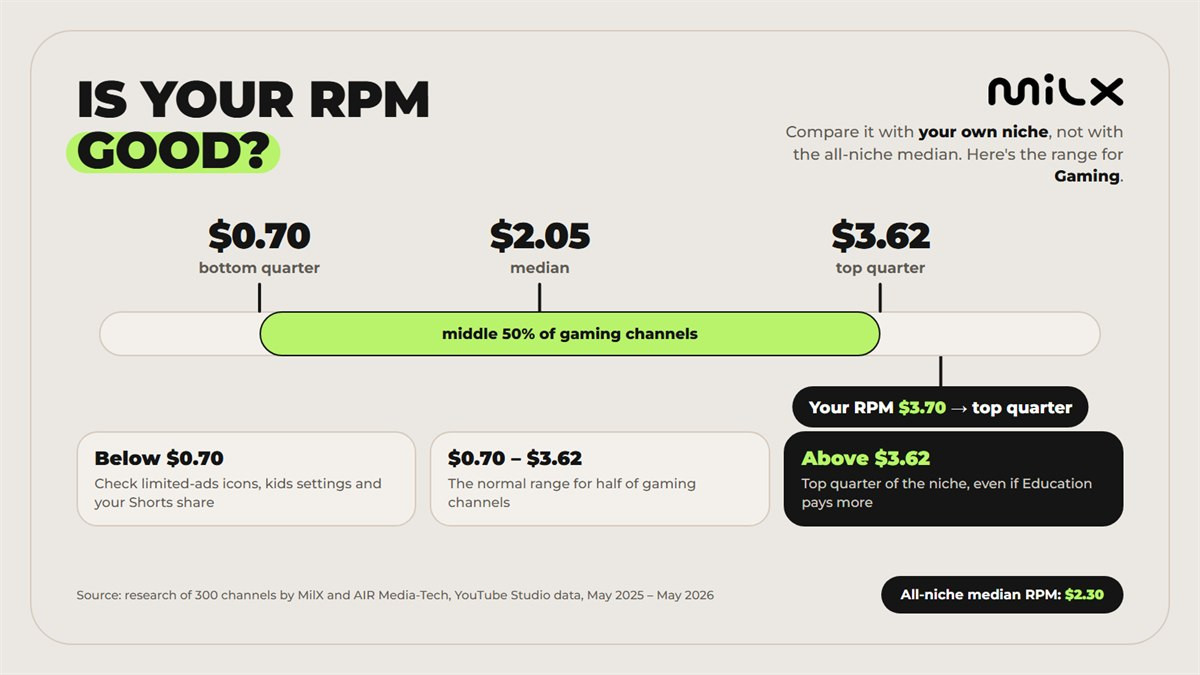
The same three numbers for every niche are in MilX's 2026 CPM and RPM rates by niche.
And what is a good CPM?
Across the niches in our research, the median CPM in YouTube Studio ran from $3.42 in Crafting & Handmade to $5.91 in Education & Science. So a $3.50 to $6 CPM in Studio is typical, and an $8 CPM is above every one of those medians. The CPM figures quoted online are usually advertiser estimates from third-party tools, and they run higher than both your Studio CPM and your RPM.
How to increase your RPM: the short list
Each tip below has its own guide with the details.
- Make videos of 8 minutes or longer, so mid-rolls run. On one kids channel in the AIR Media-Tech network, new 10-minute compilations earned a 72% higher RPM than its 2–3 minute videos. More tweaks are in five RPM boosters that work in 2026.
- Fix limited-ads icons first when RPM falls, then check the other causes in the real reason your RPM dropped.
- Skip the formats advertisers avoid, like pranks and meme compilations, which is why some viral videos bring zero money.
- Translate titles and descriptions to reach viewers in countries with a higher CPM.
- Plan kids content around limited ads, since videos made for kids get no personalized ads. Here's how kids channels still make money.
- Add memberships and Supers. They count in RPM and don't depend on ad rates, so they lift it even in low-CPM niches.
CPM and RPM for Shorts
Shorts earn differently. Ads in the Shorts Feed are pooled each month; part of the pool covers music licensing, and the rest is split by each channel's share of engaged views. Creators keep 45% of what's allocated to them, according to YouTube's Shorts monetization policies.
That's why a CPM formula doesn't work for Shorts. Your Short isn't paid by the ads shown next to it. Shorts RPM stays between $0.07 and $0.20 in most niches, according to our research of 274 channels by MilX and AIR Media-Tech, so a growing Shorts share pulls your blended RPM down. The full picture is in the YouTube Shorts monetization guide.
CPM tells you what advertisers think your audience is worth. RPM tells you what your channel earns from every 1,000 views, and it's the number to plan with. Check both in Advanced mode once a week, and when they drift apart, look at the share of views with ads before you look at anything else.
Losing part of every payout to your bank's exchange rate?
With MilX, your channel's earnings land on a balance you own, credited daily from the day you connect. Move them when you need them, in the currency that fits.
- Bank transfers in 70 currencies and 30+ payout methods, including BTC, USDT and USDC, on any day
- Instant Payments in under 5 minutes for 1% (minimum $1)
- Instant P2P transfers to your team on MilX, plus contracts, acts and invoices for your accountant
- Advance Funds: up to 2 months of earned revenue for a one-time 4.3%. If your channel qualifies, Active Funds adds up to 4 months of future revenue
$500M+ paid out to creators across 3,100+ connected channels, rated 4.6 out of 5 on Trustpilot. No subscription, no revenue share. MilX works with revenue earned after you connect.
Download the MilX app →