Key takeaways
- Most demonetizations are a channel-level pattern, not one bad video. Fixing the pattern clears more inventory than appealing video by video.
- An appeal works when it names the policy and shows a specific change. You get one attempt.
- The wait is 30 days after a first rejection, 90 days after every rejection that follows. Reapplying with an unchanged catalogue converts the short wait into the long one.
- Six months with no upload turns monetization off by itself, so a dormant cleanup period is a risk in its own right.
- Creators who get through this have a cash buffer or a second income line, and both have to exist before the notice arrives.
If MilX guidelines help you, add the MilX blog to your preferred sources.
What happens to money you already earned before demonetization
The answer depends on why the channel was demonetized and whether the issue affected only its Partner Program status or the AdSense account itself.
Money already in your AdSense balance
Funds already credited to your AdSense balance before demonetization normally stay there and get paid out on the regular AdSense schedule, once the balance reaches the payment threshold (usually $100) and the account passes verification.
Losing monetization on the channel stops new revenue from accruing. It does not automatically cancel money already earned.
When YouTube can hold or claw back earnings
- The exception is demonetization tied to a violation of YouTube's monetization policies: reused content,
- view manipulation,
- copyright issues,
- and similar cases.
YouTube's official policy allows the company to withhold or adjust earnings connected to the violation, charge them back against an undisbursed AdSense balance, or offset them against future payments.
An investigation can delay payment for up to 90 days, or until a third-party rights dispute is resolved.
Suspension or termination from the Partner Program
If the channel is suspended or terminated from the YouTube Partner Program rather than simply demonetized, the right to any revenue, including amounts not yet paid, is lost entirely.
This is a harsher outcome than a standard demonetization for advertiser-friendliness.
Channel demonetization vs AdSense account suspension
Channel demonetization and AdSense account suspension are separate events.
A suspended AdSense account, usually the result of violating AdSense's own policies rather than YouTube's monetization rules, typically freezes the balance, and in most cases those funds are not recovered.
What to check
Check the Payments tab in AdSense.
A status of "on hold" or "payment paused" means the money is not moving until a review finishes, in which case the next step is the AdSense appeal form.
If the status is normal and the balance has crossed the payment threshold, the payout should arrive on schedule even if the channel is demonetized.
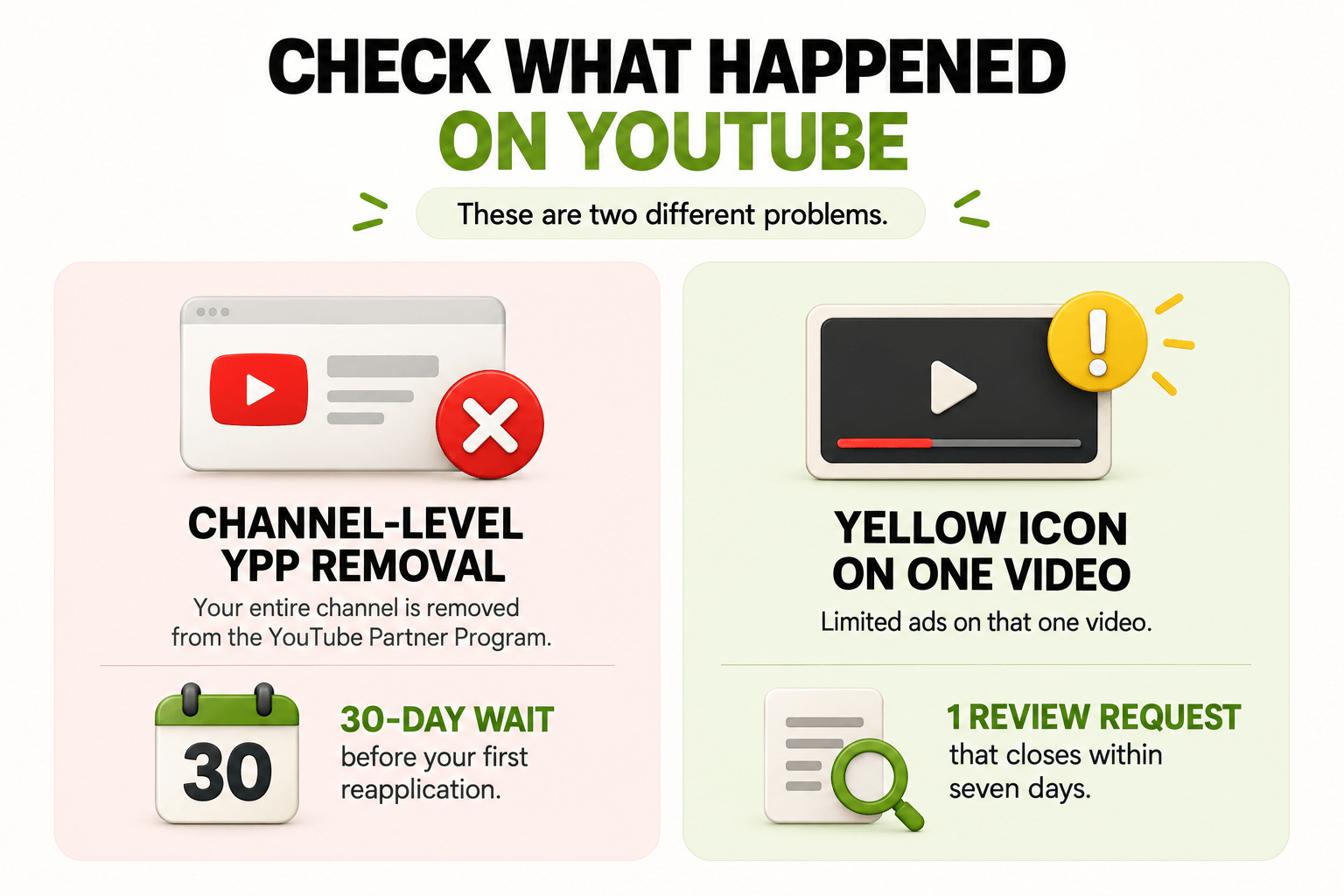
Is your whole channel demonetized, or just one video?
A yellow icon on one video is a video-level ad suitability call, and the rest of your channel keeps earning. "Monetization is off" on the Earn tab is a channel-level YPP removal, and only that one stops your revenue. The difference decides your next two weeks.
|
What you see in YouTube Studio |
What it means |
Where to act |
|---|---|---|
|
Yellow icon on one video under Content |
Limited ads (yellow icon) on that video; channel still monetized |
Hover the icon, open the action button, request one review |
|
Yellow icons on 10+ videos across months |
A pattern in your format, not one bad upload |
Fix the pattern first, appeal second |
|
"Monetization is off" on the Earn tab |
YPP removal, channel-level |
Appeal within 21 days, or reapply after the waiting period |
|
Email about reused or inauthentic content |
Your channel was assessed as a whole |
Rework the format before touching the appeal form |
|
Community strike under Content > Restrictions |
Monetization loss follows the strike, not the reverse |
Appeal the strike itself; monetization returns with it |
|
No notice anywhere, revenue flat |
Possible AdSense issue or an inactivity flag |
Check AdSense separately, then check your upload gap |
Monetization loss caused by a community strike is a symptom. Appealing the monetization decision while the strike stands will not work. The strike appeal is the one that counts.
👉 Once your channel is stable again, read how to avoid demonetization and stay YouTube-friendly.
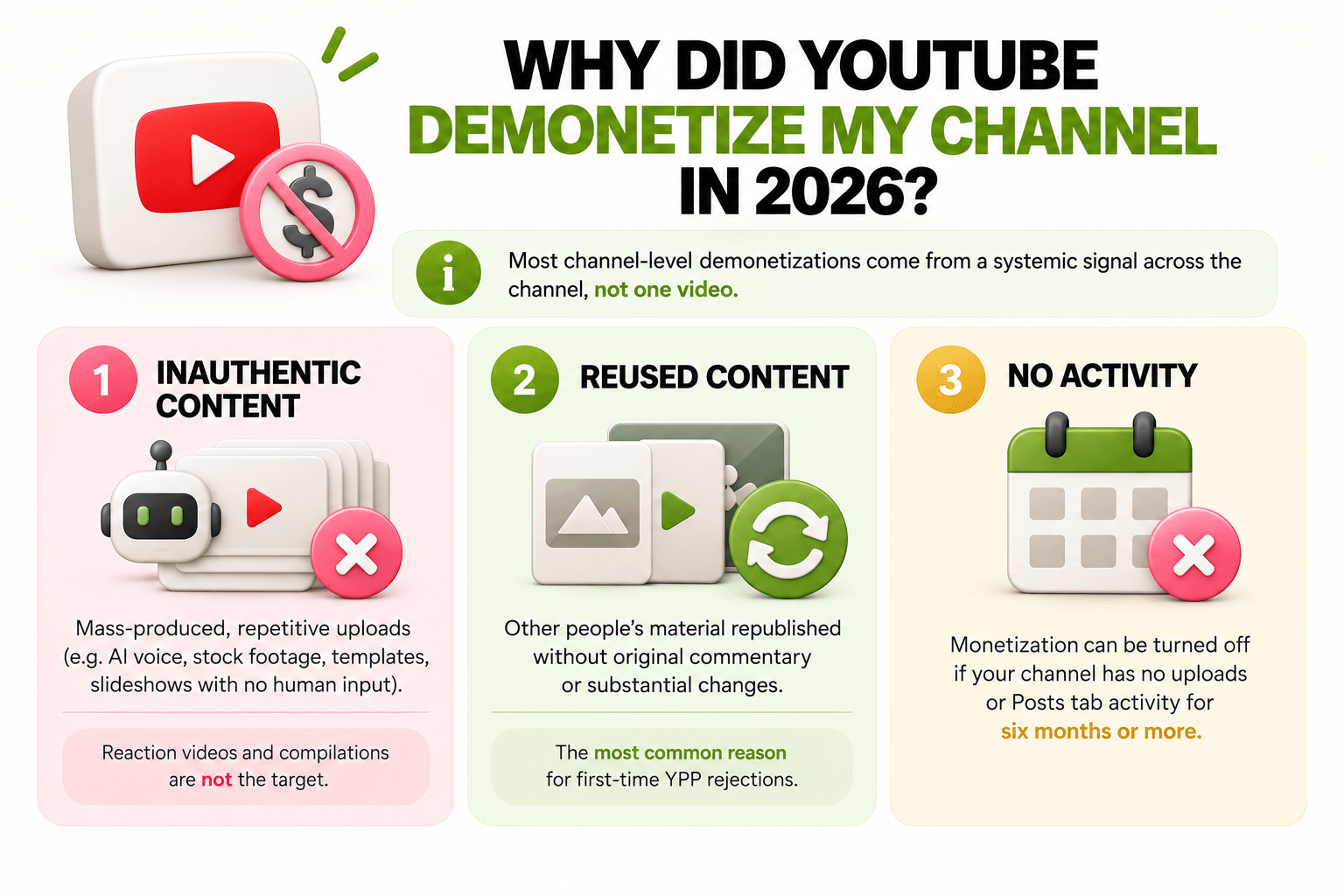
Why did YouTube demonetize my channel in 2026?
Most channel-level demonetizations in 2026 come from a systemic signal across the channel, not one video. YouTube's channel monetization policies assess the channel against Community Guidelines, AdSense program policies, and the advertiser-friendly content guidelines together.
Two policy areas do most of the damage.
On 15 July 2025, YouTube renamed "repetitious content" to inauthentic content, and on 16 July 2026 it named three groups that can't be monetized, targeting mass-produced and repetitive uploads:
- synthetic narration over stock footage,
- templated thumbnails,
- slideshow formats with no human input.
Reaction videos and compilations are not the target. Low-effort assembly at volume is.
Reused content is the neighbouring rule, and the most common rejection reason for first-time YPP applicants: other people's material republished without original commentary or substantive modification.
That last row surprises people. YouTube may turn off monetization on channels with no video uploads or Posts tab activity for six months or more. Creators who go dark for half a year while they clean up the channel lose monetization to the cleanup.
🎯 Practical tip: sort your Content tab by monetization status and export the list before you appeal. If the yellow icons cluster in one series, one thumbnail template, or one music library, you have a format problem, and fixing the format clears more videos than seven separate review requests.
According to MilX data from the AIR Media-Tech creator network, one business channel accumulated 12 videos with yellow icons in a single quarter. All 12 restrictions were contested and lifted, each one restoring monetized playbacks on inventory that had been earning at a reduced rate the whole time.
👉 Some formats carry structural risk. Check what YouTube channels have a high risk of demonetization in 2026 before you rebuild.
Your Revenue Doesn't Need to Wait Until the 21st
AdSense holds what your channel has already earned until its own payout date. Advance Funds brings that revenue forward by up to 50 days, for a one-time 4.3% on the amount you take, no monthly interest. See how Advance Funds works, or Try MilX
How do you appeal a YouTube demonetization?
You get one appeal per decision, so the order of operations matters more than the wording. Not every reason carries the same odds — match yours before you spend the one attempt you get.
|
Reason |
Appeal odds |
What to do |
|
Yellow icon on one video, ad suitability |
High, if the flag was a misread |
Open Content, request review, decision lands in seven days |
|
Reused or inauthentic content, a pattern across uploads |
Low without a format change |
Show a format change in five videos, then reapply — don't spend the appeal now |
|
Content ID claim you can document as licensed |
High, with the licence attached |
Name the specific claim, attach the licence as evidence |
|
Community strike |
Not appealable directly |
Appeal the strike itself — monetization returns with it |
Know your lane, then run the sequence that actually moves it.
- Read the notice, not the forum thread. In YouTube Studio, open Monetization, then Email Notifications, and check Recent Policy Violations. Check the Gmail account tied to the channel in the spam folder. The notice names the policy, and that name is what your appeal has to address.
- Confirm which decision you are appealing. A yellow icon is appealed from Content: hover over the notice next to the video, open the action button, and request review. A YPP removal goes through the YPP appeal process, which now runs as a short video appeal or through Creator Support in Studio.
- Fix the content before you file. Trim or blur the flagged segment, rewrite metadata that overstates what the video contains, replace unlicensed audio. Do not delete videos: deleting removes the evidence a reviewer needs and leaves the policy record in place.
- Check whether you can appeal at all. The appeal option for limited ads appears only on eligible videos, and the review closes within seven days. Since 10 March 2025, a human reviewer can be part of that process, and decisions on new uploads take up to 24 hours instead of resolving instantly.
- File once. After your one appeal on a video, the reviewer's decision is final, and that video's monetization status will not change again.
A YPP suspension runs on two clocks: seven days to appeal a pre-suspension notice, and 21 days after the suspension. Teams respond within 14 days.
What a successful appeal contains
- Name the policy. Quote it from the notice. "Advertiser-friendly content guidelines, inappropriate language" beats "I think there was a mistake."
- State what changed, with specifics. "The three flagged videos were re-uploaded with the profanity in the first 30 seconds removed and the thumbnails replaced." Vague remediation reads as no remediation.
- Point to fresh, clean uploads. Link two or three videos published after the issue. Most appeals leave this out, and it is the strongest evidence that the channel operates differently now.
- Say nothing about the money. A policy reviewer cannot weigh any of it, and an emotional appeal reads as the absence of a policy argument.
According to MilX data from the AIR Media-Tech creator network, appeals written from scratch against the specific claim are what lift restrictions. Template appeals get closed with no change. In one music case, appeals against false Content ID claims restored monetization across a back catalogue and quarterly revenue moved from roughly $11.8K to $115.6K. The audience and the views had been there all along. The money was blocked on claimed inventory.
Appeal now, or rebuild and reapply?
|
Parameters |
Appeal now |
Rebuild, then reapply |
|---|---|---|
|
What it fits |
One decision you can argue against |
A pattern running across the channel |
|
Time to a result |
7 days for a video, 14 for YPP |
30 days minimum, often 90 |
|
Attempts you get |
One, then the decision is final |
Unlimited, on the waiting-period clock |
|
Cost if it fails |
The one appeal is spent |
Another 90-day wait |
|
Evidence you need |
The licence, the edit, the clean uploads |
Five videos in a visibly different format |
|
Recommended for |
Yellow icons, licensed music claimed in error, a strike you can dispute |
Reused or inauthentic content flags, and any second rejection |
How long is the wait before you can reapply to YPP?
Thirty days after your first rejection, 90 days after any rejection that follows. YouTube states it plainly: a first rejection means you can reapply 30 days after the rejection email, and if it is not your first, or you have reapplied before, the wait is 90 days. A YPP suspension carries the 90-day rule.
This is where channels lose the second round. The 30-day window feels like a countdown, so creators reapply on day 31 with the same catalogue and collect the 90-day wait. Reapplication is a fresh assessment of the whole channel, not a re-read of your appeal.
Three things belong in those 30 days:
- A format change visible in five videos. A different production method, not a tweak.
- Old inventory dealt with. Unlist or rework the videos carrying the flagged pattern. Unlisting keeps your watch time history intact while removing the content from the assessment.
- Document rights for anything you republish. According to MilX data from the AIR Media-Tech creator network, one kids channel drew claims because its music licence allowed each track once per video, and some videos used the same track twice. After the offending segments were removed, views rose 9% and revenue 15.3%.
Plan around one more date. From 1 February 2027, the YPP entry thresholds for new creators rise to 8,000 qualified watch hours in the last 365 days or 20 million qualified Shorts views in the last 90 days, alongside 1,000 subscribers. Creators already in YPP are not affected. A creator still outside the program after that date reapplies as a new applicant against the higher bar. Reapplying in 2026 is cheaper than reapplying in 2027.
How do you earn while your channel is not monetized?
Ad revenue is one income line, and the only one YouTube controls. Creators who get through a demonetization period have a second line running before the notice arrives, or a cash buffer covering the gap. If part of your channel is still monetized- yellow icons on some videos and green on the rest- you still have an AdSense stream. Beyond it:
- Direct audience payments. Memberships on Patreon, Ko-fi, or Buy Me a Coffee keep running while ads are off. Set them up before you need them, because launching during a crisis reads as a crisis.
- Brand deals. Advertiser suitability and brand suitability are different tests, so a demonetized channel with real watch time is still a media asset. Start with companies whose products you already pay for.
- Your own products. Digital downloads, presets, courses, merch. The margin is yours, and no platform switches it off.
- Footage licensing. Stock and news licensing pays on old inventory that is earning nothing right now.
🎯 Practical tip: divide your monthly floor (rent, editor, software, food) by your average monthly channel revenue. Above 0.8, one demonetization notice becomes a personal financial emergency within 30 days. Fix that ratio before the notice, not after.
👉 The full breakdown sits in Beyond AdSense: top 7 revenue streams for a full-time YouTube creator.
How do you avoid a second demonetization?
Run a monthly review of your own channel instead of waiting for YouTube to run it for you.
According to MilX data from the AIR Media-Tech creator network, a partner network that ignored violation warnings for a year lost monetization on two major channels, then ran a full cleanup: problem uploads removed, metadata and thumbnails rebuilt, strike-prone formats retired, a pre-publish review installed. In the five weeks after, views rose 89.7%, watch time 28.5%, revenue 30.5% against the previous 40 days.
Four checks catch most of it:
- Audio rights, monthly. Read the licence terms for every track used in the last 30 days, per-video usage limits included. Content ID is fast, and it does not read your invoices. How Content ID detects copyright violations covers the mechanics.
- Metadata honesty. Titles and thumbnails promising more than the video delivers get read as misleading content, an advertiser-friendly problem before it is an audience problem.
- AI disclosure. Disclose meaningfully altered or synthetic realistic content, and keep a human editorial pass on every upload. Undisclosed synthetic content is where the inauthentic content policy bites hardest.
- Self-certification accuracy. Rate your videos correctly at upload. A pattern of under-rating trains the system to trust you less, which shows up as yellow icons on videos that would otherwise pass.
What should you do in the first 30 days after demonetization?
Work the four weeks in this order. Skipping to the appeal is what turns a 30-day wait into a 90-day one.
Diagnose and stabilize
- Identify channel-level or video-level from the table above and screenshot every notice.
- List every flagged video with the policy cited.
- Calculate your cash runway in weeks.
- Pause scheduled uploads sharing the flagged pattern.
- Appeal any community strike by day 7, because the monetization decision depends on it.
Fix the content
- Trim, blur, or re-upload flagged segments.
- Rewrite metadata that overstates.
- Replace unlicensed audio and file the new licence documents.
- Unlist inventory you cannot fix. Delete nothing.
File and diversify
- File your one appeal with the policy named and two clean recent uploads linked.
- Same week, open one non-ad income line: memberships, a product, or one brand outreach email.
Rebuild the process
- Publish three to five videos in the corrected format.
- Write a one-page pre-publish checklist (rights, metadata, self-certification, AI disclosure) and use it on every upload.
- If you were rejected rather than suspended, prepare the reapplication so it goes out on day 31 with a visibly different channel behind it.
Get paid before the views roll in
Stop waiting on the 21st of the month. Reach earned revenue up to 2 months ahead of the AdSense calendar, and up to 4 more months with Active Funds if your channel qualifies, then put it straight into your next shoot, your editor, or your gear. Over $500M paid out to creators, 3,100+ channels connected, 4.6 out of 5 on Trustpilot. Try MilX
What can MilX do while your revenue is interrupted?
Your channel's money lands on MilX daily, starting the day you connect the channel. It stays on your balance until you decide where it goes: your bank in your own currency, a wallet, crypto, or straight to your editor. 54 currencies, 30+ payout methods, any day of the month, as often as you want.
Two products handle timing.
- Advance Funds brings forward revenue your channel has already earned, but Google has not paid yet, up to 2 months of it, up to 50 days ahead of the AdSense date, for a one-time 4.3% on the amount taken and no monthly interest.
- Active Funds works against future revenue, up to 4 months of what the channel earns in a month, sized by the channel's own history, at 0.33% per day and repaid automatically at 5% of monthly revenue.
👉 Take control of your creator finances with MilX; download the app for free.