
Key takeaways
- A Content ID claim doesn't always mean lost revenue — the rights holder's policy decides whether it monetizes, blocks, or just tracks the video. Either way, it stays on one video and leaves your channel status untouched.
- A strike is a different mechanism. It follows a DMCA takedown, and three in 90 days end the channel.
- The 5-day window is the money rule: dispute inside it and revenue from the claim date is held for you. Dispute later and everything earned before that date goes to the claimant.
- The claimant has 30 days to answer a dispute and 7 days to answer an appeal. Silence at either stage releases the claim.
- Disputes win on licences, exclusive rights, or a use that changes the original. They lose on credit and good intentions.
- Editing the claimed segment (trim, replace, mute) clears the claim with zero risk and keeps your URL and stats.
- Compilations, gameplay, mashups, and non-exclusive library music cannot enter Content ID. Copyright Match Tool is the fallback.
Content ID: What Happens to Your Video & Revenue
|
Situation |
What Happens |
Revenue |
|
Video uploaded |
Content ID automatically scans audio and video |
Normal monetization |
|
Match found |
A Content ID claim is created |
Rights holder may monetize the video |
|
Content ID claim |
Usually affects the video, not your channel |
Revenue may go to the claimant |
|
Copyright strike |
Separate from a Content ID claim |
More serious channel-level consequence |
|
Dispute within 5 days |
Claim is reviewed |
Revenue is held from the claim date |
|
Dispute after 5 days |
Claim is still reviewed |
Revenue is held from the dispute date |
|
You win the dispute |
Claim is released |
Held revenue goes to you |
|
Claimant wins |
Claim remains |
Held revenue goes to the claimant |
If MilX guidelines help you, add the MilX blog to your preferred sources.
What do claim, strike, dispute, and appeal mean?
Four words, four situations. Mixing them up costs money, so use the precise term when you write to YouTube or to a rights holder.
|
Term |
What it means for you |
|---|---|
|
An automated notice on one video. It blocks, monetizes, or tracks that video; channel status stays clean. |
|
|
The result of a valid DMCA (Digital Millennium Copyright Act) takedown. Video removed, channel status changed; three in 90 days terminate the channel. |
|
|
Your first written response to a claim. The claimant then has 30 days. |
|
|
Your second response, after a claim is reinstated. The claimant has 7 days. |
👉 Before you touch any button, read our breakdown of what separates a copyright strike from a copyright claim.
Who can use Content ID?
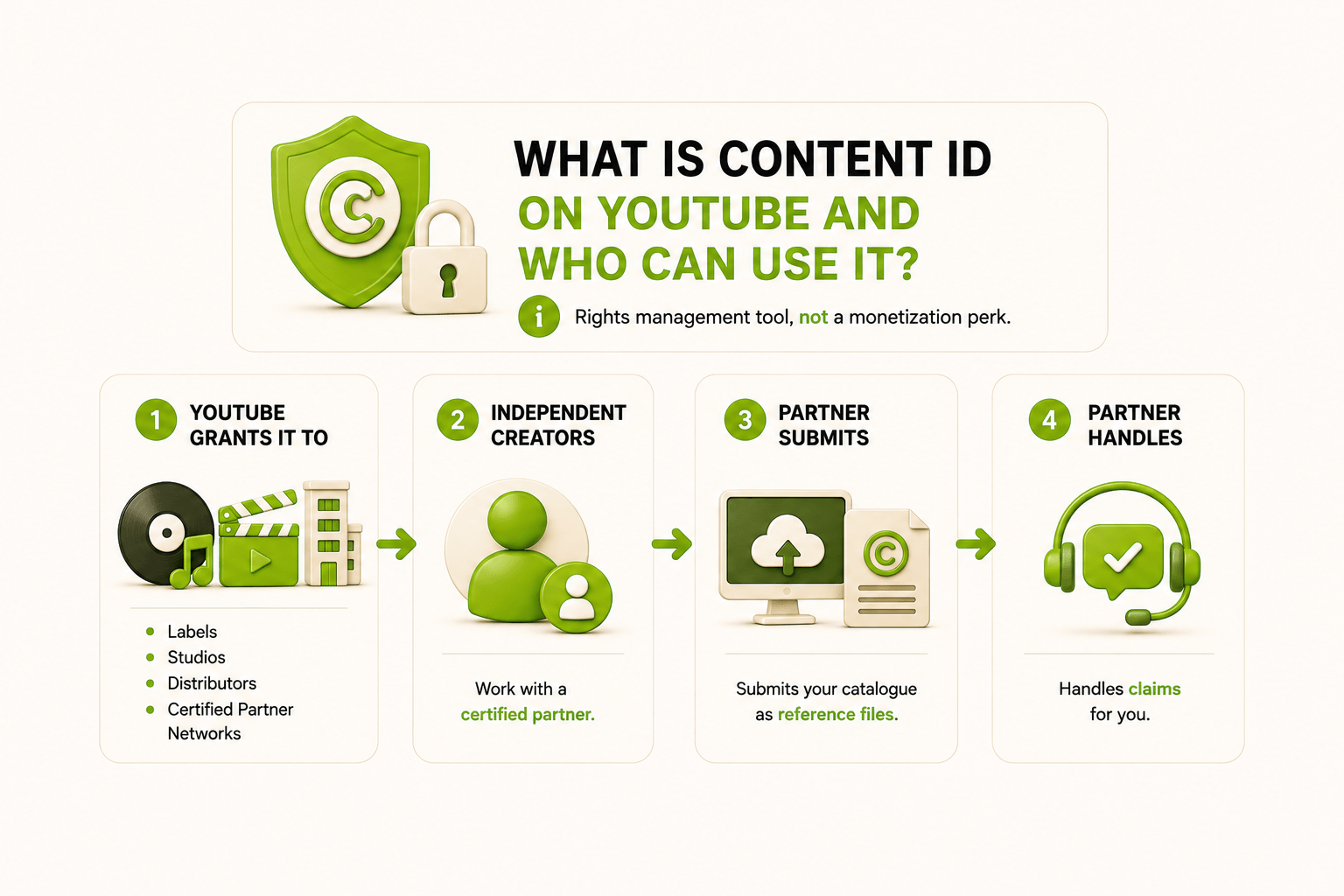
Content ID isn't something you sign up for. It's a rights management tool, not a monetization perk.
YouTube only gives it to labels, studios, distributors, and certified partners: companies that manage large catalogues of original content.
As an independent creator, you get in only through one of these partners. They run a Content Manager account, upload your catalogue as reference files, and handle copyright claims for you.
🎯Practical tip: before signing, ask who keeps the reference files if you leave, and whether Content ID carries a per-release fee. One label owner who is also a MilX user moved his whole catalogue to a new distributor because the old one billed extra for Content ID on every release.
How does Content ID work step by step?
How Content ID works takes five steps, and only the last one is visible to you.
- Upload. You publish a video, a Short, or a live stream.
- Scan. The YouTube Content ID system fingerprints your audio and video tracks and compares both against the reference database.
- Match. It finds a matching segment, down to a few seconds. Audio match, melody match, and video match are handled separately.
- Policy. The rights holder's pre-set policy fires automatically: monetize, track, or block. Each one can be region-specific, so a video can earn in Brazil and stay blocked in Germany.
- What you see. A "Copyright claim" label in YouTube Studio with claimed timestamps, claimant name, and content used.
Which match type takes which part of your income?
|
What matched |
Usual policy |
Effect on your money |
|---|---|---|
|
Full commercial track, audio match |
Monetize |
Ad revenue on that video goes to the rights holder |
|
Melody only, your own cover |
Monetize with revenue share |
Publisher's split applies, YPP members keep a share |
|
Video match, your footage reused |
Block or Monetize |
Money follows the reference file, not the upload date |
|
Seconds of music, Manual Claiming tool |
Block or mute only |
Claimants cannot monetize short or unintentional use |
|
Live stream match |
Mute, static image, stopped stream |
No monetize or track option while live |
|
Region-locked reference |
Mixed |
Earning in one country, blocked in another |
What happens to your Content ID claim revenue?
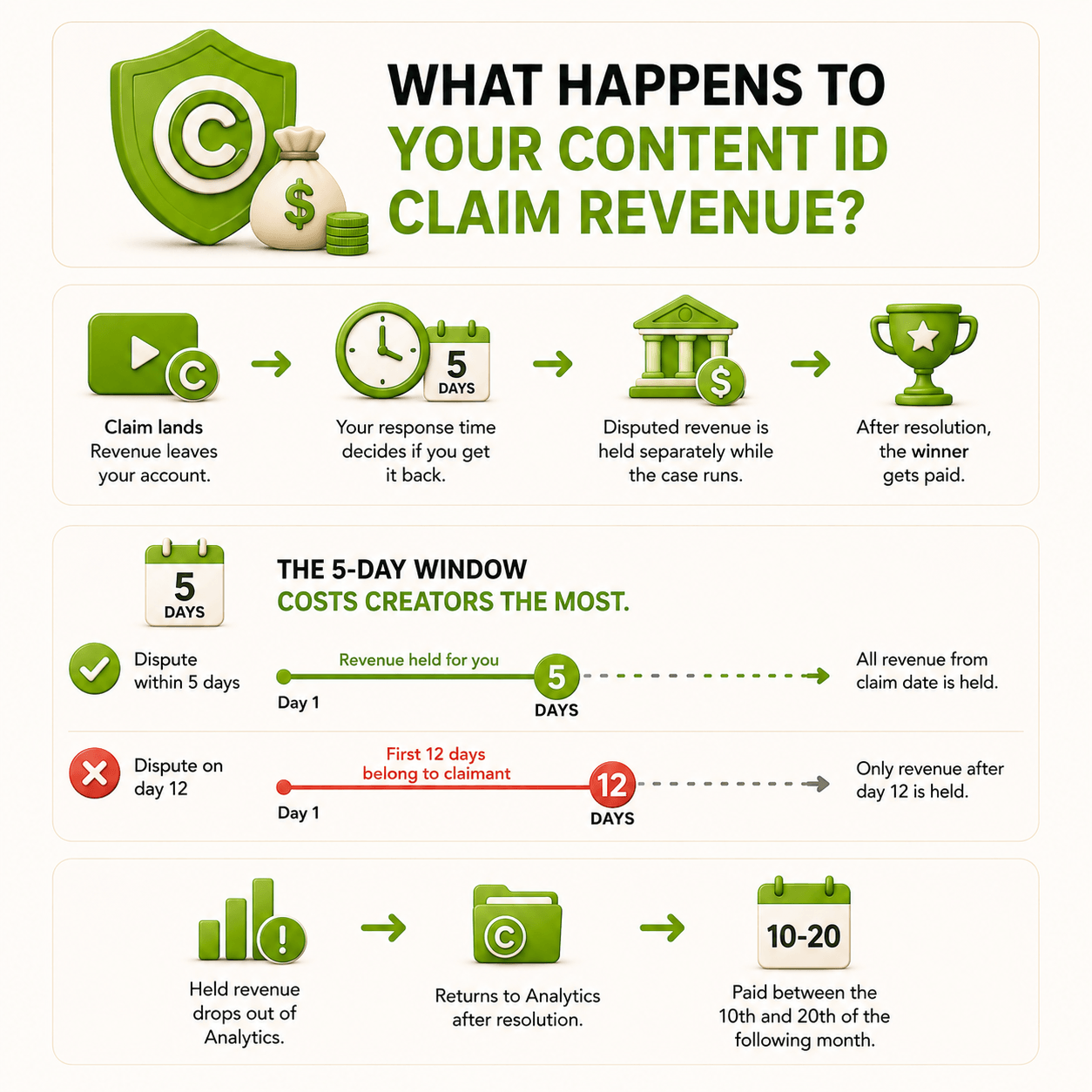
Content ID claim revenue leaves your account the day the claim lands, and your response time decides whether you get it back. YouTube holds disputed revenue separately while the case runs, then pays the winner.
- The 5-day window costs creators the most.
- Dispute within 5 days and every dollar from the claim date is held for you.
- Dispute on day 12 and those first 12 days already belong to the claimant.
- Held revenue also drops out of YouTube Analytics until resolution, then lands between the 10th and 20th of the following month.
One MilX user with a music channel spent a quarter with pirate claims blocking monetization across its catalogue. After the false fingerprints came off, quarterly revenue moved from roughly $11.8K to roughly $115.6K, and views rose 408%. The audience was there all along. The money sat on blocked inventory.
👉 Our guide on what to do when a channel loses monetization covers the recovery path, and MilX Advance Funds covers the bills while the paperwork moves.
Get Paid From YouTube Before Payday
Waiting for the 21st is the default, not the only option. With the MilX app, you can get paid before YouTube's usual payout date, pull some of your future earnings in advance, or withdraw straight to crypto instead of a bank account. Try MilX and see what fits your channel.
Is a YouTube Content ID claim the same as a copyright strike?
No. A claim sits on one video and does not affect channel standing. A strike comes from a DMCA takedown request, removes the video, and three strikes within 90 days end the channel.
The systems meet at one point. If you dispute and the claimant answers with a removal request instead of releasing the claim, your claim becomes a strike.
A clean record is also a condition for creator funding, so a strike freezes access to capital long after the video disappears.
👉Not every claim deserves a fight, as we showed in how a copyright claim works and why it is not always a problem.
How do you dispute a Content ID claim in 2026?
You dispute in YouTube Studio, and the flow takes about four minutes. The reason you select is the hard part.
- Open YouTube Studio → Content → Restrictions, then click "See details" on the video labelled Copyright claim.
- Check the claimed timestamps and the Content used block, then screenshot the page. Claimants edit claims; your screenshot stays.
- Try Select action first. Trim out the segment, replace the song from the YouTube Audio Library, or mute the claimed part. Each one removes the claim automatically, with no dispute, no risk, and no change to your URL or view count.
- If the claim is wrong, choose Dispute and pick a reason: you own the rights, you hold a licence, or the use follows fair use guidelines. Crediting the owner, owning a copy of the song, and switching off monetization are not valid reasons.
- Attach evidence: licence number, receipt, distribution contract, date, and platform of your original release.
- Wait 30 days. The claimant releases, reinstates, files a removal request, or stays silent, and silence releases the claim.
- If the claim returns, appeal. The claimant gets 7 days, and a scheduled removal request gives you 7 days to cancel the appeal first.
🎯Practical tip on fair use. Courts decide fair use; YouTube does not rule on it for you. If your defence is commentary, criticism, or parody, write one sentence covering what you added and how much of the original you used. A vague copyright violation defence comes back as a reinstated claim.
MilX user who has a kids channel, with valid music licences, had its appeal rejected with no explanation and no contact route to the claimant. The case moved only when someone tracked the claimant down by email and negotiated directly, recovering over $5,300.
A second MilX case explains more claims than piracy does. A family channel kept collecting claims on streams while holding real licences, because each track was licensed for one use per video and several videos used the same track twice. Cutting the repeated segments cleared the claims, and the channel finished with views up 9% and revenue up 15.3%.
🎯Practical tip: read the repeat-use terms, not the download page. Library subscriptions such as Epidemic Sound tie your licence to an active account and a specific download, so a cancelled plan or a recycled stem triggers claims on videos that were clean on upload day.
👉 We covered the same trap in why royalty-free music does not always protect you from claims.
Which content does not qualify for Content ID?
Content ID accepts only material you hold exclusive rights to. YouTube excludes:
- compilations,
- countdown lists,
- DJ mixes and mashups;
- karaoke recordings,
- remasters and sound-alikes;
- gameplay, unless you are the game's publisher;
- public domain recordings;
- recordings of live performances — concerts, events, speeches, shows;
- non-exclusively licensed material,
- including most royalty-free library music;
- Creative Commons footage,
- sound effects,
- production loops.
If your channel runs on gameplay, reactions, or compilations, stop planning around Content ID. Your protection layer is the Copyright Match Tool plus fast removal requests.
How do you protect your own content without Content ID?
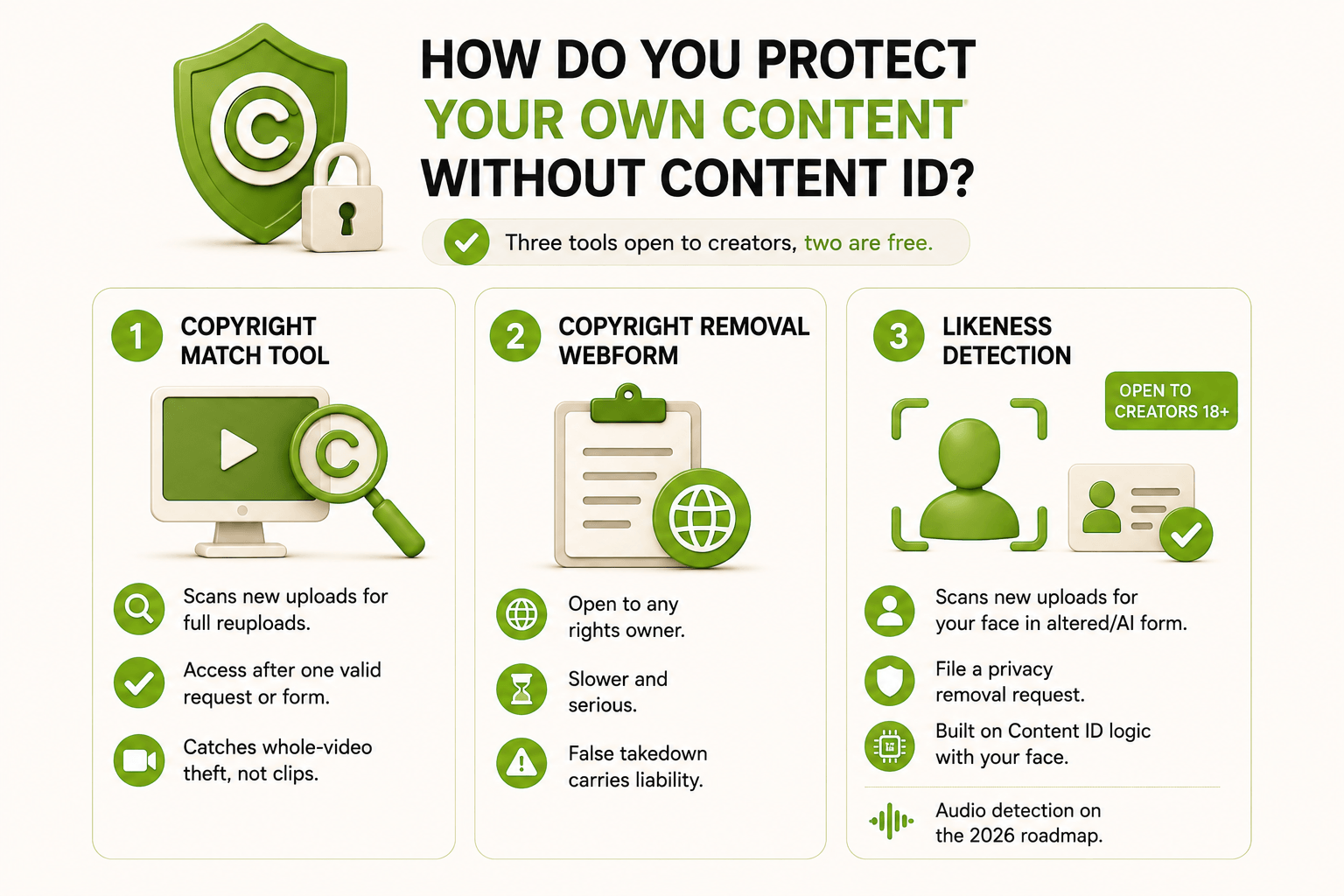
Three tools stay open to ordinary creators, and two of them are free.
- Copyright Match Tool scans new uploads for full reuploads of your videos, and access opens after one valid removal request or via the access form. It catches whole-video theft, not clips.
- The copyright removal webform is open to any rights owner, slower, and legally serious, because a false takedown carries liability.
- Likeness detection opened in May 2026 to all creators over 18 who verify identity with a government ID and a selfie video. It scans new uploads for your face in altered or AI-generated form and lets you file a privacy removal request. YouTube built it on Content ID logic, with your face in place of a reference file, and audio detection is on the 2026 roadmap.
👉 Our guide on how to protect your own content from being stolen or reused covers watermarking and reupload monitoring.
What should you do in the first 48 hours after a claim?
Speed decides the money. Work in this order.
- Hour 0 to 1. Open the claim details and record the claimed timestamps, the claimant's name, and the policy applied. Screenshot the page, because claimants can edit claims.
- Hour 1 to 3. Answer one question: Do you have paper? A licence, invoice, contract, or proof of original release means a dispute. No paper means edit the video instead.
- Hour 3 to 24. Pick your route.
|
Your situation |
Route |
Deadline |
|---|---|---|
|
Match is real, no licence |
Trim, replace, or mute the segment |
Any time |
|
You hold a licence or exclusive rights |
Dispute with evidence attached |
5 days to hold revenue |
|
Manual claim on seconds of music, set to monetize |
Dispute and quote the manual claiming policy |
5 days |
|
Commentary, criticism, or parody |
Dispute on fair use with written justification |
5 days |
|
The video earns little |
Leave the claim, delete nothing |
Any time |
|
Claim reinstated after your dispute |
Appeal, or cancel inside the scheduled removal window |
7 days |
- Day 2. Search your library for the same track or footage and fix every instance before the claimant finds them. In the MilX case above, one track triggered claims across every localised version of the channel.
- Day 2. Start a log: video URL, claim date, claimant, timestamps, action taken, resolution date. When the same claimant returns in six months, that log is your evidence pack.
- Every quarter. Filter YouTube Studio by Copyright claim and confirm no expired licence sits inside a published video.
Get Paid Before the Views Roll In
Stop waiting on the 21st of the month. Access up to 4 months of your future YouTube income today with MilX Active Funds, then put it straight into your next shoot, your editor, or your gear. More than $500M in creator revenue has already moved through MilX for 1,500+ creators, rated 4.6/5 on Trustpilot. Try MilX and check if your channel qualifies for Active Funds.
MilX is a banking app built for that gap.
- Advance Funds give you access to earned revenue 50+ days before YouTube's payout date, up to 2 months of what your analytics already show.
- Active Funds go further: up to 4 months of future AdSense revenue in one lump sum, 5% monthly repayment, commission of 0.33% per day, no credit checks.
- Withdrawals run through 30+ methods in 50+ currencies, and P2P transfers between MilX users cost $0.
👉 Take control of your creator finances with MilX: download the app for free.