These YouTube SEO best practices work on one video at a time. If you're asking how to SEO YouTube videos for more money, our guide on how to use SEO effectively to increase YouTube revenue covers the bigger picture. Here we stay with the fields themselves. Getting your YouTube keywords, tags, description, and captions right takes about ten minutes per upload once you know where each word goes.
Key takeaways
- Research keywords first, then place them naturally in the title, description, and captions.
- The first lines of the description do the heavy lifting, because viewers see them before Show more.
- Tags are minor now. YouTube says they play a minimal role in discovery, so don't over-invest in them.
- SEO earns impressions, and packaging (the title and the thumbnail) earns the click.
How YouTube discovery works across search, suggested, and browse
YouTube shows videos in three main places.
- YouTube Search answers what people type.
- Suggested videos sit next to and after the video someone is watching.
- Browse is the home page and the subscriptions feed.
In YouTube Studio, the Traffic source report in Analytics shows the split of search vs suggested vs browse for every video. Click YouTube search in that report to see the search terms that brought viewers in.
Metadata matters most in search. YouTube's own page on how YouTube search works names three things it looks at. They are relevance, engagement, and quality.
- For relevance, it checks how well the title, tags, description, and video content match the query.
- For engagement, it looks at signals like the watch time a video gets for that query.
So keywords and search ranking only work together when the video keeps people watching after the click.
In suggested and browse, the words still tell YouTube what the video is about, but viewers choose with their eyes. That's why SEO earns impressions, and packaging earns the click. Impressions show how often your thumbnail appeared, and CTR is the share of those impressions that turned into views. You'll find both in the Reach tab of YouTube Analytics.
A good CTR depends on your niche, so compare yourself with channels like yours before you change anything. AIR Media-Tech, the company behind MilX, treats 4–8% as a healthy baseline in its audits of 3,000+ YouTube channels. One audited channel sat at 4% and still led its niche, where the average was 2.1%.
Your views earn every day. Why wait a month for the money?
With MilX, your channel's revenue reaches your MilX balance every day from the day you connect. You decide when to move it, and in which of 70 currencies.
Download the MilX app →YouTube keyword research 2026: start with the search bar
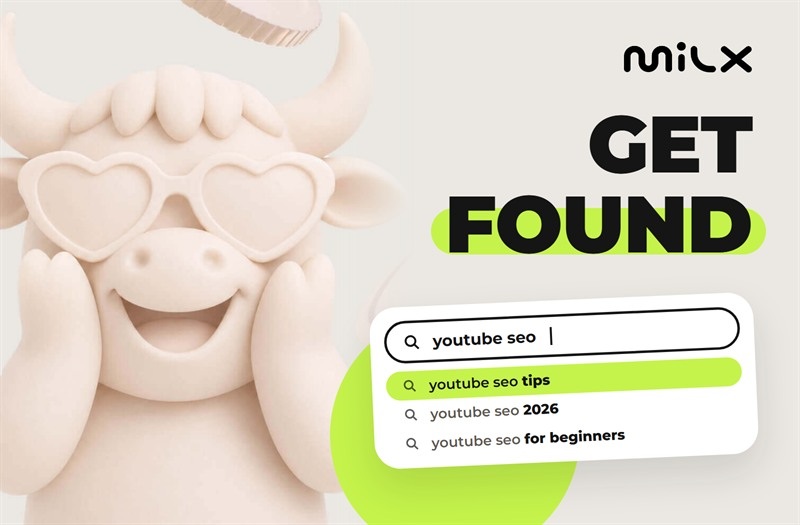
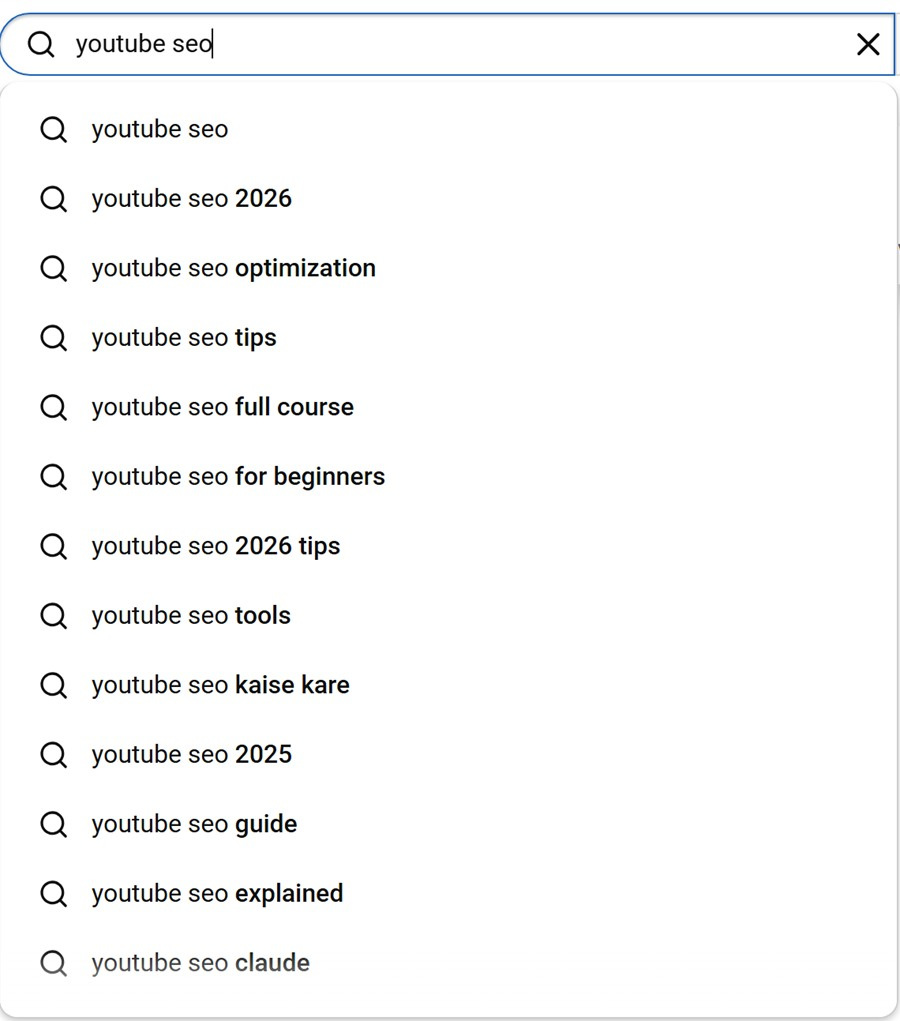
Keyword research for YouTube starts where your viewers type. Open YouTube, type the main words of your topic slowly, and read the suggestions. They come from what people search, so they show how viewers phrase the question. In November 2026, typing “youtube seo” in the US brought up “tips”, “2026”, “for beginners”, “tools”, and “full course”.
Then widen the list in three steps.
- Check YouTube's own data. YouTube's tips for video descriptions suggest YouTube Analytics and Google Ads Keyword Planner for popular keywords and their synonyms. In Analytics, open the Trends tab to see what your audience and viewers across YouTube search for.
- Check demand in Google Trends. Switch the search type to YouTube Search. It shows whether interest in a topic grows or fades, and when it peaks.
- Look at competitors. VidIQ and TubeBuddy show search volume, competition, and the tags behind other videos. Use competitor tags to learn how people phrase the topic, not to copy them. VidIQ is on our list of 8 must-have apps for YouTube creators.
Pick one main keyword per video and two or three close variants. A narrow phrase like "youtube seo for beginners" is an easier way to rank YouTube videos in search than a broad one like "youtube seo", because fewer big channels compete for it and the viewer's intent is clearer.
Where keywords go: title, description, tags, captions, and spoken words
Once you have the keyword, put it where YouTube and viewers read first. Here's how much each field does for YouTube video SEO, from the most to the least.
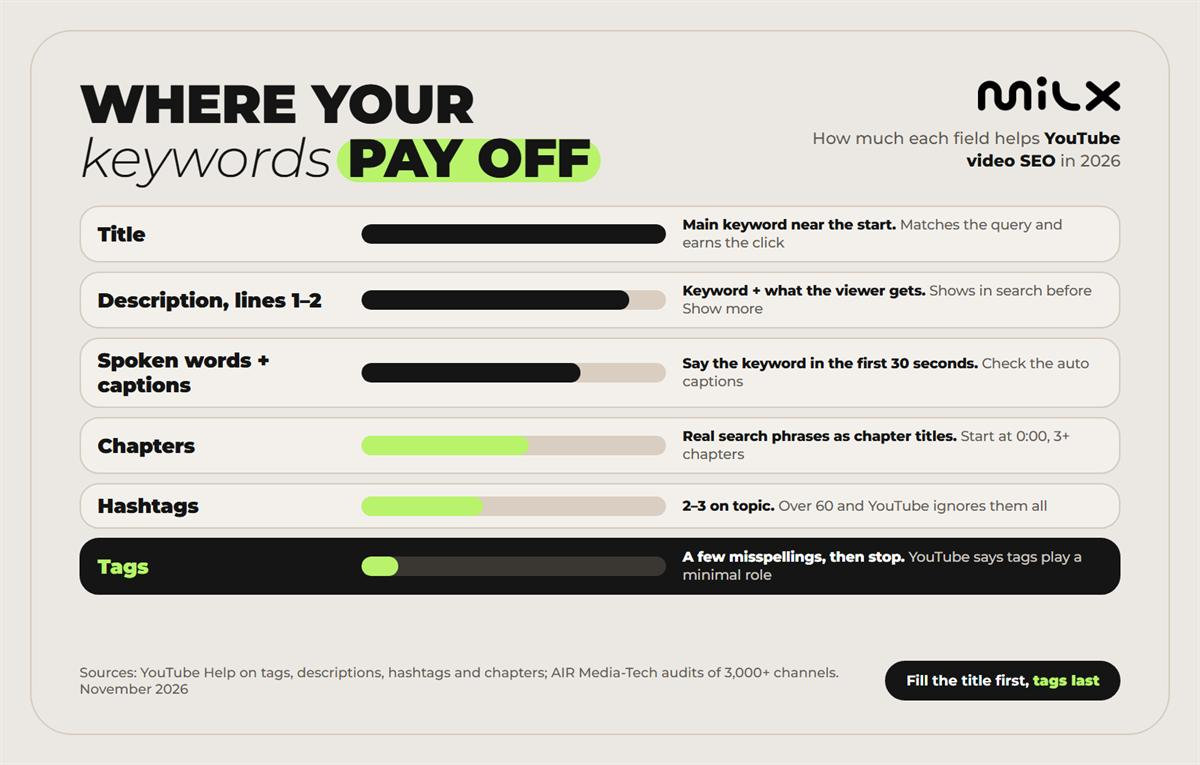
And here's the same list with what to do in each field and why.
| Element | Best practice | Why it matters |
|---|---|---|
| Title | Main keyword in the first few words, then the promise | Matches the query, and together with the thumbnail decides the CTR |
| Description, lines 1–2 | Keyword plus what the viewer gets | Viewers see it first, before Show more |
| Rest of the description | A short summary with related terms, chapters, links | More context helps the video show up for more related queries |
| Spoken words | Say the keyword in the first 30 seconds | YouTube matches the video content to the query, not only the text fields |
| Captions (CC) | Check the auto captions, fix names and terms | Your speech becomes accurate text, and viewers on mute keep watching |
| Chapters | Timestamps from 0:00, titles in search words | Named sections viewers can jump to |
| Hashtags | 2–3 on topic, at the end of the description | Up to 3 show by the title and link to a hashtag page |
| Tags | A few misspellings and variants | YouTube says they play a minimal role in discovery |
Sources: YouTube Help — Add tags to your YouTube videos; YouTube Help — Tips for video descriptions; YouTube Help — Find playlists & videos using hashtags; YouTube Help — Video chapters. Checked November 2026.
The title carries the most weight, so put the keyword near the start. "YouTube SEO tips for beginners" names the topic in the first three words, while "Everything I learned about growing on YouTube" makes YouTube guess. A title can hold 100 characters, but the end gets cut on many screens, so most guides suggest keeping it under 60–70. The other half of the job is the click, because title and CTR go together. Our guide on how to write video titles that attract viewers covers that side.
Say the keyword out loud too. YouTube matches the video content to the query, not only the text fields, and AIR Media-Tech's audits rank the first 30 seconds of speech among the places where the main phrase helps most. Captions turn that speech into text. YouTube can add automatic captions in many languages, but names and niche terms often come out wrong, so check them in YouTube Studio before you publish.
Some guides also tell you to rename the video file with your keyword before upload. YouTube's Help pages don't mention file names among the things it reads, so treat it as a harmless habit, not a ranking step.
YouTube description SEO: what to write in the first lines and below
YouTube's own tips split the description into two parts. One is what viewers see before they click Show more, and the other is what they see after.
The first part does the heavy lifting. It's the first text people read under the video, so it has to name the topic in the words people search and say what they'll get. That's where description and discovery meet.
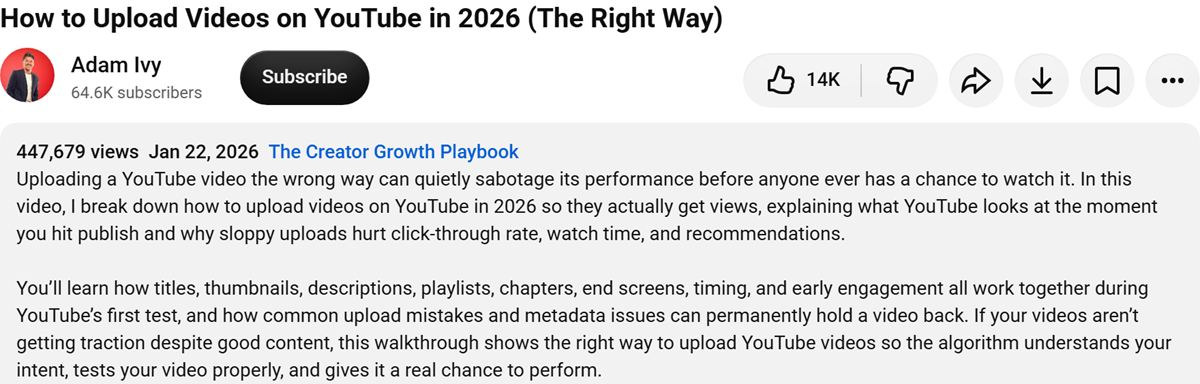
Here Adam Ivy names the problem first and puts how to upload videos on YouTube in 2026 in the second sentence, in words a viewer would search.
Here's a YouTube description template that fits most videos.
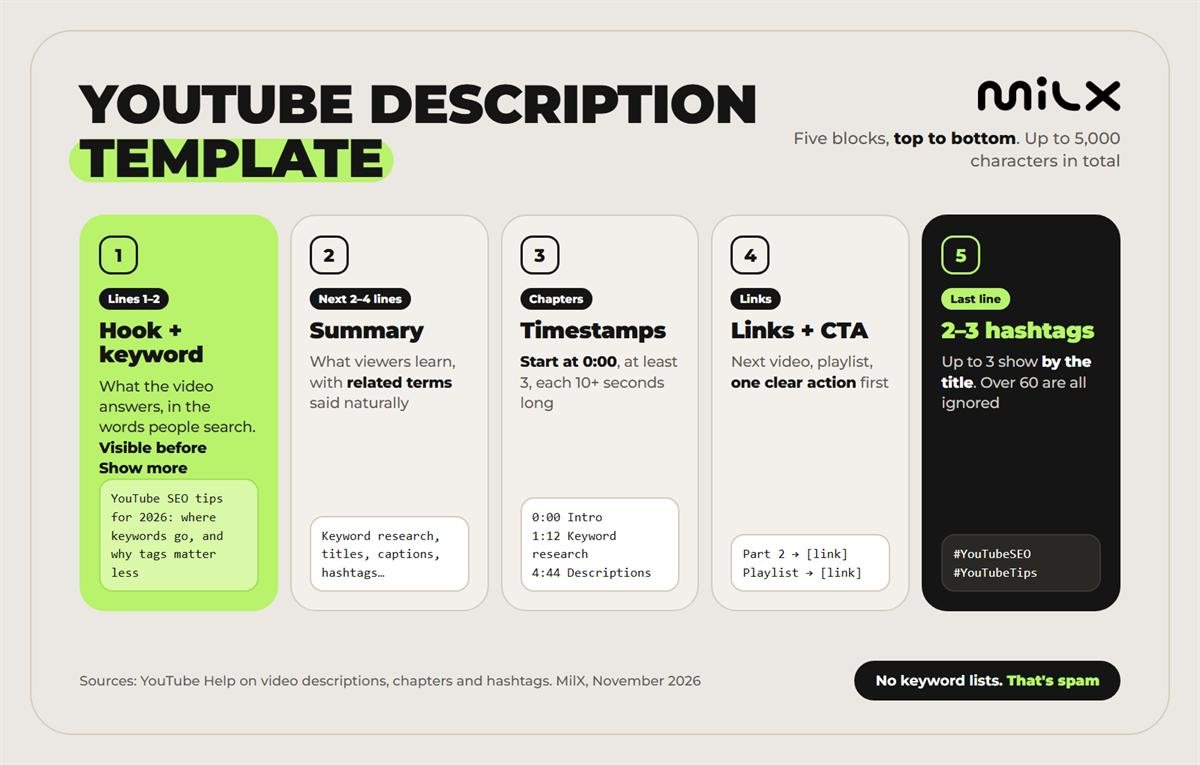
- Lines 1–2. The hook with your main keyword. For example, "YouTube SEO tips for 2026. Where keywords go in your title, description, and captions, and why tags matter less."
- The next 2–4 lines. A summary of what viewers learn, with related terms said naturally.
- Timestamps. Chapters that start at 0:00.
- Links and one CTA. The next video, a playlist, your product or socials, with the most important link first.
- The last line. Two or three hashtags.
A description can hold up to 5,000 characters, but length alone doesn't rank a video. Guides disagree on the right length, from 125 words to 350, and none of them is a YouTube rule. A clear 150–300 words beat 2,000 words of filler. Never paste a list of keywords at the bottom. YouTube's Help page on tags says that adding excessive tags to a description goes against its policies on spam, deceptive practices, and scams.
Do YouTube tags still matter in 2026?
Barely. YouTube's Help page on adding tags says the title, thumbnail, and description are more important for discovery. Tags can help when your topic is often misspelled. Otherwise, they play a minimal role.
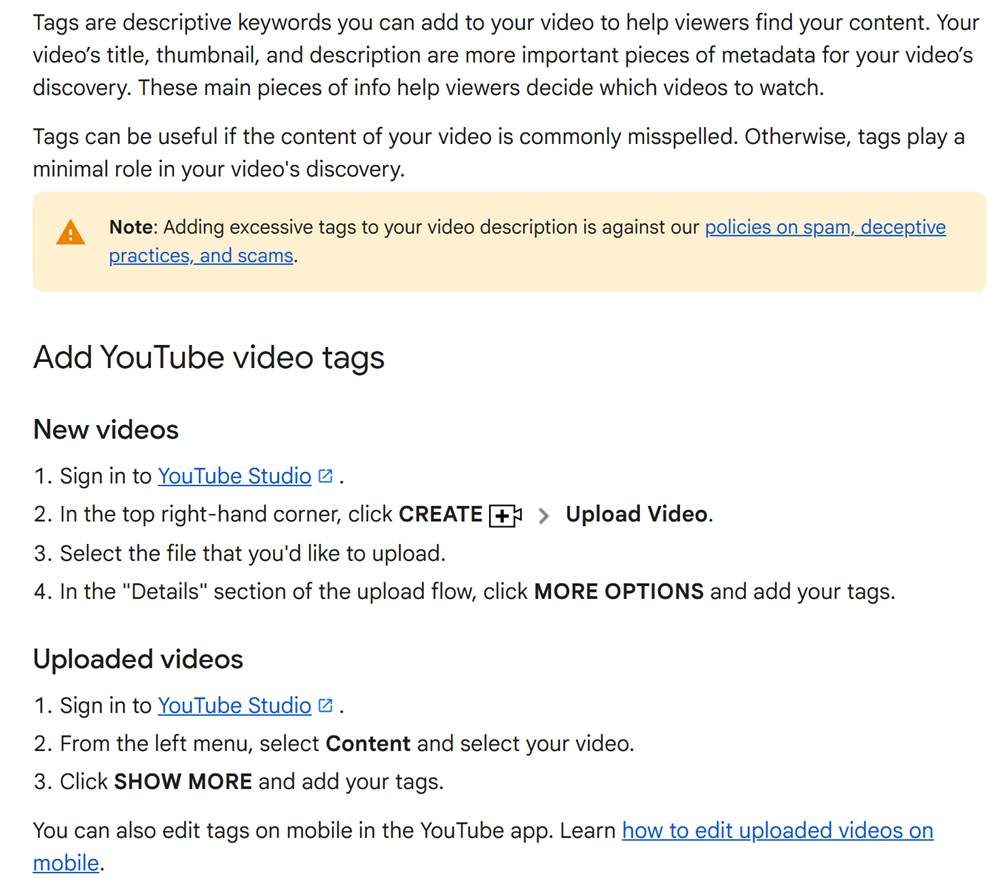
So YouTube tags SEO is a two-minute job now. Add a handful of tags that cover misspellings and variants viewers type, plus your channel name if people get it wrong.
For a video about VidIQ, that could be “vidiq”, “vid iq” and “vidiq tutorial”. Then stop. YouTube sets no number. Guides suggest anything from 5 to 15, while AIR Media-Tech's guide to metadata puts it at 3 to 8 for most videos. Filling the whole field buys nothing either way.
Accurate tags don't hurt, because tags are still part of the video's metadata. You'll find them in YouTube Studio under Content → your video → Show more, or under More options during upload. Tags and metadata only work together when the tags describe the same video as the title.
More reach means more revenue. Can you access it before payday?
More reach means more revenue, and MilX lets you access that revenue daily. With Advance Funds, you can take what your channel has already earned up to 50 days before AdSense pays, for a one-time 4.3%.
See how Advance Funds works →Hashtags, chapters and captions for SEO
Hashtags
Hashtags group your video with others on the same topic. YouTube shows up to three from the description next to the title, and each one links to a page of videos with that hashtag, per YouTube Help on hashtags.
If a video has more than 60 hashtags, YouTube ignores every one of them. So YouTube hashtags SEO comes down to two or three on-topic hashtags, like #YouTubeSEO, rather than #viral.
Chapters
Chapters split a video into named sections on the progress bar. They switch on only when the first timestamp is 0:00, there are at least three timestamps in ascending order, and each chapter is at least 10 seconds long, as YouTube Help on chapters explains.
Write chapter titles the way people search. Chapters can also show up in Google Search as key moments, and Google's documentation on video says it prioritizes key moments you set in the YouTube description.
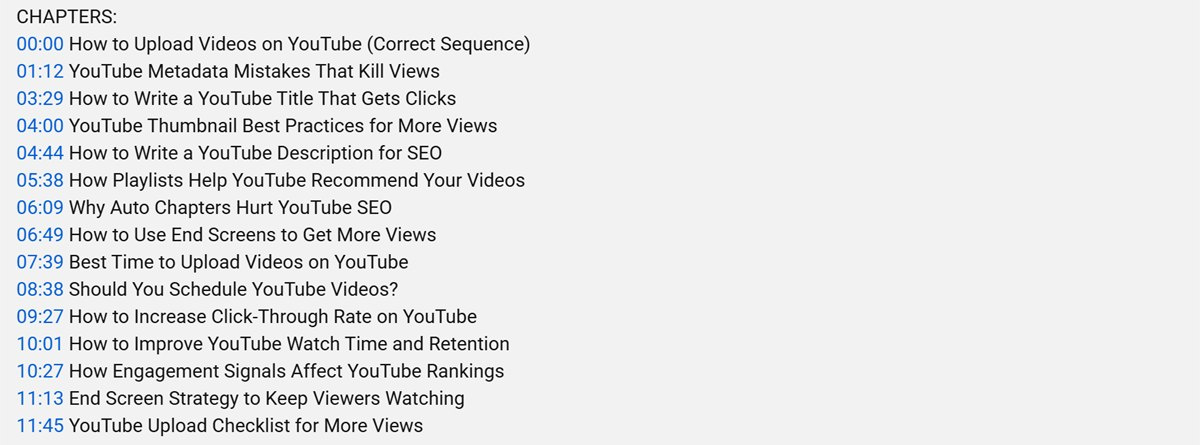
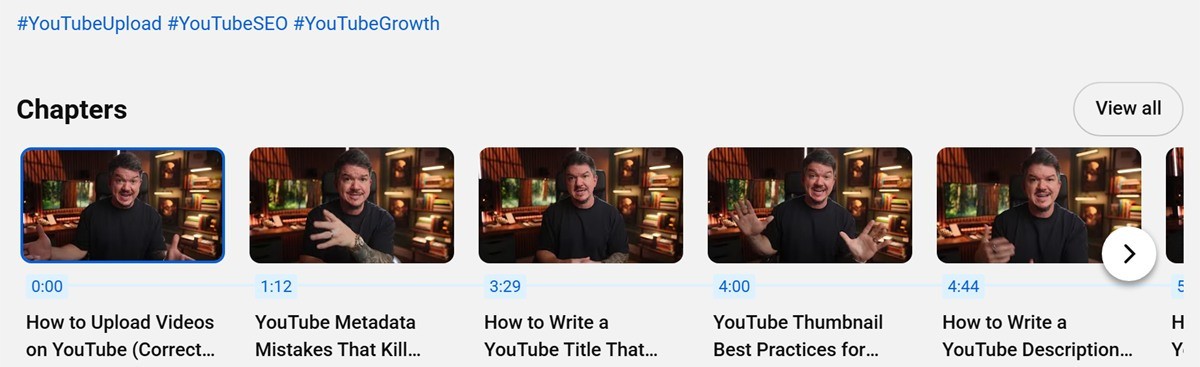
Adam Ivy's chapter list reads like a set of searches, from YouTube Metadata Mistakes That Kill Views to How to Write a YouTube Description for SEO. YouTube turns that list into a Chapters carousel under the video, right after his three hashtags.
Our tips on how to increase watch time show how chapters fit the rest of your video structure.
Captions and subtitles
Captions and SEO work together because captions (CC) put your spoken words into text. Check the auto captions for names and niche terms, and add subtitles in other languages if a large part of your audience speaks them.
Accurate captions also keep people watching on mute.
YouTube SEO checklist before you publish
All the YouTube SEO tips above fit into one list. Run each upload through it, then publish when your viewers are online. Our guide on the best times to post on YouTube shows how to find that slot.
YouTube SEO checklist before you publish
- One main keyword and 2–3 variants, checked in the YouTube search bar
- The keyword in the first words of the title
- The keyword and the promise in the first 1–2 lines of the description
- A short summary, then chapters that start at 0:00
- One clear link or CTA, the most important first
- 2–3 hashtags on topic at the end of the description
- The keyword said in the first 30 seconds, auto captions checked
- A few tags for misspellings, then stop
- The thumbnail and the title tell the same story
- A week after upload, impressions, CTR and traffic sources checked in YouTube Studio
Once the views come in, the next question is how fast the money from them reaches you.
Ranking higher? Don't wait 50 days to get paid for it
Rank higher, earn more, get paid faster with MilX. Download the app, connect your channel and see your revenue on your MilX balance every day.
- Advance Funds: earned revenue up to 2 months early, for a one-time 4.3%
- Withdraw any day in 70 currencies through 30+ payout methods
- Pay your editor or thumbnail designer for free with instant P2P