

YouTube itself says publish time shapes a video's first hours, not how it performs over months, with one exception for Premieres and live streams. And the hour you upload doesn't change what a view pays you, because RPM depends on the month the view happens.
Key takeaways
- There’s no universal best time. The big 2026 studies disagree about weekdays, so start from your “When your viewers are on YouTube” report and publish one to two hours before its darkest block.
- Upload time shapes the first hours, not the long run. YouTube says publish time isn’t known to affect a video’s long-term performance, except for Premieres and live streams.
- Shorts depend on the hour less than long videos. Buffer and SocialPilot both rank Friday 4–7 p.m. first for Shorts, and a Short can still find viewers days later.
- The month of a view sets what it pays. In our research of 300 channels by MilX and AIR Media-Tech, median RPM was $2.35 in November and $1.56 in January (May 2025 – May 2026).
Upload time on YouTube: what YouTube itself says
One of the busiest r/NewTubers threads on upload times, with more than 40 replies, ends with YouTube's own stance as the top answer. YouTube spells it out in its performance FAQ. "Publish time is not known to impact a video's long-term performance." The recommendation system aims to show a video to the right viewers no matter when it went up.
So the clock matters for a short window. The same YouTube page says that posting when your audience is most active can help early viewership.
In those first hours, your subscribers are online to click, and the first clicks and minutes watched show YouTube how people respond. Over the following weeks, watch time and clicks decide where the video goes, not the hour it went live.
vidIQ saw the same pattern in its analysis of 40.2 million US long-form uploads, updated in June 2026. By day 30, the gap between the best and worst upload hours had shrunk to a few percent. Timing matters more for time-sensitive videos, though. Videos posted in a channel's strong windows were about 32% ahead after 30 days in news and politics and about 29% in sports, against about 15% in how-to.
Premieres and live streams are the exception. For these formats, YouTube says publish time is important, and it points creators to the “When your viewers are on YouTube” report to plan them. A countdown and a live chat only work if your viewers are online when they start.
Scheduling a video doesn't change any of this. Scheduled publishing switches a private video to public at the time you pick (YouTube Help), and YouTube's help pages describe no boost or penalty for it. It's how you hit your window without being at your desk.
Posting at the right hour, and still few people find the video?
Timing gets a video seen in its first hours. Search keeps it found for months. Our guide to YouTube keywords, tags and descriptions shows how to set them up so views keep coming. Then add MilX to your preferred sources to see new creator data first in Google.
Read the YouTube SEO guide →Best times to post on YouTube in 2026, according to the biggest studies
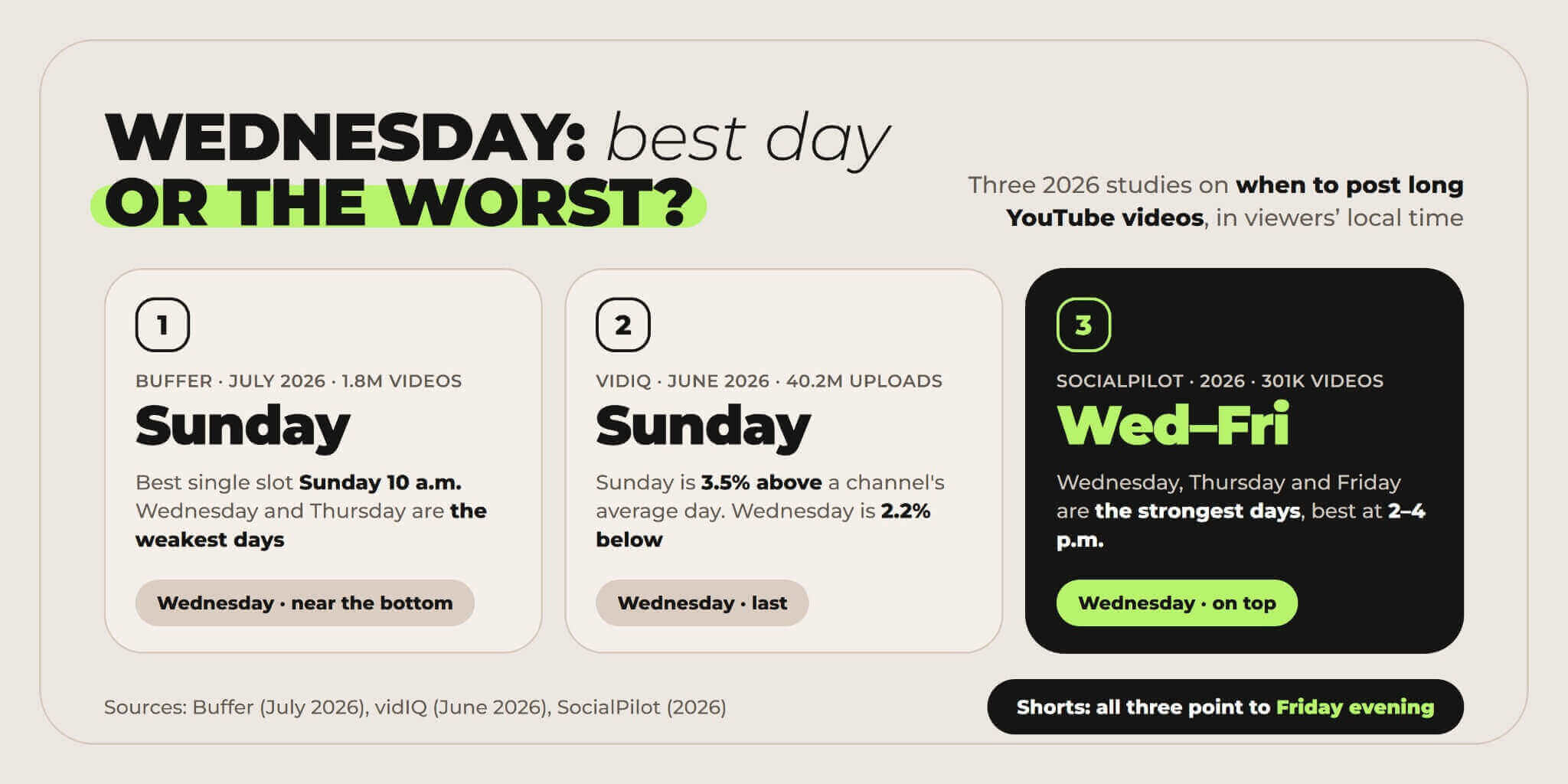
Wednesday is the strongest day to post long YouTube videos in one 2026 study and the weakest in two others. SocialPilot's analysis of 301,000 videos puts Wednesday, Thursday and Friday on top, with uploads at 2–4 p.m. Buffer's study of 1.8 million videos, published in July 2026, ranks Wednesday and Thursday as the weakest days and Sunday at 10 a.m. as the best single slot. vidIQ's analysis of 40.2 million US long-form uploads also puts Sunday first, about 3.5% above a channel's average day, and Wednesday last, about 2.2% below.
Buffer explains part of the gap itself. Its previous dataset pointed to weekday afternoons and to Wednesday through Friday, and in 2026 that pattern reversed. The studies also measure different things, from engagement per view to views after 30 days. So treat any published window as a first test, not a rule.
Here's where to start for each format. All times are your viewers' local time.
|
Format |
Where to start (viewers' local time) |
What the 2026 studies found |
Why it works |
|---|---|---|---|
|
Long videos |
Test a weekend morning (9–11 a.m.) and a weekday afternoon (2–4 p.m.) |
Buffer: Sunday 10 a.m. best, mornings 8–11 a.m. SocialPilot: weekdays 2–4 p.m., Wednesday to Friday |
A long video needs a few hours to collect its first clicks before people sit down to watch |
|
Shorts |
Thursday to Saturday, 4–9 p.m., with Friday first |
Buffer: Friday 4, 6 and 7 p.m. SocialPilot: Friday 4–7 p.m. Both rank Friday, Saturday and Thursday highest |
People scroll Shorts in the evening, and a Short can still find viewers days later |
|
Premieres and live streams |
At your viewers' peak hour from YouTube Analytics |
YouTube Help: publish time is important for these formats |
Viewers have to be online when the countdown or stream starts |
Long videos: test two slots before you commit
For long videos, run a simple test. Publish on a weekend morning around 9–11 a.m. for three or four uploads, then on a weekday afternoon around 2–4 p.m. for the same number, and compare impressions, click-through rate (CTR) and views after the first 24 hours.
Upload ahead of your viewers' peak so the video is already live when they arrive. Buffer advises one to two hours ahead; SocialPilot two to three.
Best time to post YouTube Shorts: the studies agree, and the hour matters less
Shorts are where the studies line up. Buffer's top three Shorts slots are all on Friday, at 4, 6 and 7 p.m., and SocialPilot also found Friday 4–7 p.m. the strongest window, with Saturday and Thursday next. vidIQ points Shorts to Friday evening too.
Buffer's explanation is simple. People scroll Shorts to unwind at the end of the day. The exact hour matters less than for a long video, too. SocialPilot notes that a Short posted at an off-peak time can still find its audience in the Shorts feed days or weeks later. Shorts also earn on different rules from long videos, so the hour you post doesn’t change what a view pays
How to find your own best time to post in YouTube Analytics
The one chart that tells you when to upload YouTube videos on your channel sits in the Audience tab of YouTube Studio. “When your viewers are on YouTube” shows when the people who watch you were online anywhere on YouTube over the last 28 days, according to YouTube Help, not only when they watched your videos.
Here's how to read it.
- Open YouTube Studio and click Analytics in the left menu.
- Open the Audience tab.
- Scroll to When your viewers are on YouTube. It's a grid of days and hours shaded in purple, and darker purple means more of your viewers are online at that hour.
- Find the darkest block on the day you plan to publish, and schedule the video one to two hours before it.
When your viewers are on YouTube report in YouTube Studio
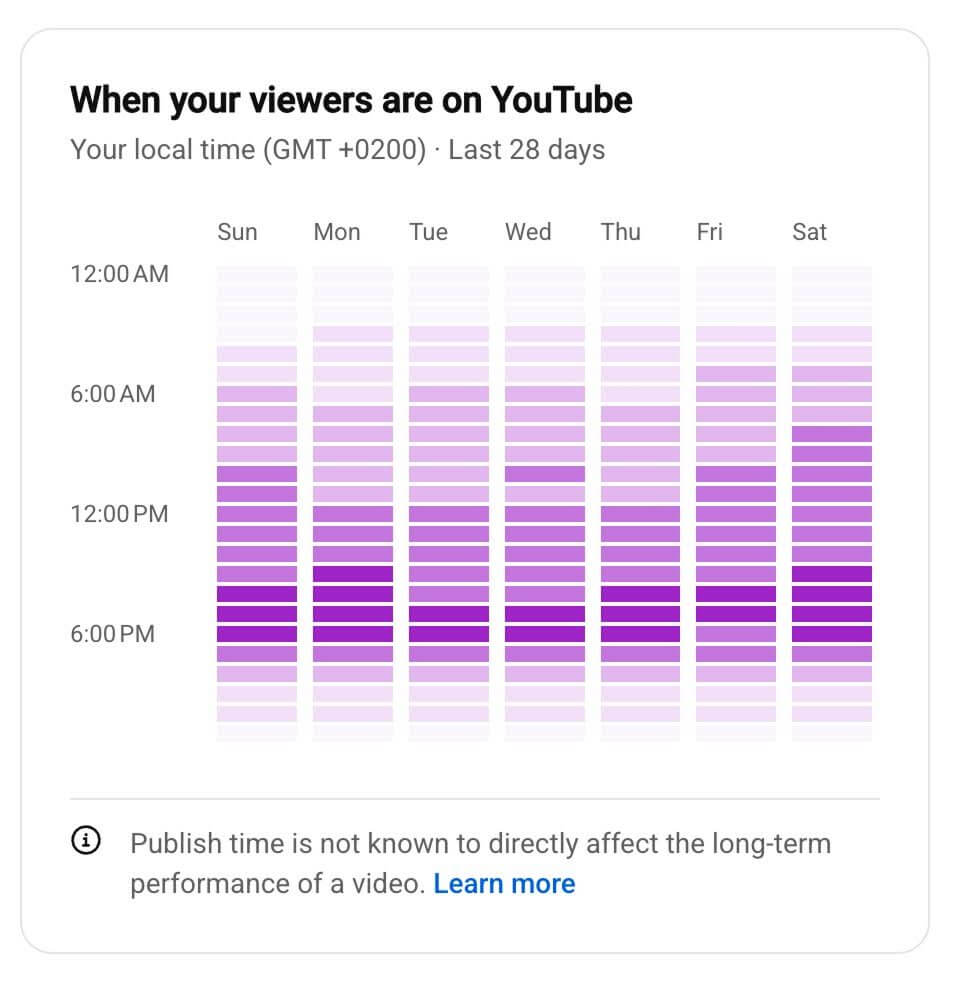
Buffer notes that the heatmap is set in your local time. If most of your viewers live in another country, convert the hours with the time zone table below.
The chart tells you when people can watch. Whether they click depends on your title and thumbnail, and those first-day clicks are what you compare when you test two slots.
What to do if “When your viewers are on YouTube” isn't showing
Smaller channels often find this card empty or missing. YouTube limits data in Analytics when metrics don't meet a certain threshold, for privacy or system reasons (YouTube Help), and it doesn't publish that threshold. Until the chart appears, two other reports in Studio will do the job.
- Top geographies in the Audience tab show which countries bring you the most watch time. Take the evening hours in your biggest country and publish one to two hours earlier.
- Realtime on the Overview tab shows when your latest views came in. Check it after each upload and log the busiest hours in a spreadsheet for four to six weeks.
Realtime card in YouTube Studio
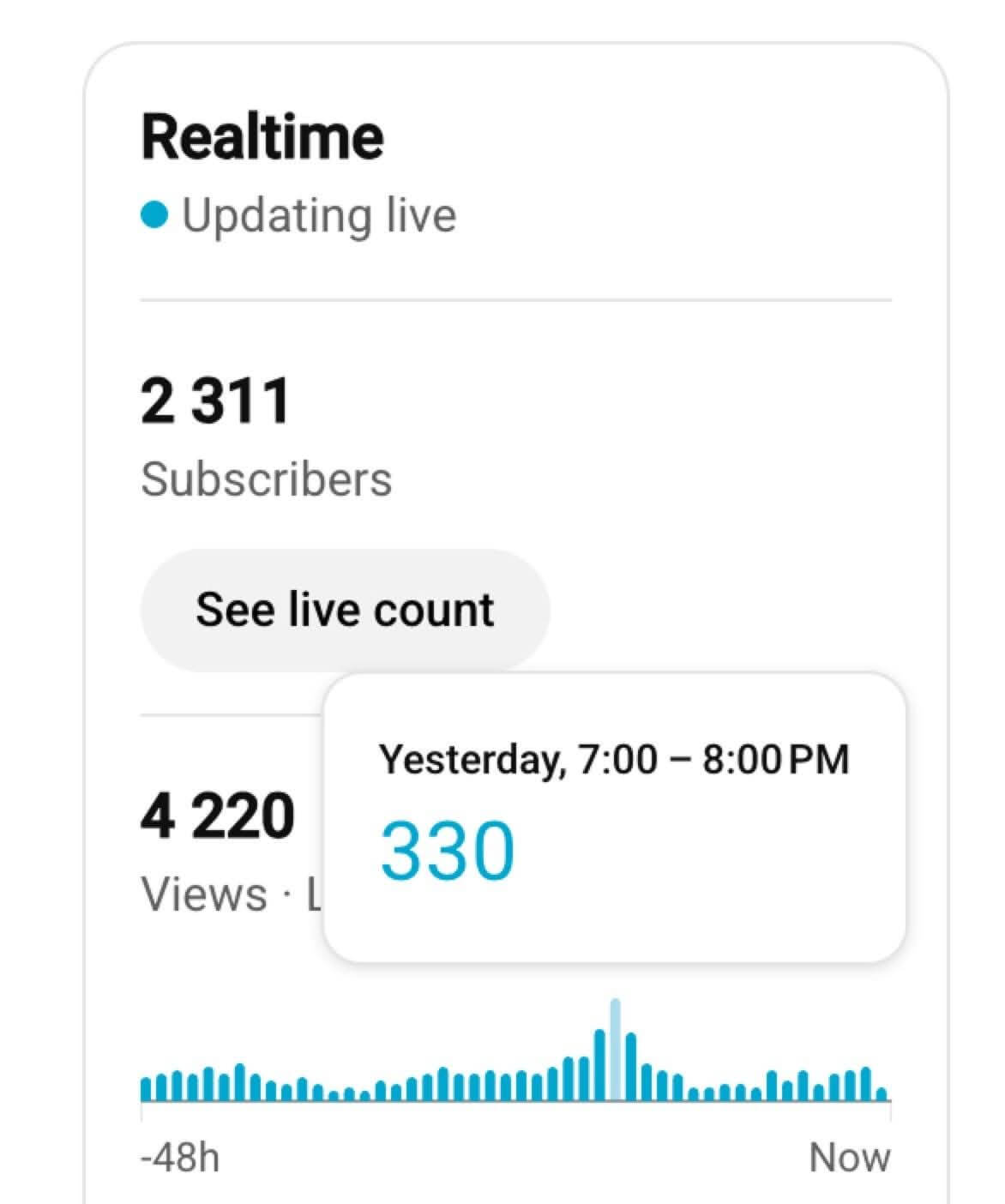
Then run the two-slot test from the section above.
Time zones: when to post for a US, UK, India, or global audience
A channel with viewers in both the US and India has no single evening to aim for. India runs 9.5 to 13.5 hours ahead of the US, depending on the coast and the season.
If one country brings most of your watch time, use that country's local time and the windows above. If your audience is split, pick a slot that lands in one country's evening and in the other's morning or lunch break.
Here are starting windows for the most common splits, in ET, PT, and UTC. Treat them as a first test.
|
If most of your viewers are in |
Publish at (ET) |
Same slot in PT |
Same slot in UTC |
What viewers see there |
|---|---|---|---|---|
|
The US and India |
8–10 a.m. |
5–7 a.m. |
13:00–15:00 |
Morning in the US, 6:30–8:30 p.m. in India |
|
The US and the UK or Europe |
12–2 p.m. |
9–11 a.m. |
17:00–19:00 |
Lunch in the US, 5–7 p.m. in the UK, 6–8 p.m. in Central Europe |
|
The whole US, East and West Coast |
2–4 p.m. |
11 a.m.–1 p.m. |
19:00–21:00 |
Live before the evening on the East Coast and by lunch on the West Coast |
|
The US and Latin America |
1–3 p.m. |
10 a.m.–12 p.m. |
18:00–20:00 |
3–5 p.m. in São Paulo, 12–2 p.m. in Mexico City |
These times use US standard time. From March to early November, the same ET slot falls one hour earlier in UTC, India, and Latin America.
Shorts are less tied to the hour, so with a split audience you can alternate. Post one Short in the US evening and the next in India's evening, then compare views after a day.
Your YouTube upload schedule: why the same slot beats the perfect hour
Two channels can post the same number of videos in a month and end up with very different results.
In our research of 18,000 English-language channels (by MilX and AIR Media-Tech), channels that uploaded on a predictable schedule got more views per subscriber than channels that posted just as often on random days, in every niche we looked at.
The gap was widest for channels posting 5 to 20 videos a month. Channels that went quiet for 14 days or more, three or more times a year, got fewer views per video than channels that kept their rhythm.
The study scored consistency by how evenly uploads were spaced and covers a 12-month snapshot of channels in the US, UK, Canada, and Australia, published in June 2026. It leaves out Shorts and shows a correlation, not a cause.
YouTube asks a different question and lands somewhere else. Its performance FAQ says growth in views across uploads is not correlated with the time between uploads, so you don't need to post daily or even weekly.
Both can be true. YouTube compares channels that post often with channels that post rarely, and our data compares channels that post equally often, on a steady rhythm or at random.
To check your own rhythm, look at the gaps between your last 20 uploads.
- Open the Content tab in YouTube Studio and sort videos by date.
- Write down how many days passed between each upload.
- If the gaps swing from 2 days to 12, fix the rhythm first. Pick a day and an hour you can keep, and hold them for at least four to six weeks before you test a new slot.
How often to post depends on your niche and format, and we cover it in our breakdown of whether posting more helps your income.
Upload time and YouTube earnings: why the month of a view matters more than the hour
The hour you publish doesn't change what a view pays you. RPM, what you earn per 1,000 views, depends on who watches, where they live, and the CPM advertisers pay for ads on those views at that moment. The calendar matters far more. In our research of 300 monetized channels (by MilX and AIR Media-Tech), covering May 2025 to May 2026, the median RPM peaked at $2.35 in November, when Q4 holiday advertisers push CPM up, and fell to $1.56 in January, about a third less, as holiday ad budgets ran out.
Median YouTube RPM, 300 channels, May 2025 – May 2026
November
$2.35
per 1,000 views
January
$1.56
per 1,000 views
The same 1,000 views paid 34% less in January than in November.
So the date of the view counts, not the date of the upload. A video you publish in March still earns November rates on the views it gets in November, while a video published on December 28 catches only a few days of holiday demand.
That's where timing does pay. Have your strongest, most advertiser-friendly videos live by October and early November, so they collect views while rates climb. Business and finance channels saw the biggest lift in our research, close to 60% in Q4.
Read next
How much more creators earn in Q4, and which niches gain most
Why advertisers flood YouTube from October, what happens to RPM in January, and how to plan your uploads around both.
Read the Q4 guide →The money from those views arrives later still. AdSense finalizes a month's earnings early the next month and pays between the 21st and the 26th once your balance passes the payment threshold (AdSense Help).
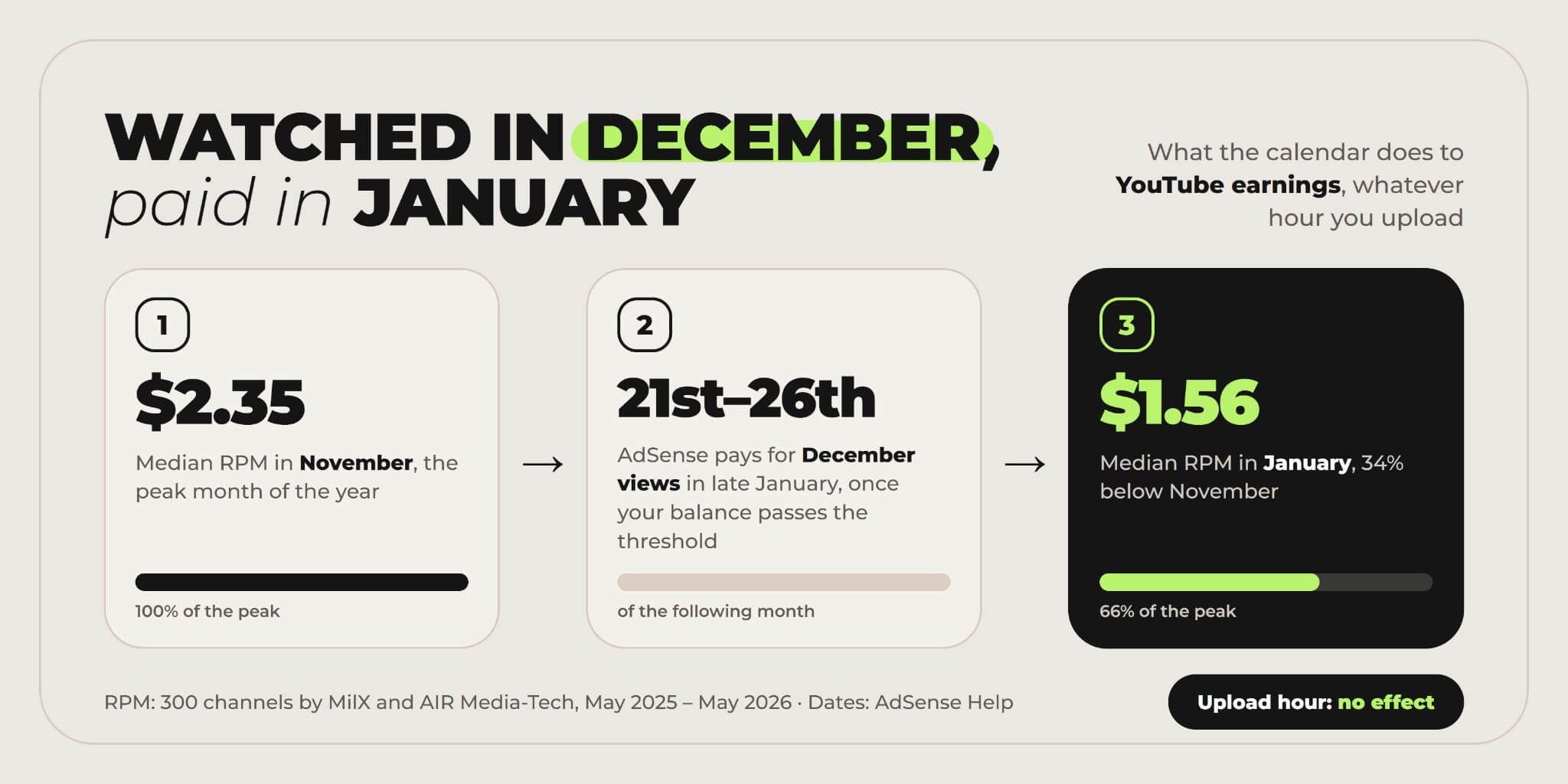
So your December views reach your bank in late January, the month RPM drops.
Waiting until late January for what your December views earned?
MilX credits your channel's revenue to a balance you own every day, from the day you connect. With Advance Funds, you can reach money you've already earned up to 50 days before AdSense pays.
- Earned revenue up to 2 months early, for a one-time 4.3% on the amount you take
- Withdraw any day in 54 currencies through 30+ payout methods
- Instant Payments in under 5 minutes, for 1% (minimum $1)
- Pay your editor instantly with no fee when they're on MilX
- No subscription and no cut of your channel revenue