Say one of your Shorts just reached a million engaged views, the views YouTube pays on. In our research of 274 channels by MilX and AIR Media-Tech, the median Shorts RPM was $0.07–$0.20 in most niches, so those views usually pay about $70–$200. And they pay only if you accepted the Shorts Monetization Module before they came in.
From February 1, 2027, there’s one more condition. A channel needs 10 million Shorts views every 90 days to earn from the pool at all, so a channel at 1–2 million Shorts views a month stops earning from it.
Key takeaways
- Shorts have their own path to money. YouTube pools the ads between Shorts, splits the Creator Pool by engaged views in each country, and you keep 45% of your allocation.
- Licensed music shrinks the pool, not your share of it. YouTube counts all your engaged views when it splits the pool, with or without a track.
- Expect cents, not dollars, per 1,000 views. In our research of 274 channels by MilX and AIR Media-Tech, median Shorts RPM was $0.07–$0.20 in most niches and $0.328 for US audiences, 3–14% of long-form RPM.
- Shorts work best as a funnel. They bring viewers to long videos and sponsors, and from February 1, 2027, earning from the pool needs 10 million qualified Shorts views every 90 days.
How YouTube Shorts monetization works: $100,000 in ads, $405 to you
Ads in the Shorts feed play between videos, not on them. So YouTube can't pay the creator whose Short happened to sit next to the ad. It pays everyone from one pot instead, in four steps, per YouTube's Shorts monetization policy:
- Ad pool. Each month, YouTube adds up the money from ads between Shorts into one ad pool, country by country.
- Music licensing comes out. Revenue tied to Shorts with licensed music is split with music partners. One track sends half to them; two tracks send two-thirds. Shorts without music send all of it to the Creator Pool.
- Split by views. The Creator Pool is divided by each creator's share of eligible engaged views in that country. 5% of the views means 5% of the pool.
- Your 45%. Your revenue share is 45% of your allocation. On long videos, it’s 55%.
Here's YouTube's own example:
Shorts ads in Country A bring in $100,000 a month across 100 million engaged views. Music licensing takes $10,000, so the Creator Pool is $90,000. Your Short got 1 million engaged views, which is 1% of the pool, or $900. After the 45% share, you earn $405.
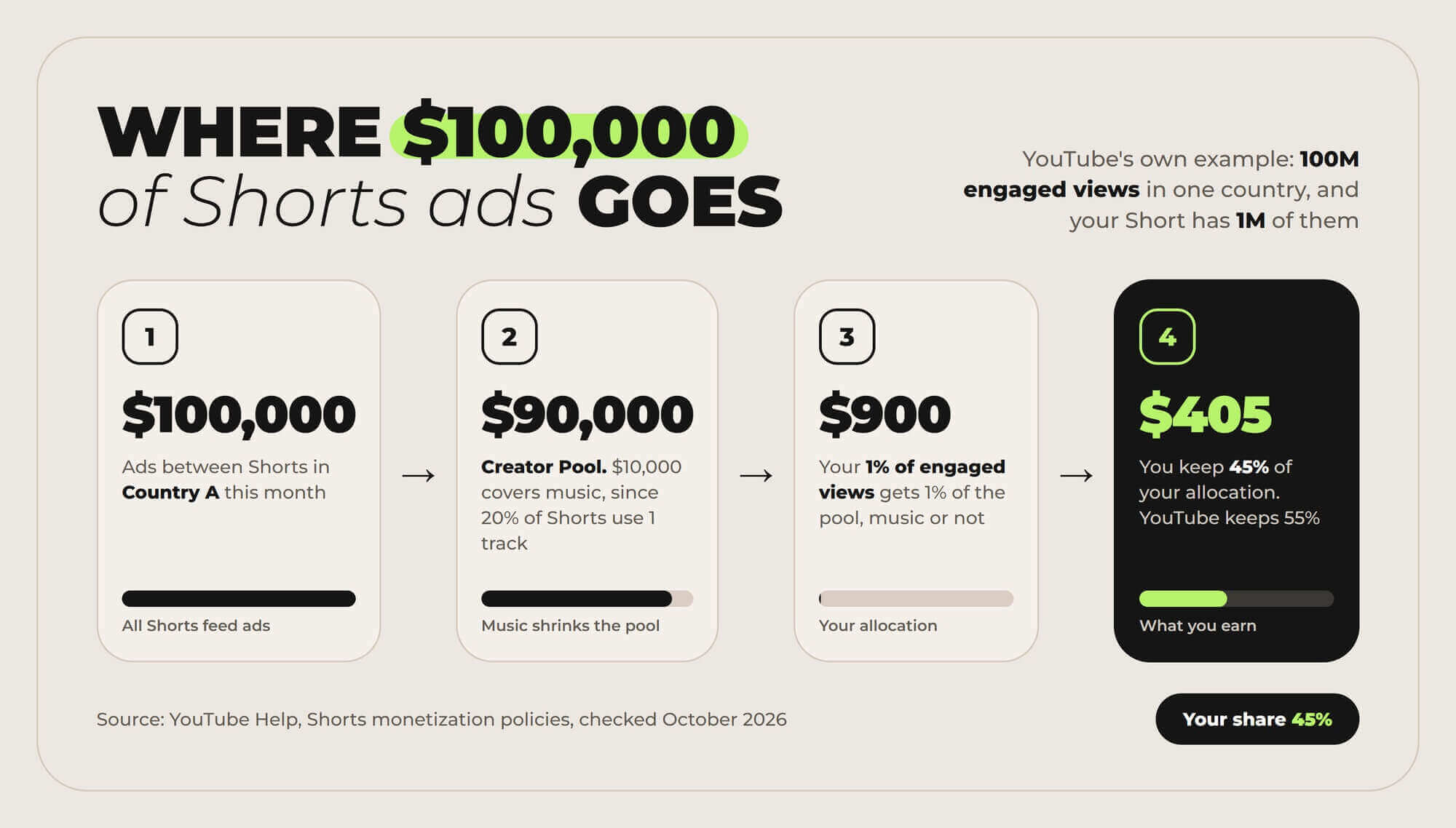
Music shrinks the pool, not your share of it
YouTube counts all engaged views on your Short when it splits the pool, with or without a track. Many guides say a licensed track cuts your payout in half. That half leaves the shared pool before the split, so every monetized creator in the country covers a small part of it.
A few kinds of revenue never reach the pool
The pool doesn’t include ads shown when the Shorts feed opens, ads on navigation pages, image posts, or views of Shorts by channels that haven’t joined the program yet.
Got Shorts views and no idea what they'll pay?
See what Shorts pay channels that already earn from them, by country and niche, and how many views it takes to make $2,000 a month. Then add MilX to your preferred sources to see new creator pay data first in Google.
See what Shorts pay →YouTube Shorts monetization requirements in 2026: 1,000 subscribers and 10 million views
Shorts earn through the YouTube Partner Program, the same program as long videos. The Shorts YPP requirements have two levels, and only the second one pays for Shorts views.
Here's what each needs, per YouTube Help on the expanded program and YPP eligibility:
|
Level |
Subscribers |
Views or watch hours |
What it unlocks |
|---|---|---|---|
|
Fan funding |
500, plus 3 public uploads in the last 90 days |
3 million Shorts views in 90 days, or 3,000 public watch hours in 12 months |
Memberships, Supers, Shopping. No Shorts ad revenue |
|
Ad revenue |
1,000 |
10 million qualified Shorts views in 90 days, or 4,000 qualified watch hours in 12 months |
Shorts feed ads, watch page ads, YouTube Premium revenue |
YPP eligibility in the Earn tab of YouTube Studio
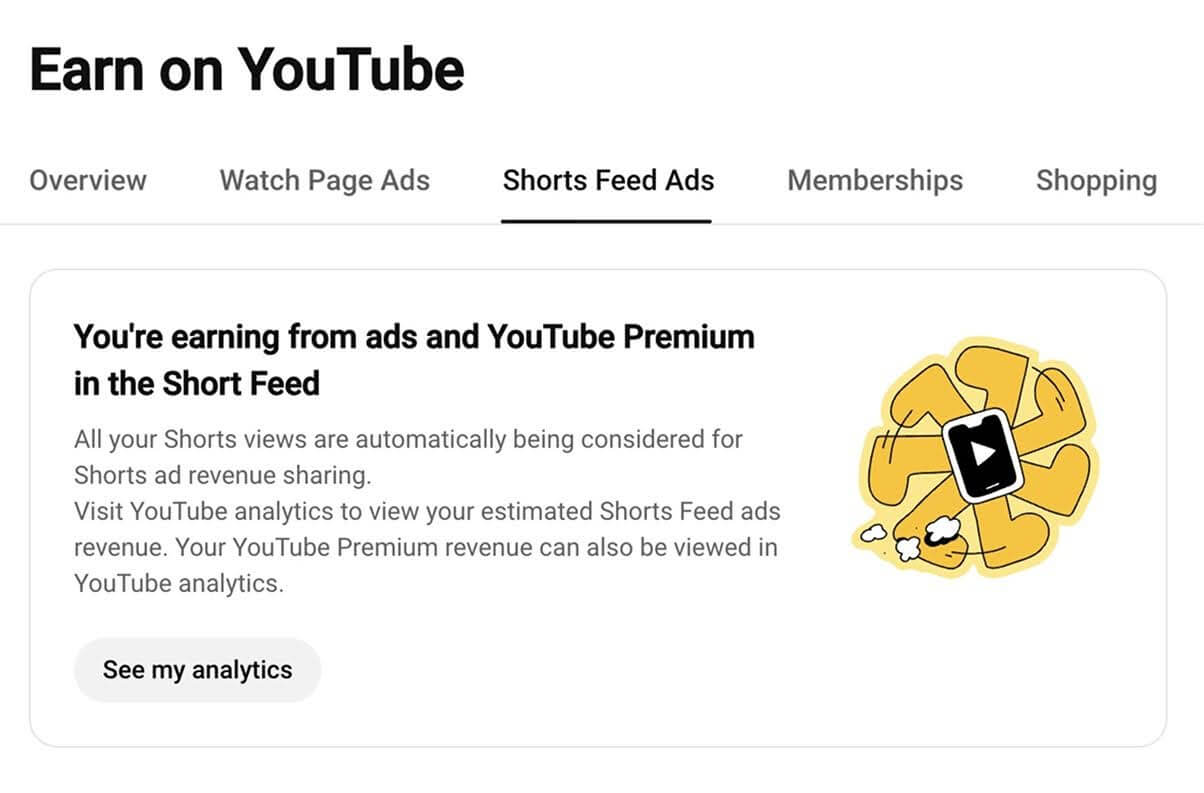
A qualified Shorts view comes from a public Short in the Shorts feed.
Views of private, unlisted, or deleted Shorts, views from ad campaigns, and image posts in the feed don't count.
Watch hours from the Shorts feed don't count toward the 4,000 hours either, so a channel that mixes formats fills two separate counters.
The rest of the checklist is the same for every channel:
- follow YouTube's monetization policies,
- live in a country where YPP works,
- have no active Community Guidelines strikes,
- turn on 2-Step Verification and advanced features,
- and link one AdSense for YouTube account.
Hitting the numbers sends your channel to review, which usually takes about a month. It doesn't guarantee approval.
For the long-form route and how long each path takes, see YouTube monetization requirements for 2026.
How to enable Shorts monetization in YouTube Studio, step by step
Getting into YPP doesn't switch Shorts revenue on by itself. Shorts have their own terms, the Shorts Monetization Module, and you accept them separately. Here's the full order on a computer, per YouTube Help on applying to YPP and Shorts monetization:
- Sign in to YouTube, click your profile picture, and open YouTube Studio.
- In the left menu, click Earn, the monetization tab. Once you’re eligible, select Apply Now.
- Click Start to review and accept the Base terms.
- Click Start to set up an AdSense for YouTube account, or link an active one you already have. The Get Reviewed step now shows In Progress.
- Wait for the review. YouTube usually answers in about a month, and the status shows in the same Earn section. Wait for the review. YouTube usually answers in about a month, and the status shows in the same Earn section, where you can check if your channel is monetized.
- After approval, go back to Earn and accept the Shorts Monetization Module (Shorts feed ads).
- Open Content in Studio. Shorts that earn don't carry a "No ad earnings" notice.
Shorts Monetization Module in YouTube Studio
The YouTube Studio app for Android and iPhone has the same Earn section, so you can apply and accept the module from your phone.
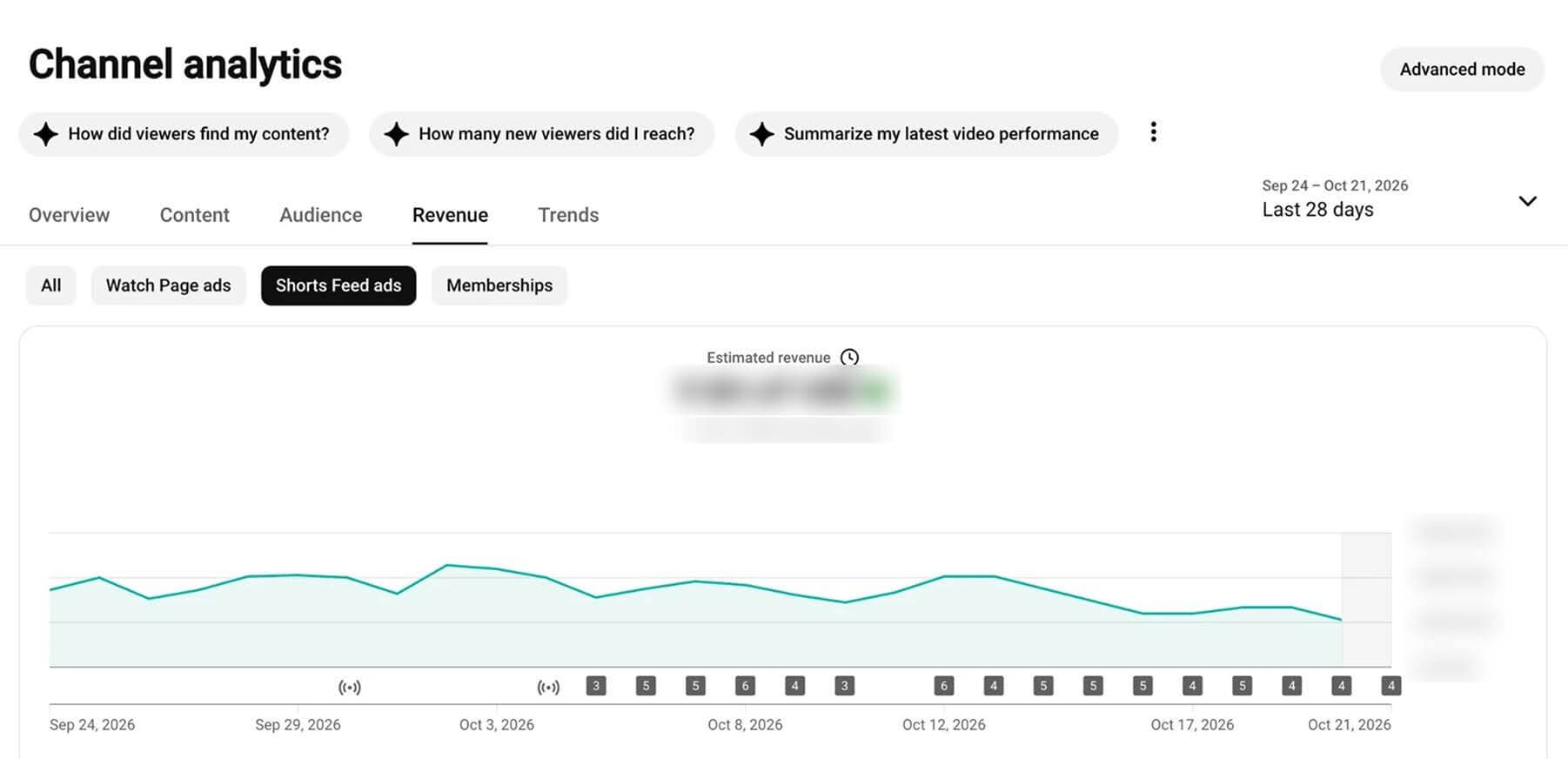
Shorts views from before you accept the module never pay. Revenue sharing starts on the date you accept, so do it the day YPP approves you. From that day, YouTube Analytics shows estimated daily Shorts feed ad revenue, and AdSense pays it once your balance reaches the payment threshold.
If YouTube rejects your application, you can appeal within 21 days or reapply after 30.
How much YouTube Shorts pay in 2026: $0.07–$0.20 per 1,000 views in most niches
The pool splits a limited ad budget across a huge number of views, so each view earns very little. In our research of 274 channels (by MilX and AIR Media-Tech), built on YouTube Analytics data for 3,044 channel-months, here's the median Shorts RPM by audience country:
|
Audience country |
Shorts RPM (per 1,000 engaged views) |
Per 1 million engaged views |
|---|---|---|
|
United States |
$0.328 |
~$328 |
|
Australia |
$0.193 |
~$193 |
|
United Kingdom |
$0.166 |
~$166 |
|
Canada |
$0.165 |
~$165 |
|
Germany |
$0.163 |
~$163 |
Source: our research of 274 channels by MilX and AIR Media-Tech, 12-month medians.
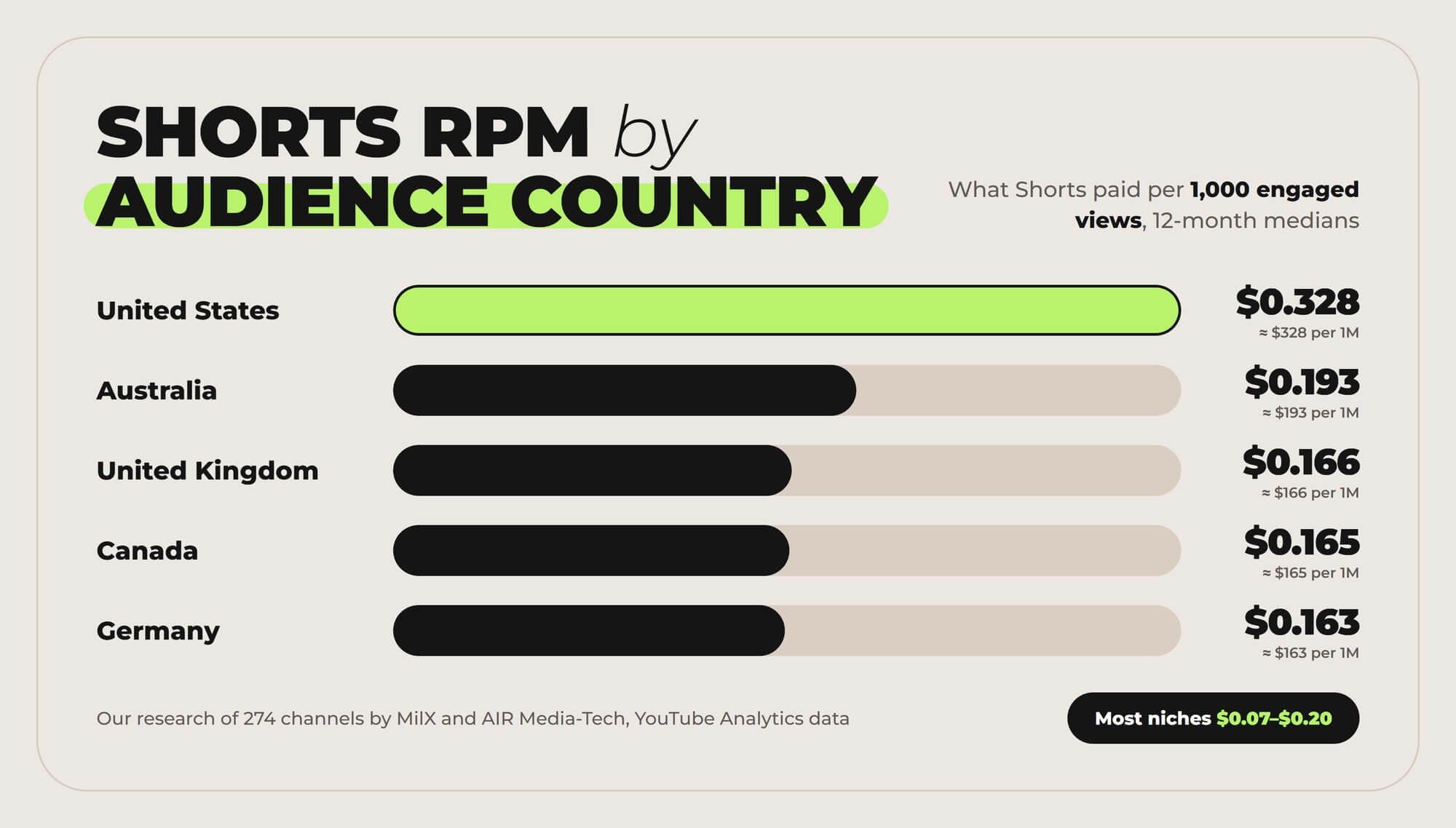
By niche, Shorts RPM among MilX users in our research sat at $0.07–$0.20 in most cases, or 3–14% of long-form RPM in the same niche. Music was the exception at $0.97–$1.48, because rights holders also earn through Content ID.
In money terms, most channels needed 11,000 to 34,000 Shorts views to earn what 1,000 long-form views paid.
The same revenue, two formats
Long-form
1,000
views
Shorts
11,000–34,000
views
That's 11 to 34 times more views on Shorts for the same money, in most niches of our research of 274 channels.
Most guides quote $0.01–$0.10 per 1,000 Shorts views. Part of the gap is which views get counted. Since March 31, 2025, the public counter on Shorts counts every start and replay, while YouTube pays on engaged views.
On an Arabic-language channel we work with, 43 Shorts collected 20.8 million views and 9.5 million engaged views. Compare engaged views in YouTube Analytics before you hold your RPM up against anyone's.
For RPM by niche, real channel examples, and how many views it takes to make $2,000 a month, see how much YouTube Shorts pay successful creators.
For the payout on one big number, here's what 10 million Shorts views pay.
Your Shorts get millions of views and pay cents?
Full-time creators earn most of their income outside the Shorts pool. See the 7 revenue streams they add on top of AdSense, and pick the one your Shorts audience is ready for first.
See the 7 revenue streams →Why your Shorts aren't monetized: 7 common reasons
Here’s what usually keeps Shorts views from counting as monetized Shorts views, with the fix for each:
- You haven't accepted the Shorts Monetization Module. YPP approval alone doesn't start Shorts revenue. Fix: open Studio, go to Earn, and accept the module.
- The views came before you accepted it. YouTube doesn't pay them retroactively. Fix: accept on approval day and count your earnings from there.
- The Short isn't original. Unedited clips from movies or TV, reuploads of other creators' videos from YouTube or other platforms, and compilations with nothing added don't earn. Fix: add your own commentary, editing, or footage.
- The content isn't ad-friendly. On Shorts, only views of content that follows the advertiser-friendly guidelines share in revenue. Fix: check those guidelines before you post on sensitive topics.
- The views are fake. YouTube removes views from click and scroll bots before it splits the pool, and they put the channel at risk. Fix: never buy views.
- A longer Short carries a Content ID claim. Shorts of one to three minutes with claimed content uploaded before September 24, 2026 are blocked and earn nothing. New uploads since then aren't blocked automatically, per YouTube Help. Fix: use licensed music from YouTube's library or royalty-free tracks you're cleared to use.
- The views don't qualify. Private, unlisted, and deleted Shorts, image posts, and views from ad campaigns don't count toward the 10 million. Fix: keep Shorts public and count organic views only.
From February 1, 2027, one more reason joins the list: falling under 10 million qualified Shorts views in 90 days.
What changes for Shorts monetization on February 1, 2027
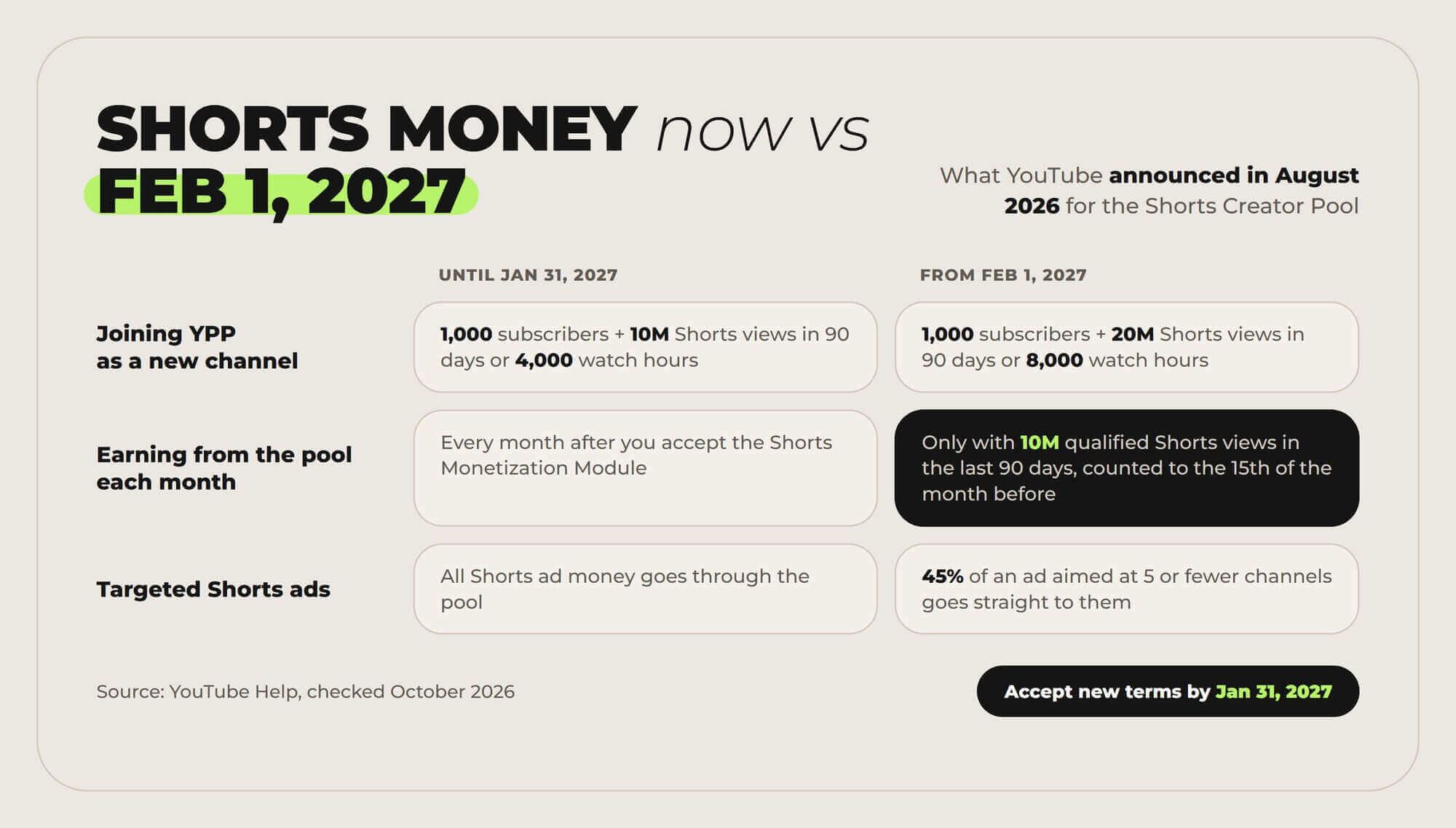
YouTube announced the changes on August 10, 2026, and its Help pages already carry them. Here's what changes for Shorts:
- A monthly bar for the Creator Pool. To earn Shorts ad and Premium revenue for a month, a channel needs 10 million qualified Shorts views in the last 90 days. YouTube measures the 90 days ending on the 15th of the month before, so March 2027 earnings depend on the 90 days up to February 15, per YouTube's Shorts monetization policy.
- Channels below the bar stay in YPP. Missing the threshold doesn't remove you from the program or affect long-form earnings, per YouTube Help. Each month is checked again, so Shorts revenue returns once you're back over 10 million.
- A higher entry bar. New applicants will need 1,000 subscribers plus 20 million qualified Shorts views in 90 days or 8,000 qualified watch hours in 365 days.
- Direct pay for targeted Shorts ads. An ad aimed at a group of 5 or fewer channels pays those creators 45% of its net revenue, on top of the pool.
- New terms. To keep monetizing, accept the updated terms in YouTube Studio by January 31, 2027.
10 million views in 90 days is about 111,000 a day, or 3.3 million a month. A channel at 1–2 million Shorts views a month won't earn from the pool after February 2027, so for most mid-size channels Shorts become a way to grow rather than an income line.
How to get more Shorts views: 6 things that work
Shorts pay per view, so the views come first. Here are the moves that bring them, plus one that turns them into long-form money:
- Hook in the first two seconds. Viewers decide fast whether to swipe. Open with movement, a bold claim, or a question on screen. Instead of "Hey guys, today I'm going to…", try "This hack saves hours, here's how."
- Make it work without sound. Add large, high-contrast captions that keep pace with the speech.
- Open on a strong frame. Skip fades and intros. A close-up, motion, or a face looking at the camera holds the first second.
- Write the title for the algorithm. Nobody picks a Short from a thumbnail. They meet it in the feed, so the title tells YouTube what the video is and who it's for. Instead of "Funny short – must watch 😂😂😂", try "Dog refuses to give back the ball – training tip gone wrong".
- Link every Short to a long video. Add a related video to each Short. In our research, channels posting about one Short for every two to three long videos (a 0.28–0.40 ratio) got the best subscriber and revenue results, while heavy Shorts pivots lost ground.
- Test formats, then post on a schedule. Try storytelling, reactions, quick how-tos, and behind-the-scenes, and keep what your analytics favor. Post when your audience is online: here are the best times to post Shorts.
For more ideas, AIR Media-Tech keeps a list of 16 ways to make Shorts go viral.
Waiting until the 21st for money your channel already earned?
With MilX, your channel's revenue lands on a balance you own every day from the day you connect. Advance Funds lets you reach what you've already earned up to 50 days before AdSense pays.
- Earned revenue up to 2 months early, for a one-time 4.3% on the amount you take
- Withdraw any day in 54 currencies through 30+ payout methods
- Pay your editor instantly with no fee when they're on MilX
- No subscription and no cut of your channel revenue