

Key takeaways: what should you do about Premium in 2026?
- Premium views often pay better than ad views, and the gap is widest on long videos where ads misfire or never load.
- Premium stabilises income because it sits outside the ad auction, so it does not swing with advertiser budgets.
- Premium Lite routes roughly twice the creator share of full Premium, and it is expanding to every Premium country since August 2026.
- Premium share of your revenue mix is a metric worth checking monthly, in Advanced mode, alongside RPM by content type.
YouTube raises Partner Program thresholds on 1 February 2027 to 8,000 watch hours or 20 million Shorts views in 90 days, so watch hours carry double weight from here.
Does YouTube Premium pay creators, or does it kill your ad revenue?
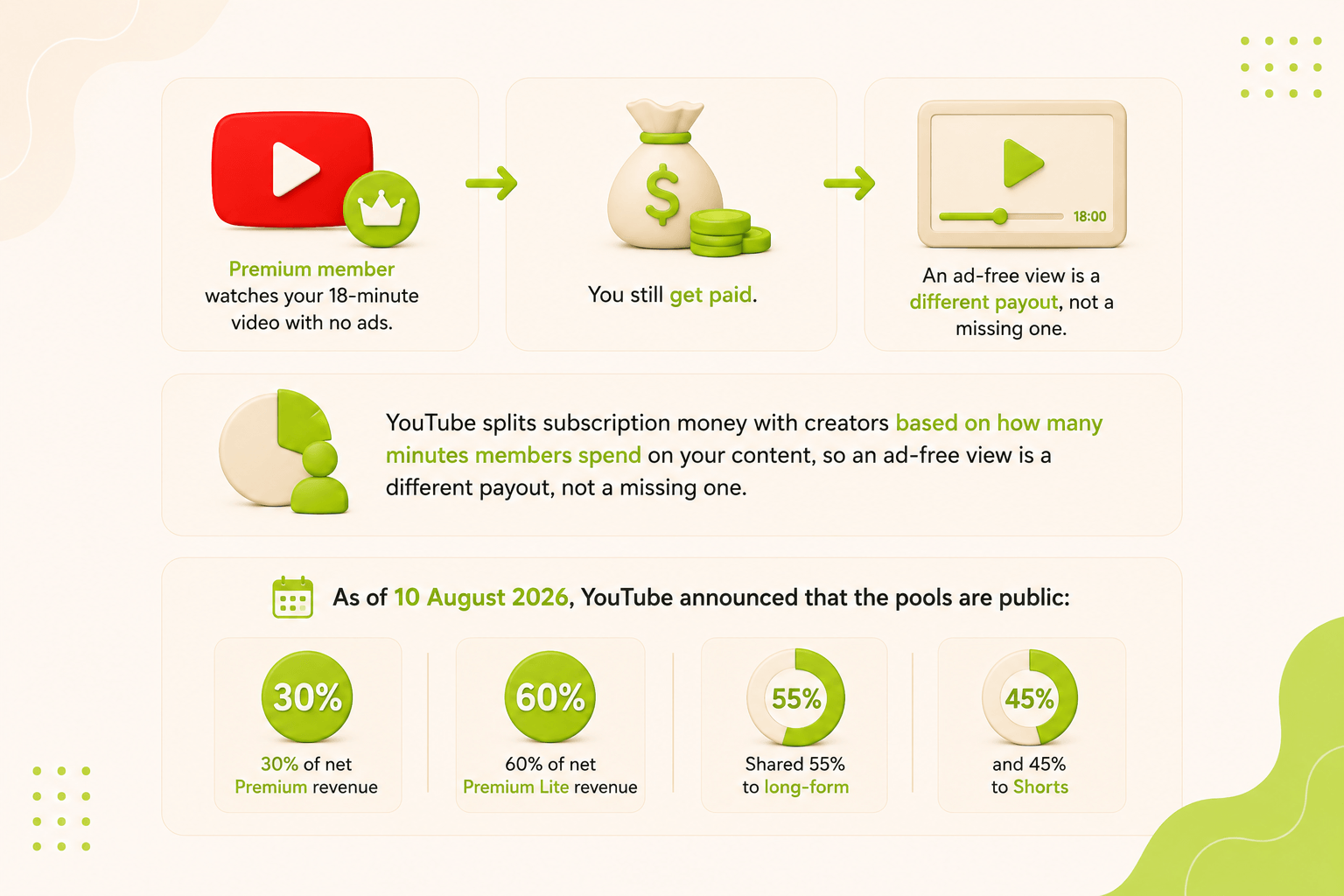
YouTube Premium pays creators, and it runs alongside ads rather than replacing them. Google's own creator documentation states that revenue from membership fees "is distributed to video creators based on how much members watch your content," and describes it as a second stream on top of what you already earn from ads.
The two systems reward different behaviour, and both land in the same estimated revenue figure.
|
Parameters |
Ad revenue |
YouTube Premium revenue |
|---|---|---|
|
What triggers payment |
A monetized playback with a winning advertiser bid |
Every minute a member watches |
|
What sets the amount |
The ad auction, your niche, and viewer country |
Your share of member watch time in a fixed pool |
|
Effect of an ad blocker |
Pays nothing |
Unaffected |
|
Seasonality |
Swings with advertiser budgets, weak January, strong December |
Steady month to month |
|
Best for |
Channels with dense ad inventory and Tier-1 CPMs |
Long sessions, low monetized playback rates, ad-averse audiences |
The real question is what share of your mix each stream carries. MilX has the side-by-side payout comparison of who benefits and who gets shortchanged by Premium.
🎯 Practical tip for creators: check your traffic mix before comparing months. A month heavy on TV and desktop viewing carries a bigger Premium share than one dominated by mobile Shorts traffic.
👉 New to the metrics behind this? Start with CPM vs RPM: the key metrics for YouTube monetization.
How is YouTube Premium creator revenue calculated in 2026?
YouTube pays from two separate subscription pools, and your slice of each depends on watch time, not on ad impressions. The official Partner Program announcement of 10 August 2026 put the numbers on the record for the first time.
|
Subscription type |
Creator pool |
Long-form share |
Shorts share |
Effective share of net revenue (long-form) |
|---|---|---|---|---|
|
YouTube Premium |
30% |
55% |
45% |
~16.5% |
|
YouTube Premium Lite |
60% |
55% |
45% |
~33% |
🎯 Practical tip for creators: track Premium watch time as its own metric each month. Data shared with MilX by its partner network shows that formats which lift average view duration move revenue faster than formats which lift views. One hobby channel in that network shifted from 20-25 minute videos to 25-30+ minute videos and closed the quarter with 9% fewer views but 20% more revenue, while average view duration climbed from 10:22 to 12:19.
Which channels earn the biggest Premium revenue share?
Long-form channels with long sessions earn the biggest Premium revenue share, and Shorts-led channels earn the smallest. The pattern follows the payout rule: minutes watched by paying members, weighted 55% for long-form and 45% for Shorts.
|
Channel type |
Typical Premium share of YouTube income |
Why it lands there |
|---|---|---|
|
Music, lofi, 24/7 live streams |
Highest of any format |
Members leave them running for hours, and background play plus downloads both count |
|
Kids and family long-form |
High |
Long-form kids content shows a monetized playback rate near 12% in MilX partner data, so ads rarely fire, while Premium pays for every minute |
|
Educational, tutorials, documentary, 20+ min |
Above average |
Long sessions plus a desktop, Tier-1 audience that blocks or pays away ads more often than average |
|
Gaming and entertainment long-form |
Mid-range |
Strong session length, but ad inventory is already dense, so Premium is a smaller slice of a bigger pie |
|
News and talk under 5 minutes |
Below average |
Short sessions produce few Premium minutes per view |
|
Shorts-led channels |
Lowest |
Shorts sit in the 45% bucket, and a view lasts seconds, not minutes |
The kids row is the counterintuitive one. Made-for-kids content has limited ad targeting, and data shared with MilX by its partner network puts the monetized playback rate at roughly 12% for that content against 45.7% for Shorts on the same channels. Ads misfire on that inventory. Premium pays on watch time whether an ad loaded or not.
🎯 Practical tip for creators: if your monetized playback rate sits below 40%, Premium and watch time hold more room than CPM does. Chasing CPM on inventory that rarely serves an ad is the slower route.
Does YouTube Premium raise or lower your RPM?
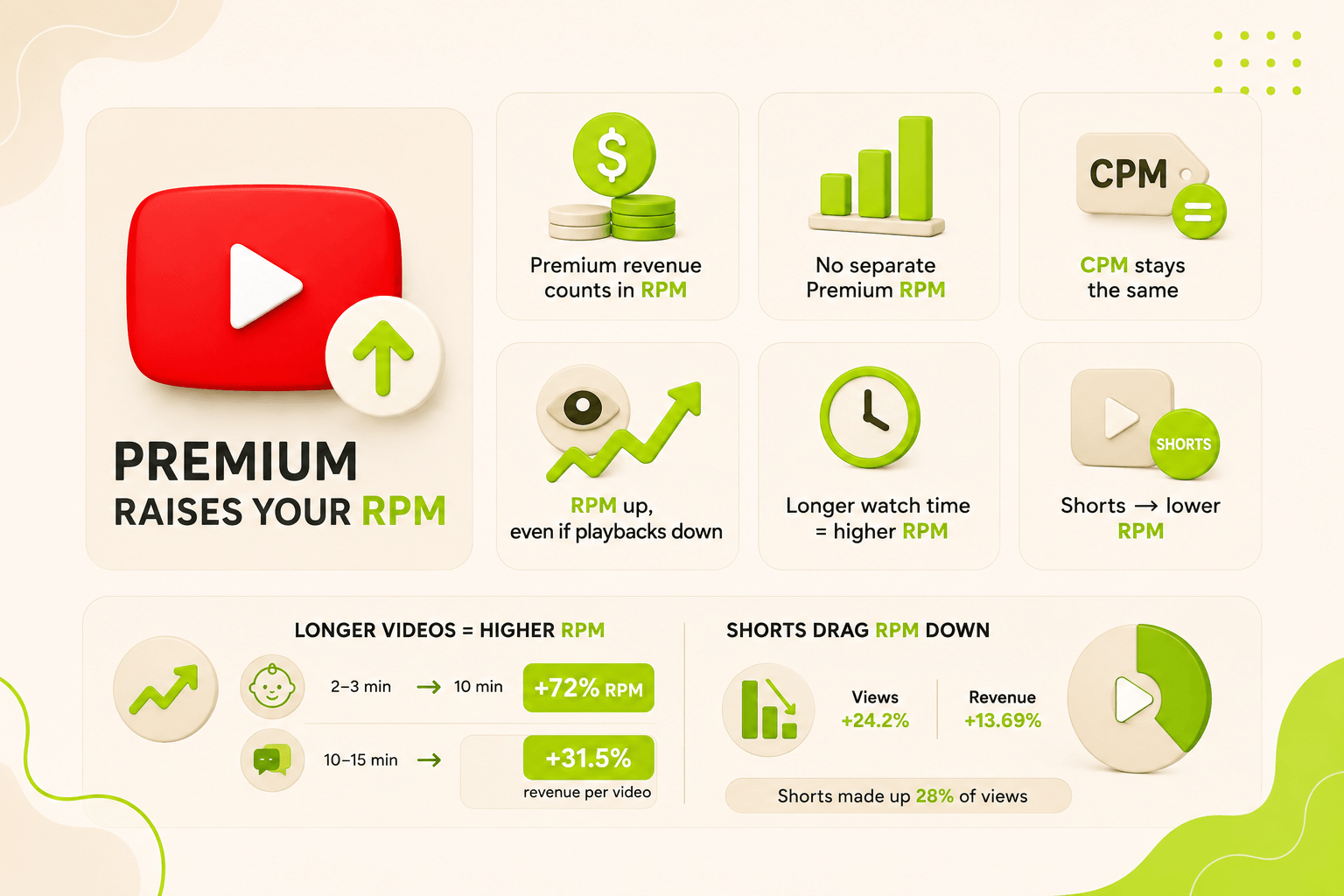
Premium raises your RPM. Google defines RPM as total revenue per 1,000 views from all sources and lists YouTube Premium revenue inside that calculation, alongside ads, memberships, and Supers. Every Premium minute adds to the numerator while the view count in the denominator stays put.
Studio reports no standalone YouTube Premium RPM, so the lift shows up inside your channel RPM.
CPM is the metric Premium leaves alone, because a Premium view never enters an ad auction.
An ad-free view can pull your monetized playbacks down while your RPM climbs. Creators watching only CPM read that as damage. It usually is not.
Watch time drives this harder than most metrics. A kids entertainment channel in MilX's partner network replaced 2-3 minute uploads with 10-minute compilations and recorded 19% higher average view duration, 9% higher CPM, and 72% higher RPM, same channel, same niche, same quarter. A chat-format channel in that same network standardised uploads to a 10-15 minute window and lifted average view duration 30% and revenue per video 31.5% in one month.
The reverse shows up too. One portfolio in that network saw views rise 24.2% while revenue rose 13.69%, because Shorts carried 28% of the views. Shorts RPM runs at 3-14% of long-form RPM in almost every niche, and the Premium pool weights them lower as well.
🎯 Practical tip for creators: compare RPM by content type in YouTube Studio, not channel-wide. A channel-level RPM that mixes Shorts and long-form hides which format funds you.
Your Premium Minutes Are Earned. Your Payout Is 40 Days Out.
Premium income is the steadiest line in your revenue mix, and it still lands on the same monthly AdSense schedule as everything else. MilX Advance Funds gives you revenue you have already earned up to 50 days before YouTube's standard payout cycle reaches you. Try MilX and see what your channel qualifies for.
Where do you find your Premium revenue in YouTube Analytics?
Premium is not a separate line in the standard Revenue tab. YouTube folds it into two metrics, and the official definition of Watch page ad revenue is "estimated revenue from AdSense for YouTube, DoubleClick ads, and YouTube Premium." Shorts feed ad revenue includes it too.
Here is the path that gets you the closest read available today:
- Open YouTube Studio, select Analytics in the left menu, then Revenue in the top menu.
- Read How much you're earning for the six-month trend and How you make money for the source split. Premium sits inside Watch page ads and Shorts feed ads, not beside them.
- Open Content performance to compare RPM across videos, Shorts, and live streams separately.
- Switch to Advanced mode and add the Premium columns as a breakdown alongside your regular metrics - YouTube Premium views, YouTube Premium watch time, and YouTube Premium revenue. These aren't a separate line of data; they show the portion of your total views, watch time, and revenue coming from Premium subscribers, in the same rows as your regular numbers.
- Sort by Premium revenue and look at what the top five videos share: length, format, upload day, audience country.
Two timing rules save you a panic.
- Revenue takes two days to appear in Analytics, then gets adjusted again about a week later and mid-following-month.
- Studio numbers are estimates, and finalised AdSense figures usually land a little lower after invalid-traffic filtering.
🎯 Practical tip for creators: export the Premium columns monthly and track Premium share of total revenue as a percentage. A month where that share jumps without a matching view spike means a long-form video found a paying audience. MilX has a guide on reading your YouTube Analytics correctly if the Revenue tab keeps contradicting your dashboard.
What do ad-free views and ad blockers do to your income?
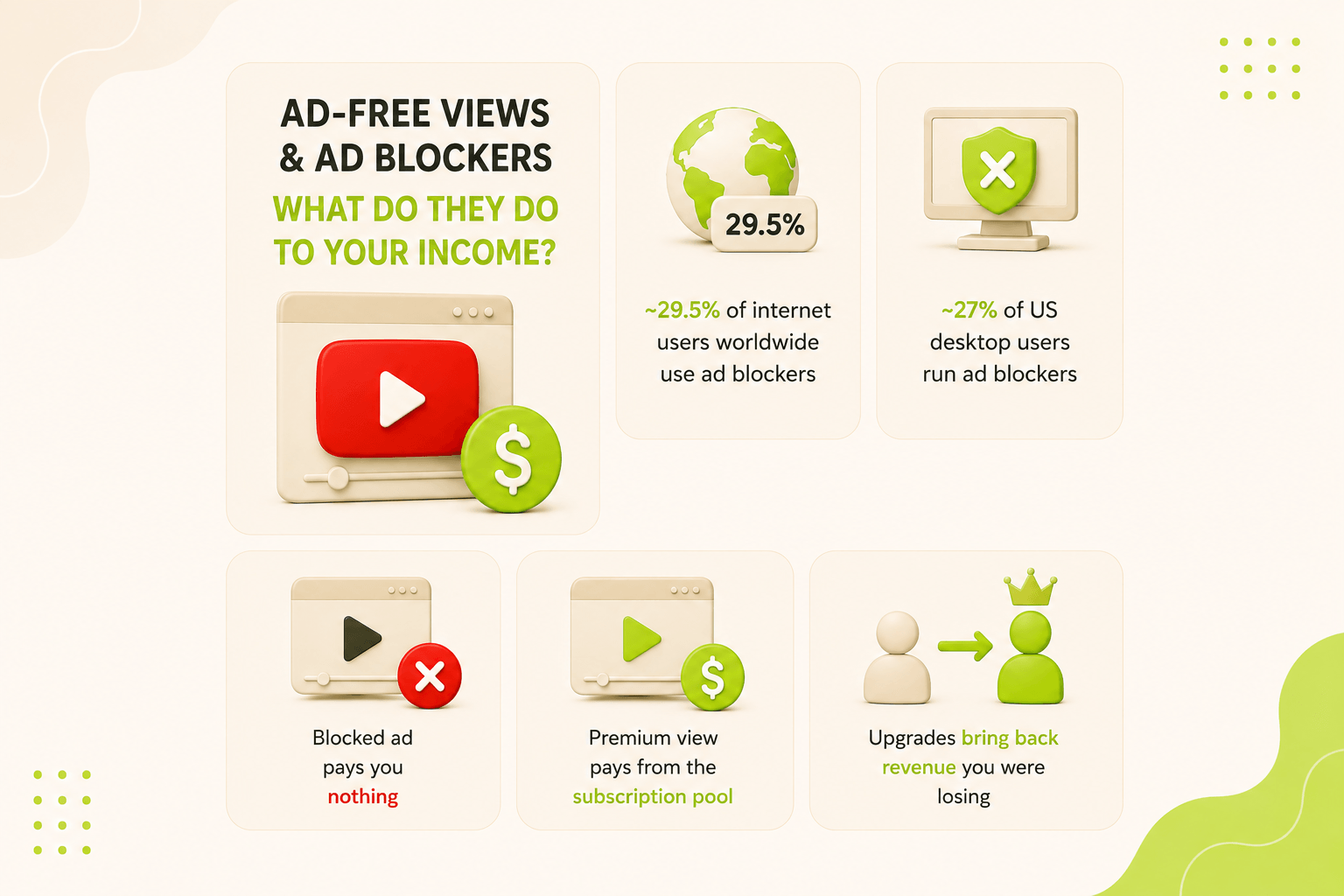
Roughly 29.5% of internet users worldwide run ad-blocking tools, and US desktop rates sit near 27%.
A blocked ad pays you nothing.
A Premium view pays from the subscription pool.
When part of your desktop audience upgrades to Premium or Premium Lite instead of installing a blocker, you get back revenue you were losing. MilX has the deeper breakdown of how ad blockers hit creator revenue.
How do you grow your YouTube Premium revenue in 30 days?
Premium revenue responds to format changes faster than ad revenue because minutes drive it rather than an auction you don't control. Work through this in order.
Measure what you have
Pull the last 90 days in Advanced mode with the three Premium columns.
Calculate Premium revenue as a percentage of total revenue and note your top five videos by Premium revenue.
That percentage is your baseline. Write it down.
Fix video length first
Standardise uploads into one consistent window instead of ranging from two minutes to twenty.
A fixed 10-15 minute window lifted average view duration 30% and revenue per video 31.5% within a month, one result from a channel in MilX's partner network. Consistency did as much work as length.
Build the sessions Premium rewards
Add one long-form format members can leave running: a compilation, a multi-part working session, a full-length live archive.
Route your Shorts into it with end screens, because Shorts bring discovery and long-form collects the revenue.
Re-measure and cut
Publish in 4K where your content supports it, since Smart TV audiences are a high-value, long-session group.
Compare Premium revenue share against your Week 1 baseline and keep only the format that moved it.
What to skip. Do not pivot to a Shorts-heavy schedule expecting Premium to follow. Shorts sit in the 45% bucket, and in MilX partner data, entertainment channels running 21+ Shorts a month saw long-form RPM fall from $4.99 to $1.15.
Want to get your cash earlier?
Premium steadies your income. It does not fix the calendar. Your steadiest revenue line still arrives once a month, 30 to 60 days after you earned it, which hurts when the shoot that earns next quarter's watch time has to be paid for this week.
Get Paid Before the Views Roll In
Stop waiting on the 21st of the month. Access up to six months of your future YouTube income today with MilX Active Funds, then put it straight into your next shoot, your editor, or your gear. Over 5,000 creators and $500M+ processed, an Official YouTube Partner rated 4.6 on Trustpilot. Try MilX and check if your channel qualifies for Active Funds.
MilX is a financial app built for creators.
- Advance Funds gives you revenue you have already earned 50+ days before YouTube's standard payout cycle.
- Active Funds gives you up to 6 months of future revenue in one lump sum, fees from 0.33% per day, 5% monthly repayment from future income, and no credit check.
- Withdraw through 17+ methods in 50+ currencies, and pay your editor for $0 if they are on MilX too.
👉 Take control of your creator finances with MilX; download the app for free.