Key takeaways
- Pin your own CTA or the most useful viewer comment on every video. YouTube lets you pin one comment per video at a time, yours or a viewer's.
- Ask a question to spark replies. A question that takes five words to answer gets more replies than "What do you think?"
- Use the pin to route viewers to another video. A link to the next part or a playlist keeps the session going after this video ends.
- Refresh the pinned comment as the video ages. The question that works on launch day is rarely the best pin three months later.
- A pin isn't a ranking switch. YouTube doesn't list pinning among its recommendation signals, so the pin works through the replies and the next click it brings.
What a pinned comment on YouTube is and why it matters
A pinned comment is a comment that the channel owner fixes to the top of a video's comment section. On a computer, viewers see it above all other comments with a "Pinned by" label and your channel name. On a phone, they see it once they open the comments, per YouTube Help on posting and pinning comments.
You can pin your own comment or a viewer's. YouTube's own tips to build community with comments name four jobs for your own pin. It can clarify something from the video, ask the audience a specific question, tease a moment or an easter egg, or thank viewers for watching.
Pinned comment engagement comes from the spot itself, because it's the first comment people see when they open the comments. That makes it the best place on the page for a CTA that doesn't feel like an ad, a correction, or context the video didn't have time for.
How to pin a comment on YouTube
Here's how to pin a comment on YouTube on a computer, step by step.
- Sign in to YouTube and open your video.
- Scroll to the comments and find the comment you want to pin. To pin your own comment, post it first.
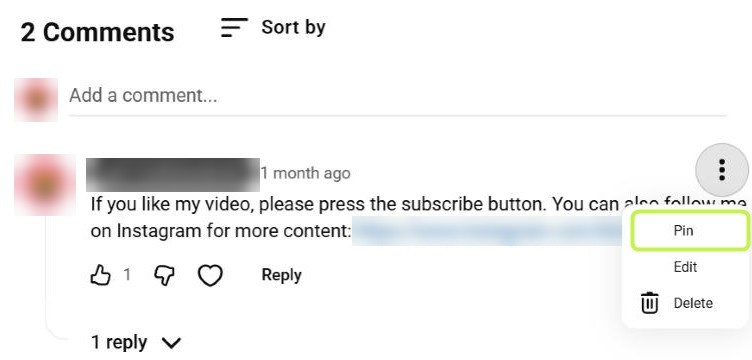
- Click the three dots (More) next to the comment, then Pin.
- Click Pin again to confirm.
On a phone, open the video in the YouTube app, tap the comments, tap the three dots next to the comment, and choose Pin. In the YouTube Studio app, open the video's comments and use the same menu. That's also how to pin your own comment on a Short, since the comment menu under Shorts works the same way.
A few rules matter before you start.
- One pin per video. Pinning a new comment replaces the old one. If you unpin a comment, it moves back to its original place.
- Advanced features come first. To pin comments, your channel needs access to advanced features, and they can take up to 24 hours to show up after you turn them on. You'll find them in YouTube Studio under Settings → Channel → Feature eligibility, as YouTube Help on advanced features explains. If the Pin option is missing, this is the usual reason.
- You can pin a viewer's comment. That's often the stronger move once replies come in, because new viewers see a real conversation instead of a prompt.
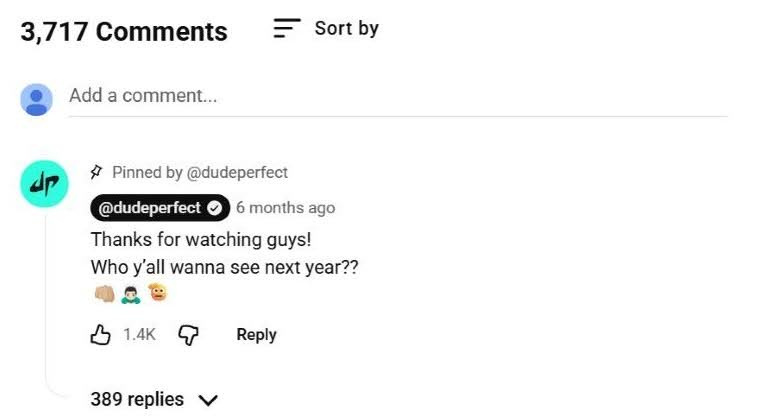
Under "First to Make the Plane Shot Wins!", Dude Perfect pinned one plain question, "Thanks for watching guys! Who y'all wanna see next year??" By November 2026, it had 1.4K likes and 389 replies. That's about one in ten of the video's 3,717 comments, all in one thread at the top.
Pin option missing? Check these first
If the Pin option isn't in the menu, one of these is usually why.
| What you see | Why | What to do |
|---|---|---|
| No Pin in the three-dot menu on your own video | Advanced features aren't on for the channel | YouTube Studio → Settings → Channel → Feature eligibility. Verify your phone, then get advanced features through channel history or ID or video verification |
| You just turned advanced features on, and Pin still isn't there | They can take up to 24 hours to show up across the channel | Wait a day and check again |
| No Pin under someone else's video | Only the channel that owns the video can pin | Switch to the account of the channel that uploaded it |
| No comments to pin at all | Comments are turned off for the video | Turn comments on in the video's details in YouTube Studio |
Sources: YouTube Help — Post & interact with comments; YouTube Help — Get access to intermediate and advanced features. Checked November 2026.
How to write pinned comments: 5 formats that work
Before you write anything, decide what you want the viewer to do next. Reply, watch another video, jump to a moment, or simply know something the video got wrong. Each goal has its own format, and one pin does one job. These are the YouTube pinned comment ideas that cover most videos.
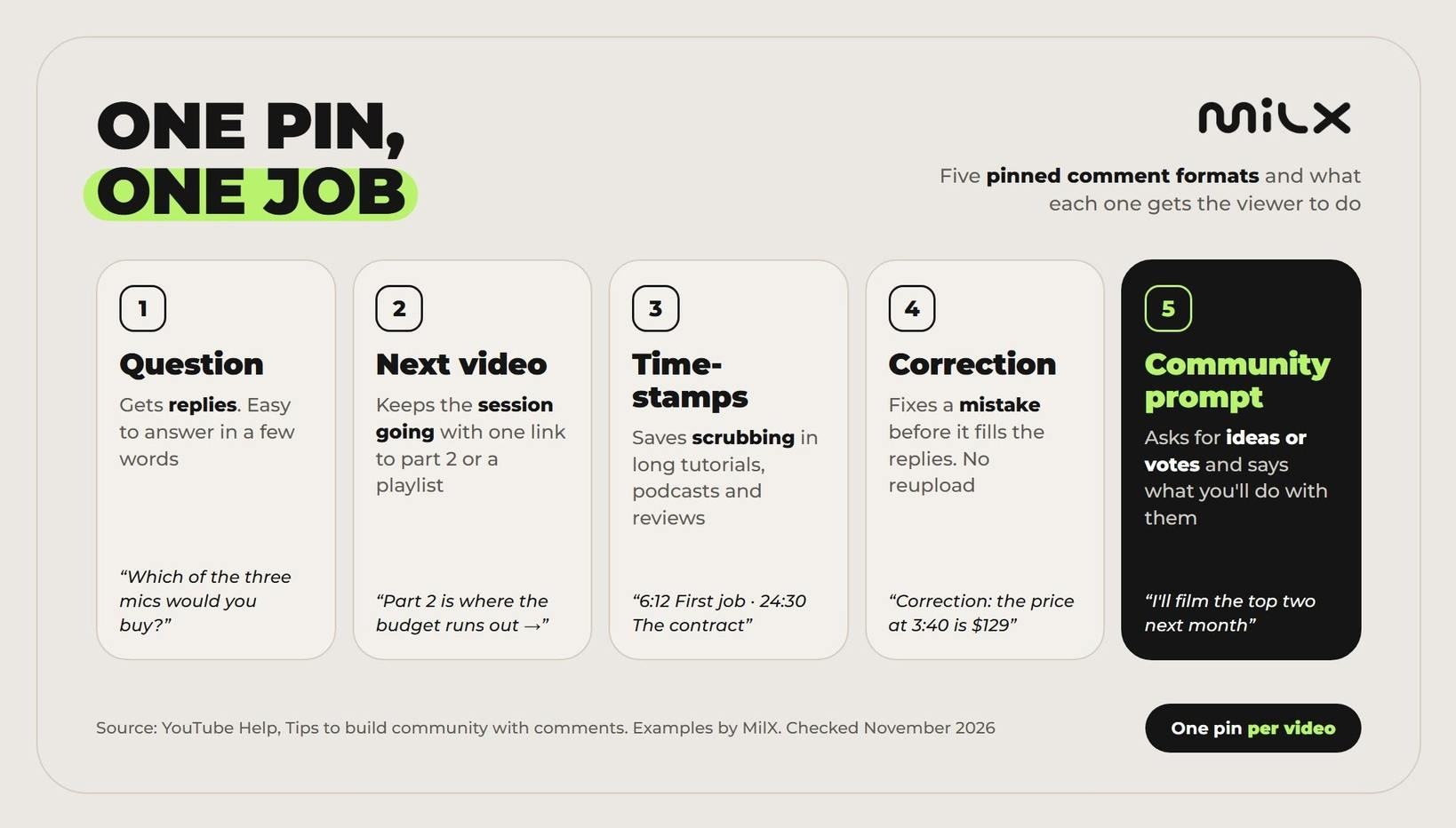
- A question with a short answer. The question is the core of any YouTube comment engagement strategy, and the easier it is to answer, the more replies you get. "Which of the three mics would you buy?" works better than "Thoughts?" because the viewer already holds the answer. If you're choosing which question to ask, the feeling behind it matters too. Curiosity and belonging bring replies, and anger brings reports, as our piece on which feelings drive the highest revenue per viewer shows.
- A CTA to another video. A pinned comment CTA that points to the next part or a playlist gives viewers somewhere to go when the video ends. That keeps the viewing session going, which YouTube cares about more than any single comment. Pair it with an end screen and a card, the same way our tips on how to increase watch time suggest.
- Timestamps. For long tutorials, podcasts, and reviews, a pinned list of timestamps saves viewers from scrubbing. If you haven't added chapters in the description, the pin is the next best place. End it with a question about one section, so the pin also gets replies.
- A disclaimer or correction. Got a price, a date, or a setting wrong? Pin the fix. Late viewers read it before they reach the angry replies, and you don't need to reupload. The same format works for sponsorship disclosures and safety notes.
- A community prompt. Ask viewers for something you'll use. Ideas for the next video, the results after trying your method, a vote between two options. These comment prompts YouTube creators use most work best when you promise what happens with the answers ("I'll film the top two next month").
Writing for money (affiliate links, merch, memberships) is a different job. We cover it in how to turn viral comments into recurring income.
Pinned comment examples: the best pinned comments vs weak ones
The best pinned comments are short, tied to the video, and easy to answer. Here are pinned comment examples for different video types, each next to a weaker version of the same idea.
| Video type | Weak pinned comment | Strong pinned comment | Why it works |
|---|---|---|---|
| Tutorial | Hope this helped! Like and subscribe | Which step took you longest, the export or the color fix? I'll make a separate video on the most common one | Two options, and the answer shapes the next video |
| Product review | Links in the description | Correction: the price at 3:40 is $129, not $149. Would you pay that for the battery alone? | Fixes an error first, then asks |
| Travel vlog | What do you think? | Night train or cheap flight for this route? We tried both, results in part 2 👉 [link] | Easy choice plus a route to the next video |
| Gaming | GG | Would you have taken the shortcut at 12:05? I still think it cost me the run | Timestamp plus a side to take |
| Podcast or long interview | Full episode above | 0:00 Intro · 6:12 First job · 24:30 The contract story · 41:00 Advice. Which part should get its own clip? | Timestamps save scrubbing and still ask |
| Finance explainer | Not financial advice | These numbers are for the US in November 2026. Which country should I run next? | Real disclaimer plus a community prompt |
| Music | Stream the song everywhere! | Acoustic or full band for the live version? Most replies by Friday wins | A vote with a deadline |
| Shorts | Follow for more | The full 10-minute version is here 👉 [link]. Did the trick work for you on the first try? | Moves Shorts viewers to long-form |
Examples written by MilX for this guide. Adapt the wording to your audience and language.
The weak versions all have the same problem. They ask for nothing specific, so the viewer has nothing to answer.
Your channel grows every week. Does your payout?
Higher engagement builds a steadier channel, and steadier income you can access with MilX. Your revenue reaches your MilX balance every day, and Advance Funds lets you take what you've already earned up to 50 days before AdSense pays, for a one-time 4.3%.
See how Advance Funds works →Pinned comment best practices: do's and don'ts
Do:
- Write the pin while you script the video. Then you can point to a real moment, like "the shortcut at 12:05", instead of something generic.
- Pin it the moment the video goes live. The first viewers are often your most loyal ones, and they set the tone of the thread. Our guide on the best times to post on YouTube explains why a steady upload slot matters more than the exact hour, and the pin goes up in that same minute.
- Reply to the first replies. YouTube says replying shows your audience you're listening. Heart or like a comment you want to reward, since a heart may send the viewer a notification.
- Keep the first line strong. On a phone, long comments get cut with "Read more", so the question or link goes first.
- Match the pin to the title. The title makes a promise, and the pin continues it. Our guide on how to write video titles that attract viewers covers the first half.
Don't:
- Pin the same comment on every video. Your regular viewers learn to scroll past it.
- Ask two questions at once. People answer one, or none.
- Fill the pin with links. One link is a pinned comment CTA. Three links read like spam.
- Pin a rude comment to make fun of it. It draws more of the same, and comment moderation turns into a full-time job.
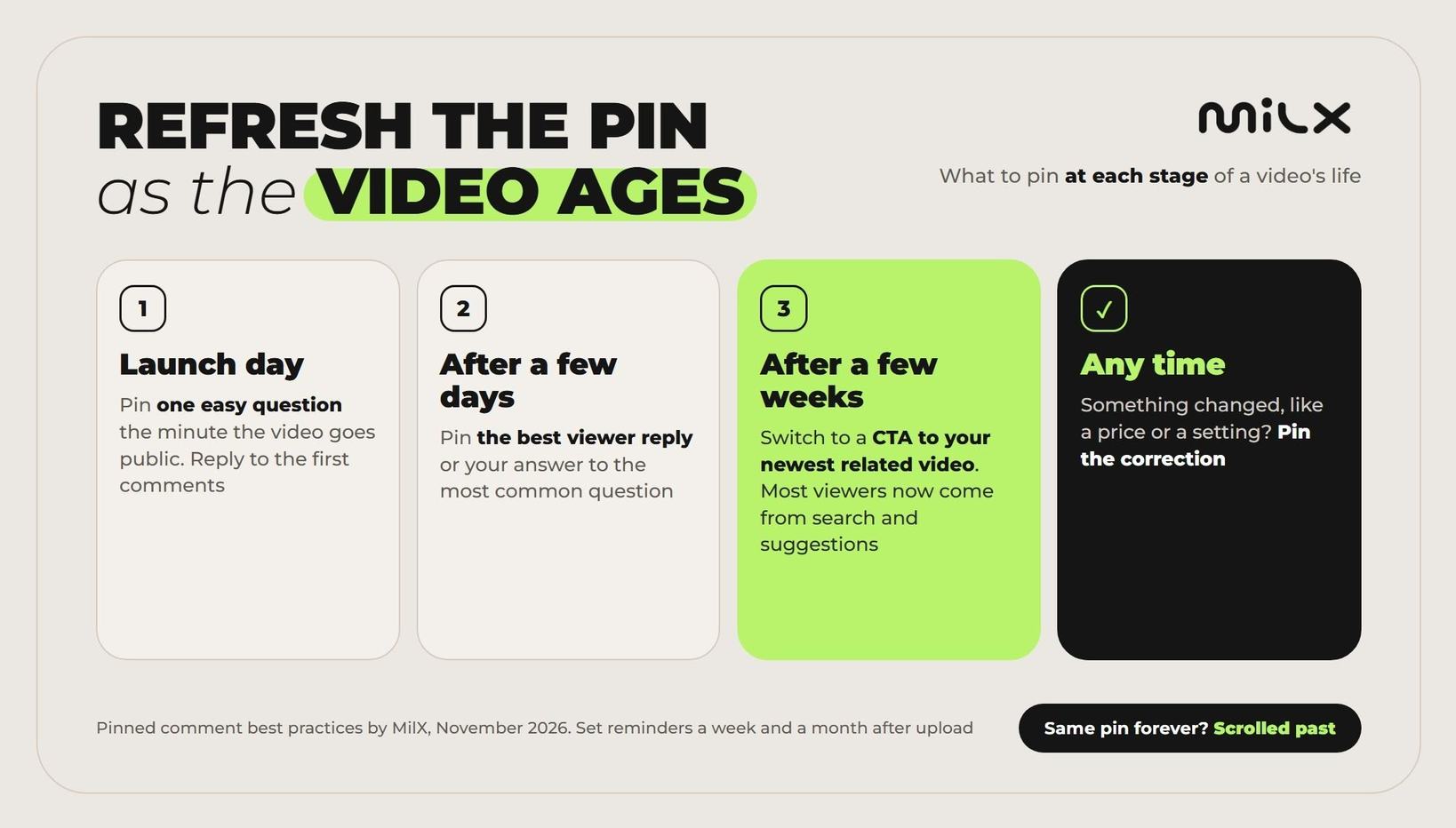
Refresh the pinned comment as the video ages. On launch day, a question works best. After a few days, pin the best viewer reply or your answer to the most common question. After a few weeks, switch to a CTA that routes viewers to your newest related video, because most of them now come from search and suggestions and have never seen your newer uploads.
How comments feed retention and the algorithm
Do pinned comments boost engagement? They can raise comments and replies, but a pin isn't a direct ranking factor. YouTube's page on how recommendations work lists signals like watch history, search history, likes, dislikes, and satisfaction surveys. Pinned comments aren't on that list, and YouTube doesn't publish how much comments weigh.
So the link between replies and the algorithm is indirect. A pin can help in three places.
- More replies. A clear question at the top lowers the effort of commenting. That raises your engagement rate, the share of viewers who like, comment, or share.
- A longer session. A pinned link to the next video gives viewers a next click on YouTube. That's what a pinned comment for more views does. It sends existing viewers to another video instead of making YouTube show this one to more people.
- A better experience. A correction or timestamps help viewers find what they came for, and YouTube's surveys ask how satisfied they were.
A pin won't change your audience retention graph, because retention measures how much of the video people watch, and the pin sits below it. If viewers leave at 0:40, fix the first 40 seconds first.
To see if your pinned comment engagement is working, compare similar videos in YouTube Studio. Open Analytics, switch to Advanced mode, and add Comments added and Likes as metrics. Divide each by views, so a big video and a small one compare fairly. Then look at replies under the pin itself. If you test a question against a statement, test one change at a time, across at least three videos each, so one lucky upload doesn't decide for you. A better question usually gets a higher engagement rate.
Here's what to compare across similar videos.
| What to check | Where | What it tells you |
|---|---|---|
| Comments added ÷ views | YouTube Studio → Analytics → Advanced mode | Whether viewers comment more often than on similar videos |
| Likes ÷ views | The same Advanced mode report | The other half of your engagement rate |
| Replies under the pin | The comments under the video | Whether the pin itself started the talk, or people commented despite it |
Before your next upload, run your pin through this list.
Checklist before you pin
- The pin does one job: a question, a next video, timestamps, a correction or a community prompt
- The first line works without "Read more"
- Viewers can answer in a few words
- It mentions something only people who watched will know
- One link at most
- It goes up the minute the video is public
- You'll reply to the first comments
- A reminder in your calendar to refresh it in a week and in a month
Once the replies start coming in, the next question is how fast the money from those views reaches you.
More replies today. When does the money arrive?
Grow engagement on YouTube, get paid faster with MilX. Your channel's revenue reaches your MilX balance every day from the day you connect.
- Advance Funds: earned revenue up to 2 months early, for a one-time 4.3%
- Withdraw any day in 70 currencies through 30+ payout methods
- Pay your editor or co-host for free with instant P2P