Key takeaways
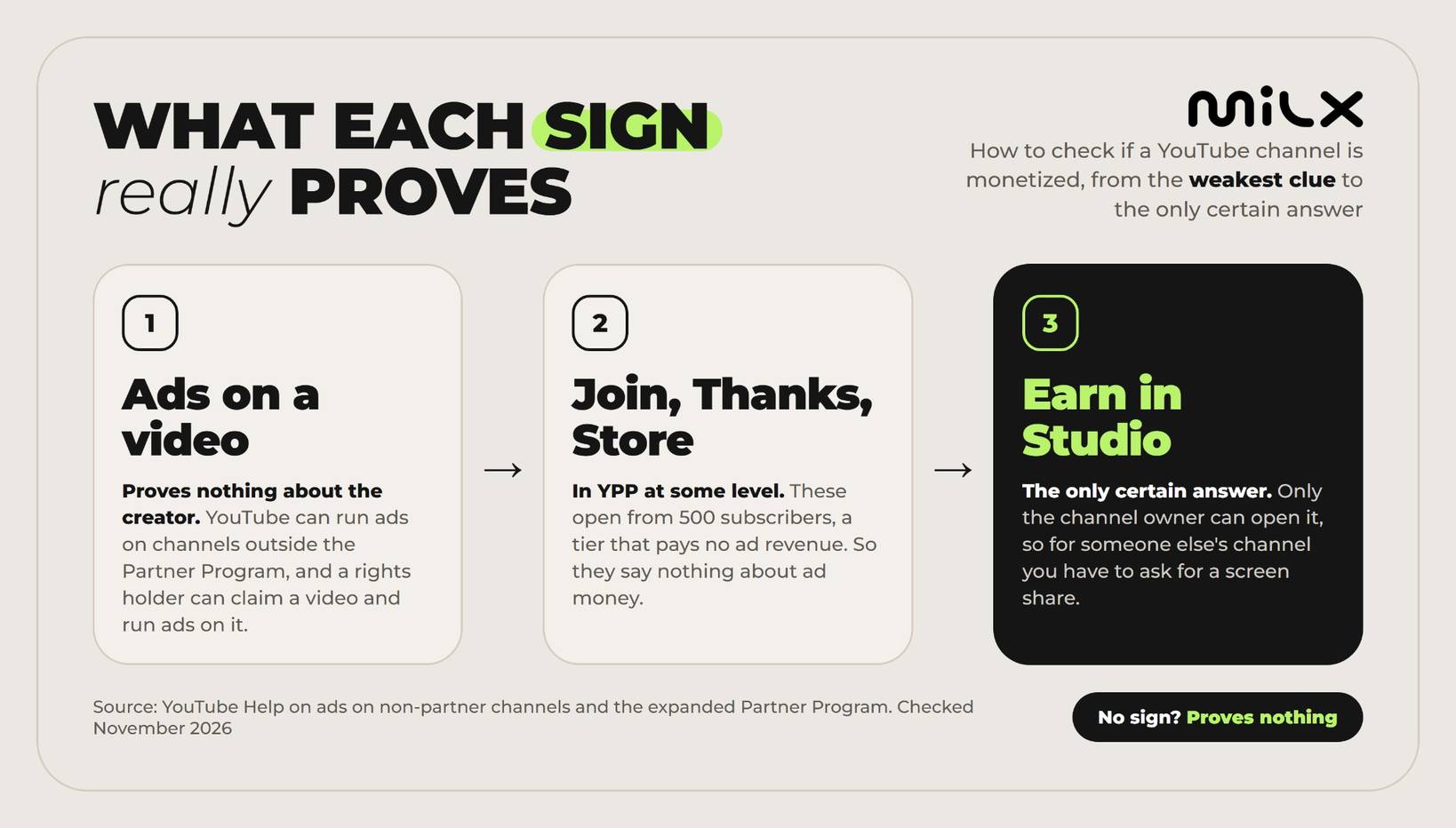
- Ads are a hint, not proof of monetization. YouTube can run ads on channels outside the YouTube Partner Program (YPP) without paying the creator, and a rights holder can claim a video and run ads on it.
- The only certain check for your own channel is the Earn tab in YouTube Studio. Nothing public confirms another channel's status.
- Monetization needs YPP eligibility and a review, not just views. The numbers only let you apply, and YouTube then reviews the whole channel.
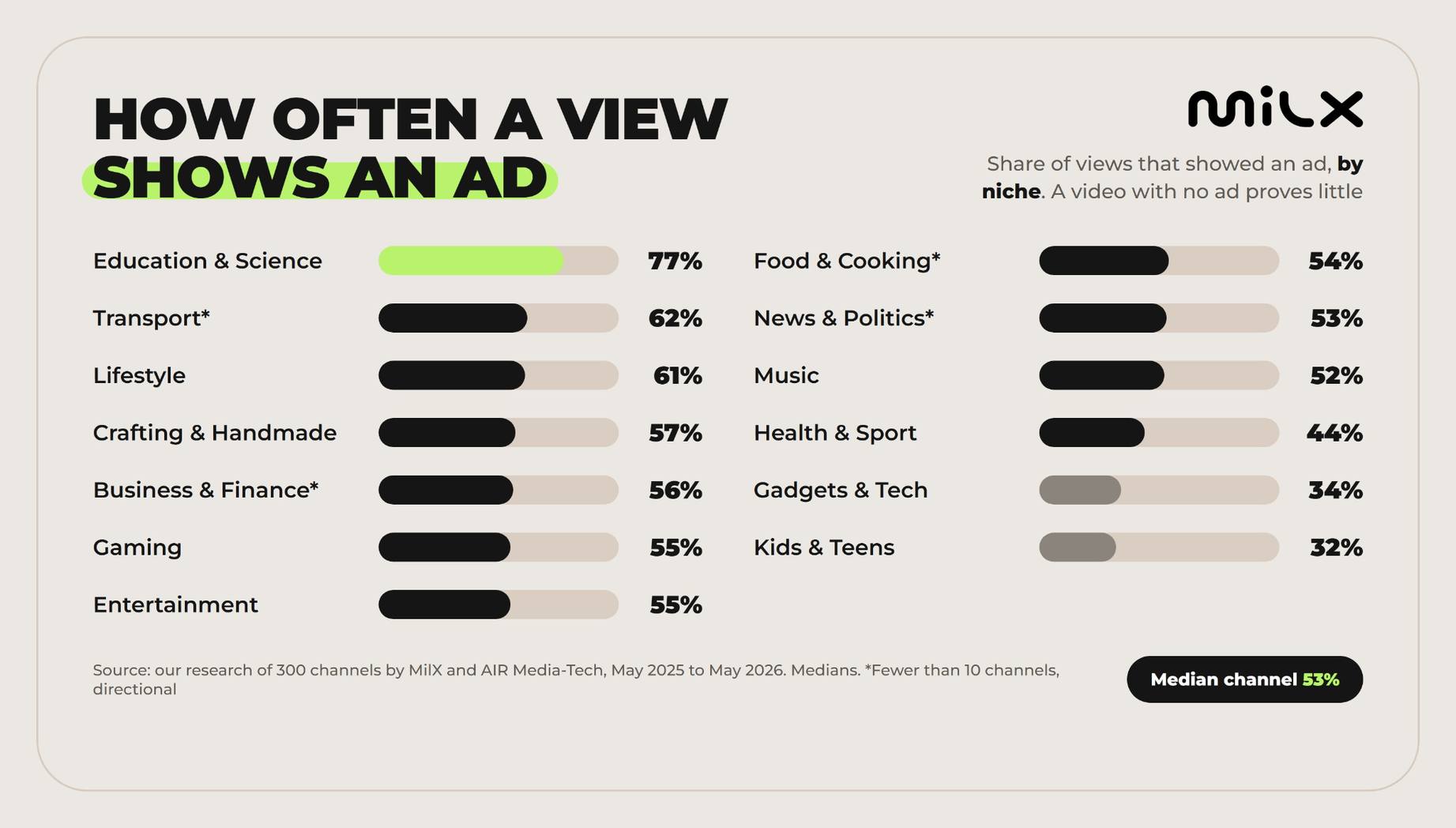
- A video with no ad proves nothing either. In our research of 300 channels (by MilX and AIR Media-Tech, May 2025 to May 2026), the median channel showed an ad on 53% of its views.
- Once monetized, payout timing becomes the next hurdle. AdSense pays once a month, and only after your balance reaches the payment threshold, which is $100 for accounts in US dollars.
Is my YouTube channel monetized: check the Earn tab in Studio
Your own channel is the easy case. To check YouTube channel monetization status, open the Earn section of YouTube Studio, the monetization tab in older guides. It shows your YouTube Partner Program status. Here's how to check monetization on YouTube step by step, per YouTube Help on YPP eligibility.
- Open YouTube Studio at studio.youtube.com. On a phone, the YouTube Studio app has the same Earn section.
- In the left menu, click Earn.
- Find what you see in the table below.
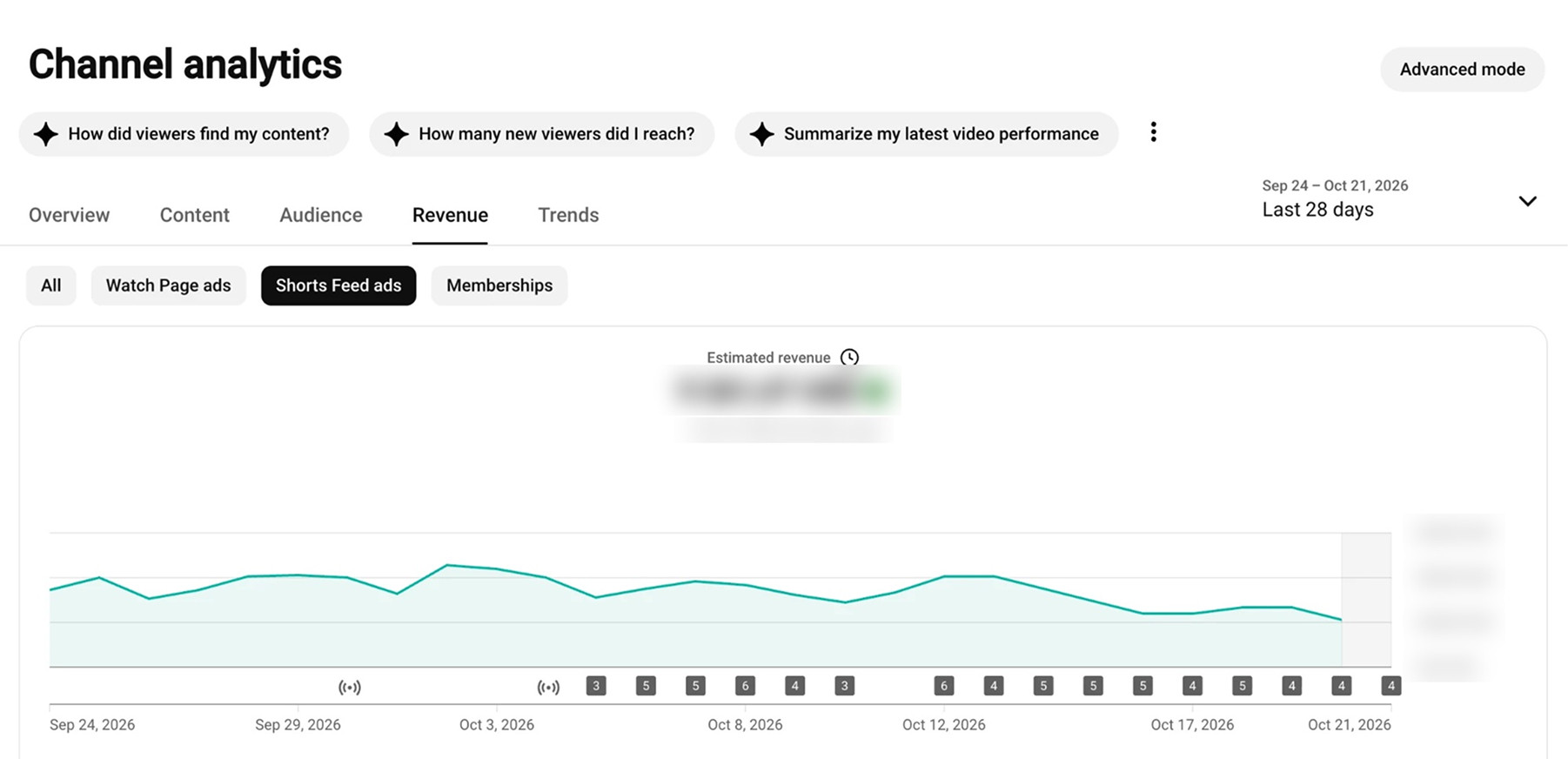
- If Earn says you're in, open Analytics and find the Revenue tab. It shows your estimated revenue, with a delay of 2 days.
- To check one video, open Content in Studio and look at its Monetization column.
|
What the Earn section shows |
What it means |
What to do next |
|---|---|---|
|
Progress toward subscribers, watch hours and Shorts views, with Get notified |
Not eligible yet, so not monetized |
Select Get notified. YouTube emails you when you qualify |
|
Apply Now |
You qualify but haven't applied, so not monetized |
Accept the Base terms and link an AdSense for YouTube account |
|
Get Reviewed step shows In Progress |
Your application is in the queue. A decision typically takes about a month |
Wait, and keep your videos public, since hiding or deleting them can affect the application |
|
A rejection notice |
Reviewers found a policy problem on the channel |
Appeal within 21 days, or keep uploading and reapply after 30 days (90 days after a repeat rejection) |
|
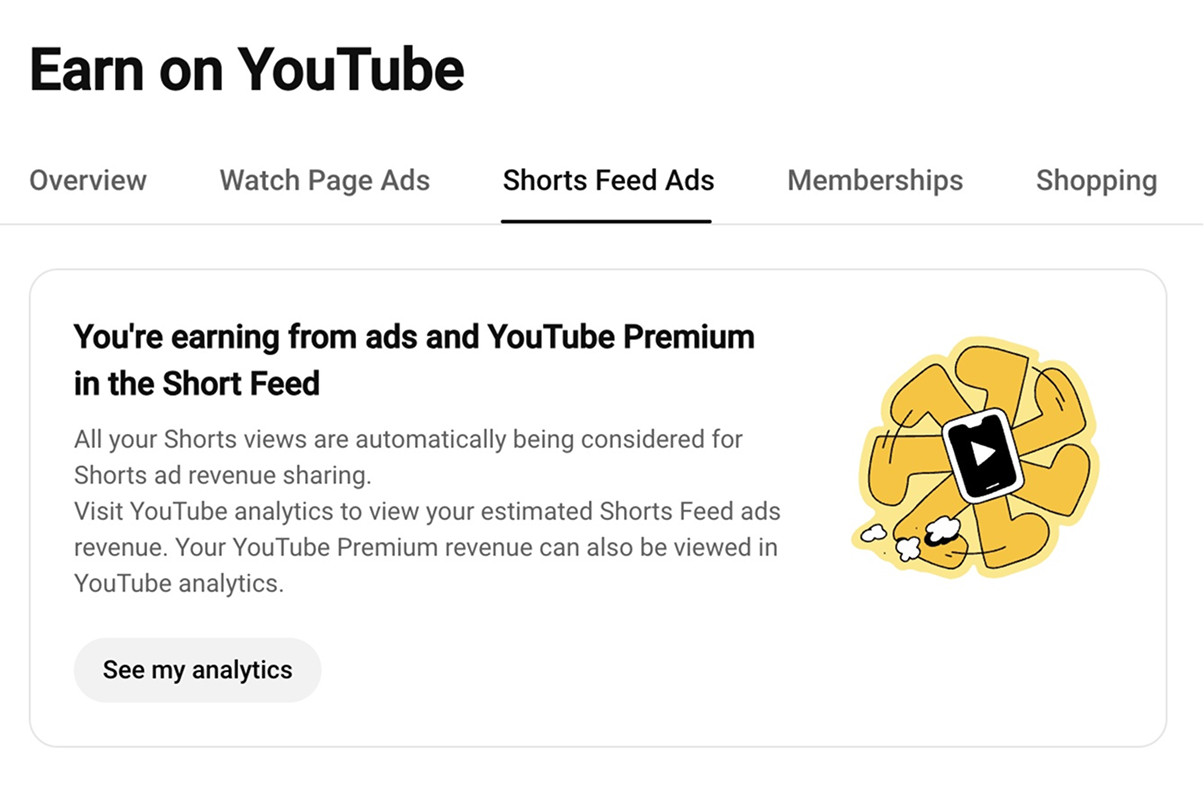
Tabs such as Watch Page Ads, Shorts Feed Ads, Memberships and Shopping |
You're in YPP |
Accept the module for each feature you want to earn from |
|
Monetization is off |
The channel was removed from YPP |
The exact wording can differ by channel and country. Checked in YouTube Help, November 2026.
The Earn section of a monetized channel in YouTube Studio
So how to check if your channel is monetized in 2026 comes down to one question. Did YouTube accept your application? Reaching 1,000 subscribers and 4,000 watch hours lets you apply, and the channel stays unmonetized until YouTube accepts it. For the steps from there, see how to start monetization on YouTube.
Before February 1, 2027
Seeing Apply Now in Earn? Apply before the bar doubles
YouTube has announced that from February 1, 2027, new applicants will need 8,000 qualified watch hours in 365 days or 20 million qualified Shorts views in 90 days, still with 1,000 subscribers. The partner support team at AIR Media-Tech, an official YouTube partner, says an application submitted by 23:59 UTC on January 31, 2027 is judged at 4,000 hours, whenever the decision comes.
Sources: YouTube Help, Changes to the YouTube Partner Program; AIR Media-Tech, YouTube Monetization Requirements 2027.
The Revenue tab is the second check. YouTube Help describes it as the place where channels in the Partner Program see which content earns the most and which sources pay best.
The Revenue tab in YouTube Analytics, with amounts hidden
Not sure if a channel is earning?
Here is how to check in seconds, and what monetization really unlocks at each level of the Partner Program. Then add MilX to your preferred sources to see new creator pay data first in Google.
See what monetization unlocks →How to tell if a YouTube channel is monetized from the outside
YouTube shows no monetization label on any public page. So how to know if a YouTube channel is monetized comes down to a few visible signs, and the order matters. Start with the strongest.
- Read the subscriber count. Under 500 means the channel is below the lowest YPP tier.
- Look for a Join button next to Subscribe. That's channel memberships.
- Open a recent video. Look for a Thanks button under it, a store shelf, or product tags.
- Open a live stream or Premiere. Highlighted paid messages in the chat are Super Chat and Super Stickers.
- Watch a few videos in an incognito window and note pre-roll and mid-roll ads. Give this the least weight.
|
Sign on the channel |
What it means |
What it can't tell you |
|---|---|---|
|
Under 500 subscribers |
Below every YPP entry bar, so almost certainly not in the program |
Why the videos still carry ads |
|
Over 1,000 subscribers |
Could be in YPP |
Watch hours and the review result, which stay private |
|
Join button |
Channel memberships are on, so the channel is in YPP at some level |
Whether it earns from ads |
|
Thanks button under a video |
Super Thanks is on, so the channel is in YPP at some level |
Whether it earns from ads |
|
Super Chat or Super Stickers in live chat |
Fan funding is on, so the channel is in YPP at some level |
Whether it earns from ads |
|
Store tab, store shelf or product tags |
Usually YouTube Shopping, which also opens through YPP |
Whether it earns from ads |
|
Ads on the videos |
The videos can carry ads |
Who gets the money |
|
Sponsor reads, affiliate links, outside merch links |
The creator has deals outside YouTube |
Anything about YPP, since none of these require it |
|
None of the above |
Nothing |
Whether the channel is monetized |
Source: YouTube Help, Overview of the expanded YouTube Partner Program; YouTube Help, I'm not a YouTube partner, so why am I seeing ads on my videos? Checked November 2026.
A Join button and a Store tab on a public channel page
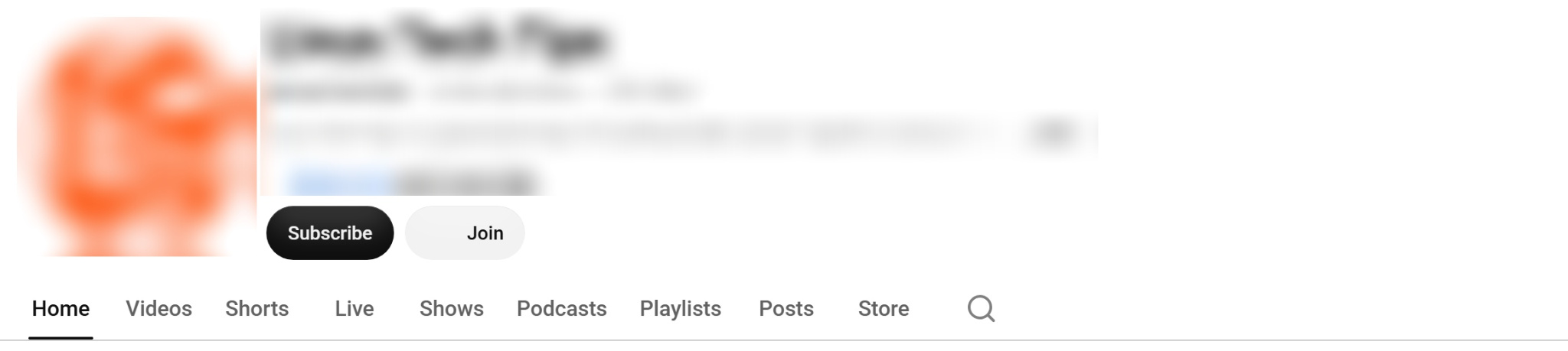
If you want to check competitor monetization, these signs show the channel reached YPP at some level. They stop there, because memberships, Supers and Shopping open from 500 subscribers, below the tier that pays for ads. To size up what a competitor earns, use our guide to finding competitors' earnings on YouTube.
How to tell if a YouTube video is monetized as a viewer
A viewer can't see whether one video earns, even on a channel that's in YPP. YouTube shows each video's monetization status only to the creator, in the Content section of Studio. Here's why a video on a monetized channel can still play without the creator's ads.
- The video doesn't fit the advertiser-friendly content guidelines, so it runs limited or no ads.
- A rights holder claimed it, and the rights holder may place ads on it and keep that revenue.
- The creator hasn't turned on monetization for that video.
A missing button or a missing ad proves nothing
Absence works the same way. A monetized channel can show none of these signs. Channel memberships aren't open to made-for-kids channels, and creators can switch Super Thanks off.
A single ad-free watch means little too. In our research of 300 channels (by MilX and AIR Media-Tech, May 2025 to May 2026), the median channel showed an ad on 53% of its views. Kids and teens channels showed one on 32%, and education and science channels on 77%.
How often a view shows an ad, by niche
Shows ads vs. in YPP: are ads a sign of monetization
A channel with 300 subscribers can show ads and earn nothing from them. YouTube Help says it directly. "YouTube may also place ads on videos in channels not in the YouTube Partner Program."
The rule goes back to November 2020. Under the YouTube Terms of Service, you give YouTube the right to monetize your content, and the same clause adds that "This Agreement does not entitle you to any payments."
A second case is copyright. If a video uses someone else's music or footage, the rights holder may have chosen to place ads on it.
So ads and monetization are two separate facts about a channel. An ad tells you the video can carry ads, and it can't tell you who gets the money.
Two things that look the same to a viewer
Shows ads
Can happen on any channel, at any size. YouTube or a rights holder may have placed the ad, and the creator may get nothing.
In YPP
A status YouTube grants after a review. Ad revenue sharing starts at 1,000 subscribers, once the creator accepts the Watch Page or Shorts module.
Sources: YouTube Help, I'm not a YouTube partner, so why am I seeing ads on my videos?; YouTube Help, YouTube Partner Program overview & eligibility. Checked November 2026.
Shorts-only channels: ads tell you even less
On a channel that posts only Shorts, the ads you see say nothing about the creator. Ads in the Shorts feed play between Shorts, and YouTube adds that revenue together each month and shares it with creators from one pool, per YouTube's Shorts monetization policy. So an ad next to a Short isn't tied to the channel that made it.
For a Shorts-only channel, look at the subscriber count and the Join and Thanks buttons instead, since Super Thanks also works on Shorts. A Shorts channel earns from the pool only after YouTube accepts it into YPP and the creator accepts the Shorts Monetization Module. For how the pool is split, see our YouTube Shorts monetization guide.
Check if a YouTube channel is monetized by page source and checker tools
Many guides still tell you to open the page source and look for is_monetization_enabled, and some call it the most reliable free method. YouTube added that flag around June 2021 and removed it around November 17, 2023, as Cord Cutters News reported, citing Wired.
We tested it on November 4, 2026. The source code of two channel pages and one video page had no is_monetization_enabled at all. The other string guides mention, yt_ad, did appear on the video page. It only points to ads, and ads are the weak signal from the section above.
That removal also hit the tools. The Chrome extension called Is This Channel Monetized was built to read that flag, according to the same Cord Cutters News report. Today's monetization checkers combine public signals such as subscriber counts, ads and sponsor mentions, and give you a guess.
TubeLab's own Chrome Web Store listing says "This does NOT check monetization with 100% accuracy." Searches like "check if YouTube channel is monetized" and "is this channel monetized" mostly lead to these tools. They're fine for scanning many channels in a niche, where a few wrong answers cost nothing.
Money on the line? Ask for the screen
If you're buying a channel or paying a creator who says they're in the Partner Program, ask for a screen share of the Earn section and the Revenue tab in Analytics. It's the one check a tool can't replace, because only the channel owner can open those pages.
Third-party estimates from SocialBlade and their limits
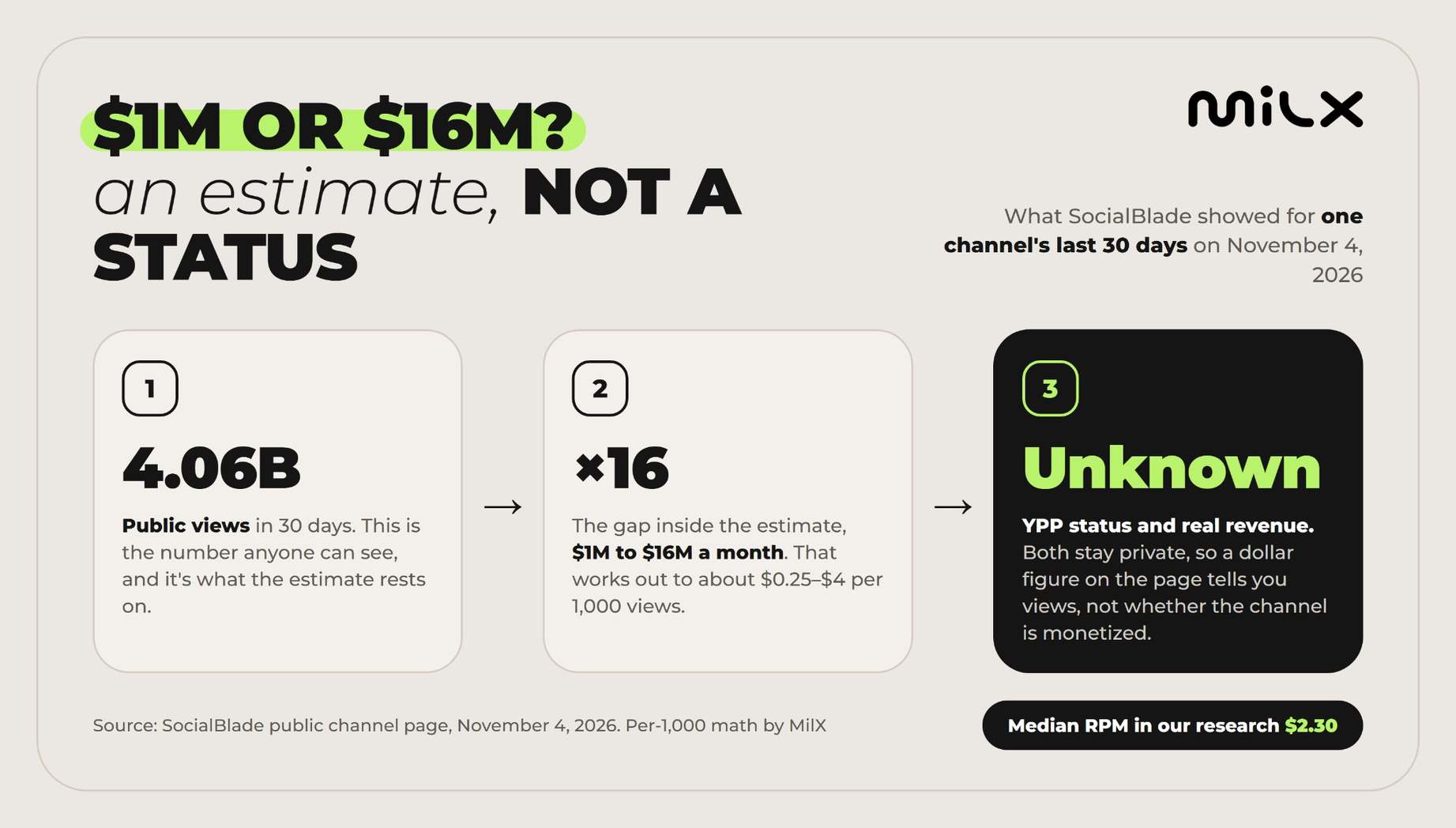
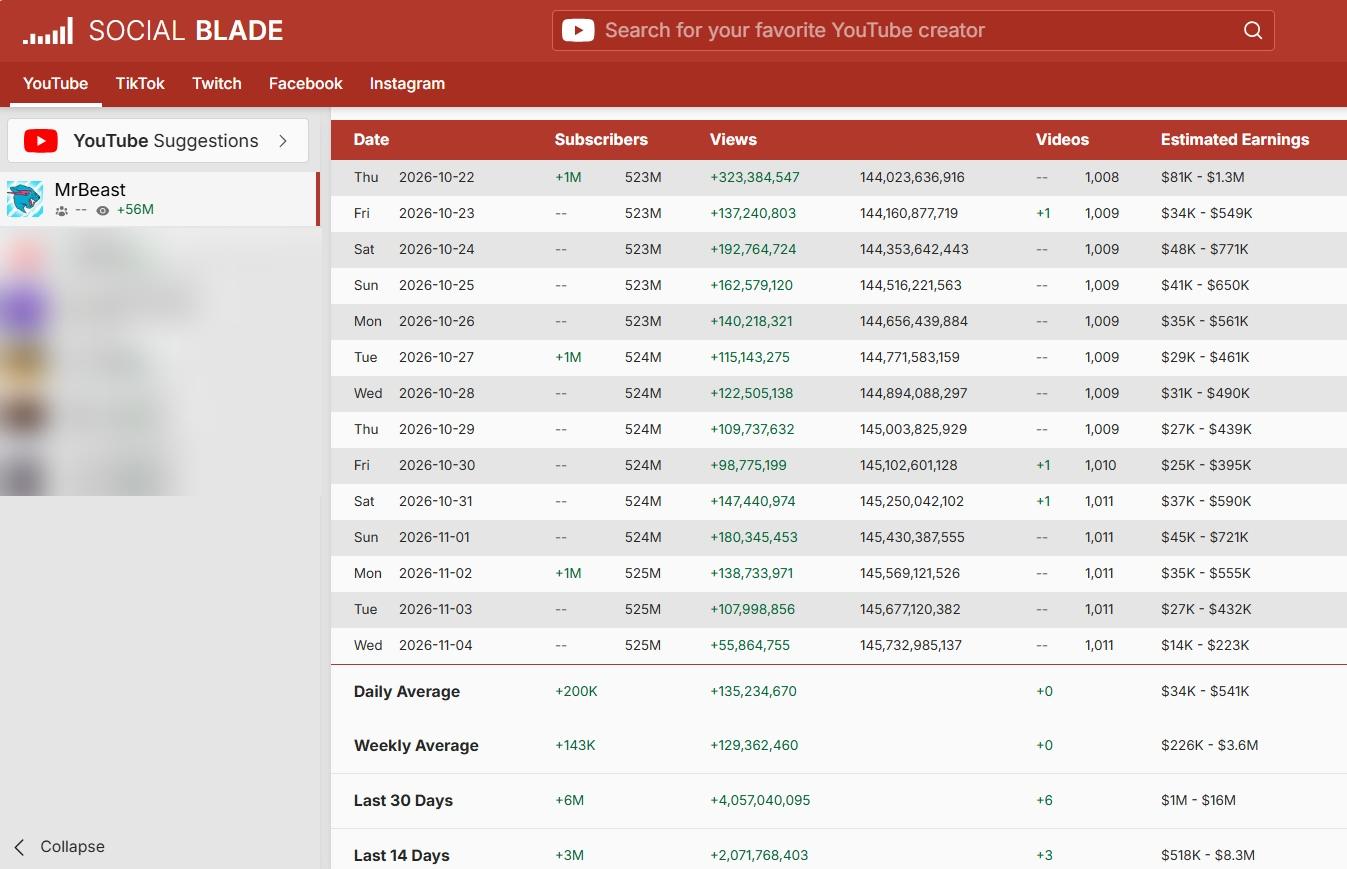
SocialBlade has no monetization check, though it often comes up when people ask whether a channel earns money. What it has is an estimate. On November 4, 2026, its page for MrBeast showed 4.06 billion views in the last 30 days and estimated earnings of $1M to $16M for that month.
That range works out to about $0.25 to $4 per 1,000 views, and the daily rows follow the same rate. So a SocialBlade monetization estimate is public views multiplied by a wide rate. For comparison, the median long-form RPM in our research of 300 channels was $2.30. The page can't see YPP status or real revenue, because both stay private.
Daily views and estimated earnings on SocialBlade, November 4, 2026
What monetization requires in 2026: YPP thresholds
The YPP requirements tell you which sign can mean what. YouTube has two entry levels, per its Help pages on the expanded program and YPP eligibility.
|
YPP tier |
Subscribers |
Watch hours or Shorts views threshold |
What it opens |
|---|---|---|---|
|
Fan funding |
500, plus 3 public uploads in the last 90 days |
3,000 qualified watch hours in 12 months, or 3 million qualified Shorts views in 90 days |
Memberships, Supers, Shopping. No ad revenue |
|
Ad revenue |
1,000 |
4,000 qualified watch hours in 12 months, or 10 million qualified Shorts views in 90 days |
Watch page ads, Shorts feed ads, YouTube Premium revenue |
Source: YouTube Help, Overview of the expanded YouTube Partner Program; YouTube Help, YouTube Partner Program overview & eligibility. Checked November 2026.
YouTube has announced that from February 1, 2027, new creators will need 8,000 qualified watch hours or 20 million qualified Shorts views, still with 1,000 subscribers. Channels already in YPP keep their status, and the deadline for the current bar is in the card at the top of this guide.
The full checklist and what YouTube reviews are in YouTube monetization requirements for 2026.
Monetized means eligible to earn, not paid fast
AdSense pays once a month. With MilX, your channel's revenue reaches your balance every day from the day you connect, and Advance Funds lets you take what you've already earned up to 50 days before AdSense pays, for a one-time 4.3%.
See how Advance Funds works →Why a channel with lots of views may still be unmonetized
Views alone never switch monetization on. Here's what usually stands between a big view count and YPP, per YouTube Help on eligibility and the channel monetization policies.
- It never applied. Meeting the thresholds doesn't add a channel to YPP automatically.
- The application isn't finished. YouTube reviews a channel only after it accepts the terms and links an AdSense for YouTube account.
- The review is still going. A decision typically takes about a month, and sometimes longer.
- The views don't count. For YPP eligibility, watch hours from the Shorts feed don't count toward the 4,000, and the bar covers only the last 12 months. So your Studio total can run higher than the number YouTube uses. Trust the Earn section.
- The channel failed the review. Reviewers look at the channel as a whole, so reused or mass-produced content can block all of it.
- An account rule isn't met. The channel needs no active Community Guidelines strikes, 2-Step Verification, advanced features, and a country where YPP is available.
- It lost monetization. A policy violation can remove it at any size, and YouTube reserves the right to remove it from channels with no uploads or posts for 6 months. Monetization isn't permanent, which is one of the common myths.
Once your channel is monetized, payout timing comes next
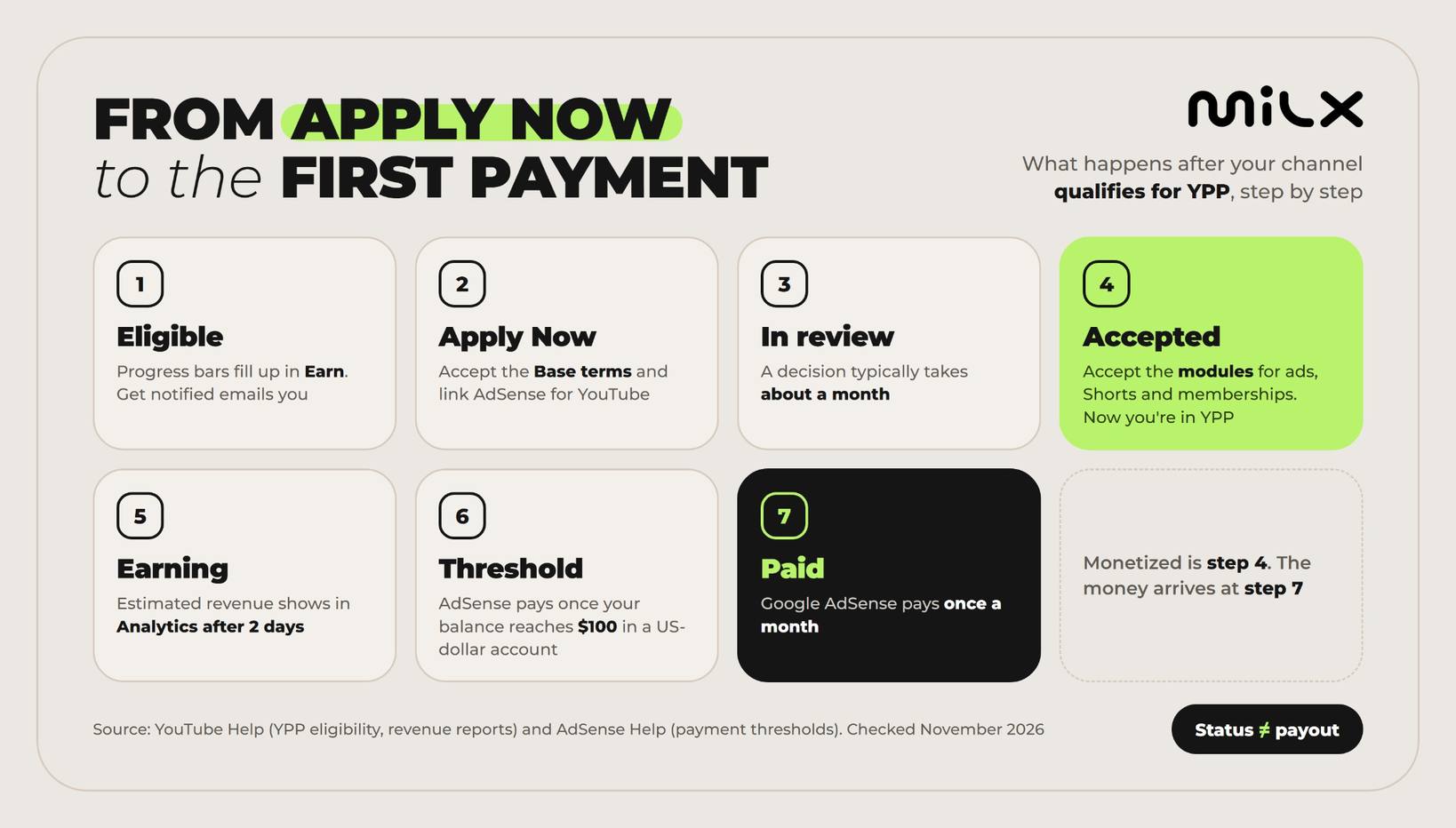
Monetization is a status, and the money follows on its own schedule. Google AdSense pays monthly, once your balance reaches the payment threshold ($100 for accounts in US dollars), and Studio's estimated revenue can still change before then. Here's how YouTube AdSense withdrawals work, from views to payout.
From Apply Now to the first AdSense payment
Once you're monetized, don't wait 30+ days for your earnings
With MilX, your channel's revenue lands on a balance you own every day from the day you connect. More than $500M has gone out to creators across 3,100+ channels.
- Advance Funds: earned revenue up to 2 months early, for a one-time 4.3%
- Active Funds: up to 4 months of future revenue, if your channel qualifies
- Withdraw any day in 54 currencies through 30+ payout methods
- No subscription and no cut of your channel revenue