

Royalty-free means you pay once, or monthly, instead of paying a royalty every time somebody hits play.
👉 New to this? Start with why royalty-free music doesn't always protect you from copyright claims.
Best Royalty-Free Music Libraries for YouTube in 2026
Different libraries play best in different scenarios.
- If you're new to YouTube with no budget — YouTube Audio Library. Free, safe, YouTube-only.
- When you post weekly and maybe run a podcast too — Uppbeat ($5.59/mo) or Epidemic Sound Creator (€5.99/mo).
- When you run a second channel, or take client work — Epidemic Sound Pro (€11.99/mo) or Artlist Pro.
- If you need footage and graphics too, not just music — Envato Elements ($16.50/mo).
One thing applies to all of them: a licence alone doesn't stop a claim — whitelisting your channel does. And check how many times one licence lets you use one track in one video; that's the clause that catches people.
|
Library |
Price per month |
Licence type |
Content ID coverage |
Commercial use |
Licence after you cancel |
|---|---|---|---|---|---|
|
Free |
Per track: YouTube licence or CC-BY |
Not claimed by rights holders |
Yes, on YouTube |
Permanent |
|
|
Free tier; $5.59 / $6.29 / $8.99 billed annually |
Subscription; free tier runs on unique credits |
Safelist: 1, 3 or 10 channels |
Paid plans |
Videos published while safelisted stay cleared |
|
|
Creator €5.99, Pro €11.99, billed yearly |
Subscription |
Safelisting: 1 channel per platform, 3 on Pro |
Creator personal; Pro adds client work and ads |
Content published while active stays cleared permanently |
|
|
$9.99 Music & SFX |
Subscription |
Clearlist: 1 channel per platform, 3 on Pro, more above |
Yes, Pro and above |
Projects published in the term stay licensed and monetisable |
|
|
$49/one time purchase for single-use license |
Subscription and single-use license |
Auto-clearance: 1 channel, up to 5 on Pro |
Yes |
Published work stays; no re-downloads, no new projects |
|
|
$16.50 per month if paid annually |
Subscription, per-project lifetime licence |
Claim Clear: 3 channels, 30 videos a month |
Yes, client work included |
Existing licensed uses covered permanently |
Cancelling is where the money hides.
- Soundstripe states you cannot re-download or use content in new projects after cancelling. Canceling your subscription does not affect projects you've already completed.
- Artlist covers projects published during the term "forever", and warns that a claim can still land if the video goes up after the licence ends.
- Envato grants a lifetime licence per project as of the download date.
Where Each One Bites
Every library markets itself as copyright-safe music for YouTube, but the fine print differs by vendor.
- YouTube Audio Library — most tracks are YouTube-only, and only the Creative Commons ones travel elsewhere, and only with attribution. Check which licence a track has before you reuse it off-platform.
- Uppbeat — each free download is a one-video credit. Reuse it once, and that's the claim.
- Epidemic Sound — fine on one channel; add a clips channel, and you're paying for Pro.
- Artlist — even Clearlist-registered channels can get claimed if a platform's system hasn't synced yet — register before the first upload, not after.
- Soundstripe — cancel, and you can't re-download or start new projects with tracks you already used.
- Envato Elements — one track, two unrelated videos, two separate licences.
If MilX guidelines help you, add the MilX blog to your preferred sources.
What does the licence cover?
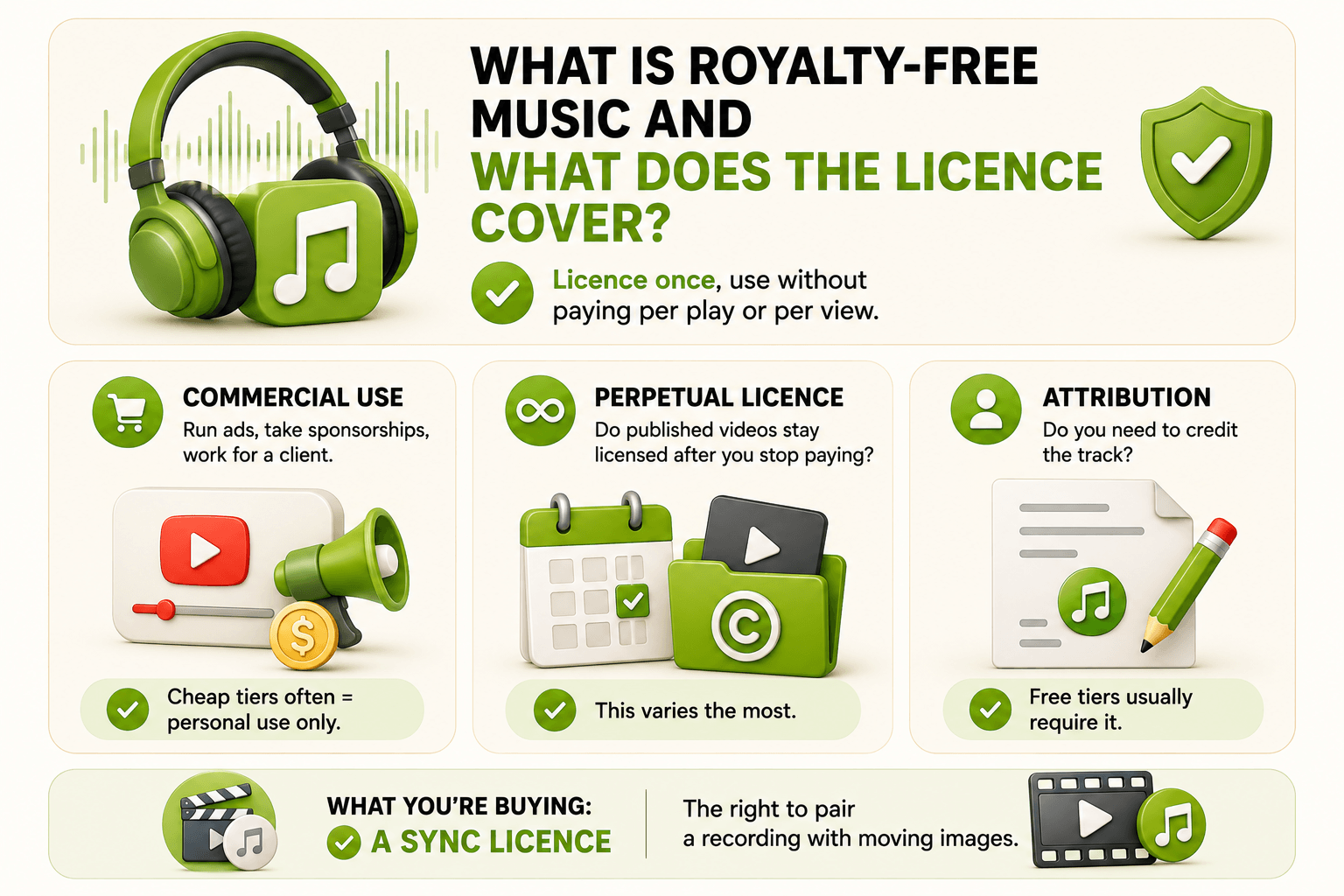
Three things decide what you can do with a royalty-free track:
- Commercial use — whether you can run ads, take sponsorships, or work for a client.
- Perpetual licence — whether videos you've already published stay licensed after you stop paying. This varies the most.
- Attribution — whether you have to credit the track. Free tiers usually require it.
What you're really buying is a sync licence: the right to pair a track with a video.
🎯 Practical tip: keep the licence certificate with the project file. If a claim lands a year later, YouTube's dispute form asks for it.
A Licence Doesn't Stop a Content ID Claim
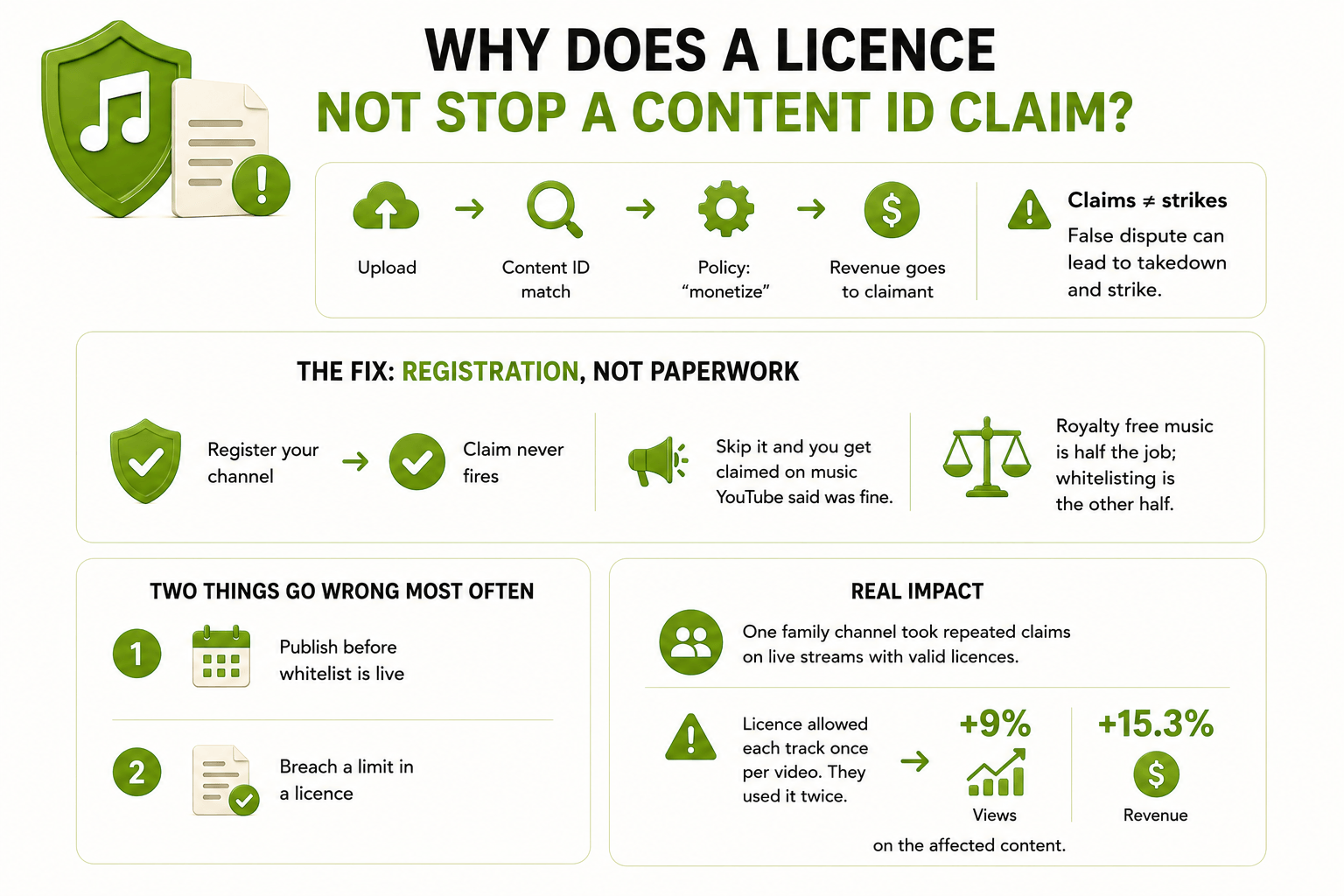
Most claims are automatic — Content ID fingerprints your upload and matches it against a reference file. Some large rights holders also get a manual tool to search YouTube and claim specific videos by hand, but that's the exception. Either way, no one's checking your invoice — the system applies the owner's policy, usually "monetize," which sends the ad revenue to the claimant.
Сlaims and strikes are separate — but disputing a claim without a good reason can turn into a takedown, and a takedown is a strike.
Registering your channel is what stops the claim from firing in the first place. Every major library runs its own Content ID whitelist: Safelisting (Epidemic Sound), Clearlist (Artlist), Safelist (Uppbeat), Claim Clear (Envato), Auto-clearance (Soundstripe).
- Register the channel, and the claim never fires.
- Skip it, and you get claimed even on music the library told you was copyright-safe for YouTube.
Two things go wrong most often: publishing before the whitelist is live, and breaking a limit inside the licence nobody read.
One family channel among MilX's users kept getting claimed on its live streams, even with valid licences — because their licence allowed each track once per video, and some videos used the same track twice. Once fixed, views rose 9%, and revenue rose 15.3%.
🎯 Practical tip: whitelist, wait a day, then publish, and check one video under Copyright in Studio. If a claim still lands, keep the licence certificate handy — you'll need it for the dispute.
👉 The MilX guide to how Content ID detects copyright violations covers the mechanics.
AdSense Pays Once a Month. You Can Access Funds Before That
YouTube settles up once, between the 21st and the 26th. Connect your channel to MilX, and what it earns gets credited to your account daily instead, not once a month later. Withdraw it whenever you need it, in 50+ currencies through 30+ payout methods. Try MilX
How do you check music licensing for creators before you publish?
Eight steps, about ten minutes, run before the video goes live rather than after the claim.
- Confirm the tier covers the use. A sponsored video is not covered by a personal tier.
- Register every channel on the whitelist, including the clips channel, the Shorts channel, and the language clones.
- Let the whitelist go live before you upload. Publishing ten minutes after registering causes most avoidable claims.
- Read the per-video usage clause. How many times may one track appear in one video, and how many videos does one download cover?
- Paste the required credit character for character. On free tiers, it is unique to that download: one credit, one video.
- Save the licence certificate with the project. It is your evidence in a dispute.
- Check Studio the next morning, under Content → Restrictions. A claim caught on day one is a fix; on day ninety it is lost revenue.
- Take inventory before cancelling anything. Which library covers which published videos, and does it keep them cleared afterwards?
What do you do when a licensed track gets claimed?
Work through it in this order, because step 3 carries risk that step 2 does not.
- Do not dispute blind. An unfounded dispute can be escalated into a takedown, and a takedown is a strike.
- Use the library's release tool first. Claim Release, Claim Clear, safelisting, and Clearlist resolve most cases within a day.
- Then dispute the certificate. Choose "licence" as the reason and paste the full licence text into the rationale. YouTube allows 30 days for a response.
- Check every localised copy. Claims spread across duplicated and translated versions of the same video.
One music channel among MilX's users had monetisation blocked across its catalogue by pirate Content ID fingerprints rather than by any real rights holder. After appeals and removal, quarterly revenue moved from roughly $11.8K to roughly $115.6K.
In a second case, a kids channel among MilX's users took three strikes on music it had licensed, its appeal was rejected, and the claimant would not answer email; direct negotiation cleared the strike and about $5,360 came back.
👉 The MilX guide to YouTube monetization and reused music covers how claims cap earnings.
Get Paid Before AdSense Gets Around to It
YouTube pays once, between the 21st and the 26th. Advance Funds gets you up to 2 months of revenue your channel already earned, today, for a one-time 4.3% and no monthly interest. See how Advance Funds works, or Try MilX
What does each library give you?
Here’s a quick comparison of the top royalty-free music libraries, their pricing, coverage, and key licensing limits.
YouTube Audio Library
- Free, per track, and the only catalogue YouTube itself vouches for: YouTube's Audio Library help page says its music will not be claimed by a rights holder, and that YouTube takes no responsibility for "royalty-free" music from anywhere else.
- Good for a first channel or royalty-free background music under a talking head.
- Where it bites: this YouTube royalty-free music library covers YouTube only, so a cross-post to Instagram or a podcast feed sits outside the licence.
Uppbeat
- This is where free royalty-free music meets fine print: each free download generates a unique credit valid for one video, and reusing it, pasting it after upload or copying it wrong is what triggers claims, per Uppbeat's help centre.
- Paid plans swap credits for a Safelist.
- Where it bites: past a few videos a week, the cheapest paid tier costs less than the admin.
Epidemic Sound
- Most royalty-free music for podcasts questions land here, because podcasts sit inside the standard Creator licence. Its cancellation rule is the best in this table: content published while the subscription was active stays cleared to monetise permanently.
- Where it bites: a main channel plus a clips channel is a Pro plan.
Artlist
- Cinematic and story-led royalty-free music for videos, with footage and plugins in the same subscription.
- The Music & SFX price is set at checkout and varies by region, so read it there rather than trusting a number in any blog post, this one included.
- Projects published during your term stay monetised "forever" after expiry; new projects are not covered.
- Where it bites: Artlist's own documentation admits claims appear even with a valid licence when a platform's system does not recognise it, so register on Clearlist before the first upload.
Soundstripe
- Simple if you would rather not manage a whitelist by hand.
- Where it bites: the exit. No re-downloading and no new projects with downloaded tracks once you stop paying.
Envato Elements
- Each download registers a licence tied to one project, and that licence is lifetime, so cancelling leaves every existing use covered.
- Where it bites: one track in two unrelated videos needs two licences.
Fund the Next Shoot, No Need to Wait
Your music budget, your editor, and your gear all have dates. AdSense has one date a month. Connect your channel to MilX, and access your YouTube income up to 6 months upfront. Join the 3,100+ users Try MilX
No revenue share and no subscription. Payments are processed by a licensed Money Service Business regulated by FinTrac in Canada. $500M+ paid out, 3,100+ channels connected, and 4.6 out of 5 on Trustpilot.
👉 Take control of your creator finances with MilX: download the app for free.