


If you just got your first $500 AdSense payout, or a $4,000 brand deal just landed, and it still feels slightly unexpected - stop for a second. What are you going to do with that money?
Nobody ever taught them to think about it. In this piece, we're going to give it to you: a manual on building and scaling a business on YouTube.
The real YouTube scaling cost isn't the gear or the team on its own. It's the margin compression that follows when costs grow faster than revenue. Scaling a YouTube channel without a financial system in place is the fastest way to turn growth into a loss.
This is the business education that every startup founder gets in their first week, adapted for creators who are already earning but haven't built the systems to manage it. We'll share what Y Combinator teaches early-stage companies, what a16z means by operational discipline, what we learned while building the MilX finance app for creators, and how it all translates to the specific economics of a YouTube or TikTok business.
Let’s get started.
First, YouTube Revenue Is Not Your Score
When money starts coming in from your content, it's tempting to think of it as income. It isn't, quite. Its revenue. And revenue is not the same thing as money you can spend.
Here's the equation that matters:
YouTube Profit = Revenue − All Expenses
The reason this matters immediately, even at $500 a month, is that the habits you build around money at the beginning are the habits you'll have when the numbers get large.
Creators who treat revenue as spendable income from the start are the ones who have $15,000 months and empty bank accounts. Creators who understand the difference early are the ones who build something durable.
The metric worth tracking from day one is profit margin: your profit divided by your revenue, expressed as a percentage. It's your real business health score.
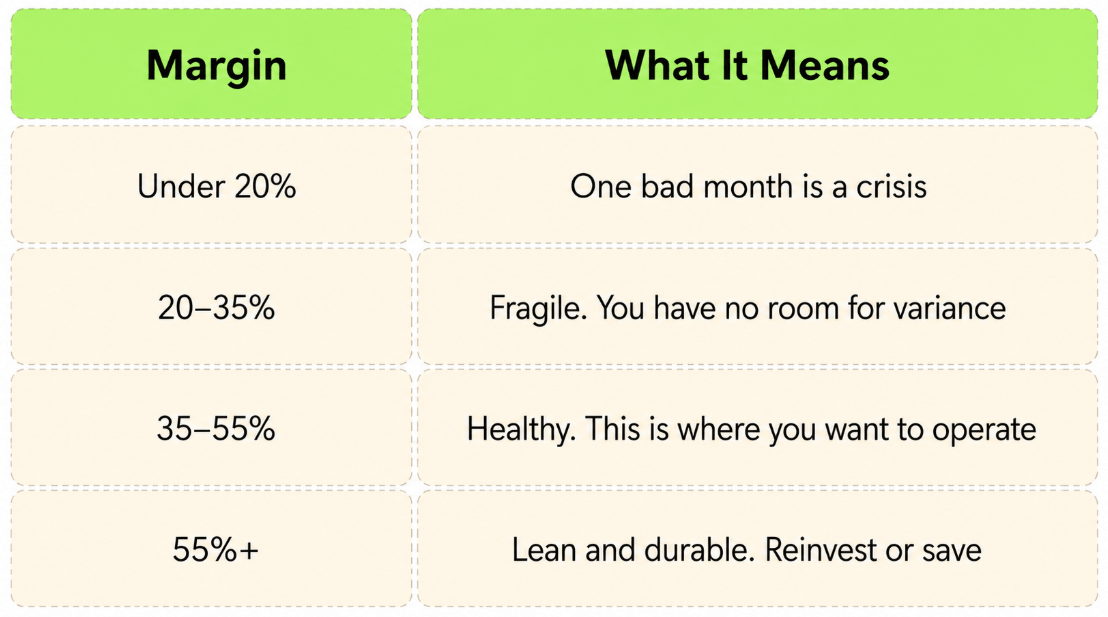
YC tells every founder the same thing:
Don't optimize for growth, optimize for not dying.
Paul Graham calls this stage “ramen profitable”, meaning making just enough cash for living. For creators, that means: don't optimize for subscribers, optimize for margin. A creator at 50K subscribers with 50% margins is in a far stronger position than one at 500K subscribers running at 8%.
Draw The Full YouTube Business Cost Picture
Ask most creators what they spend, and you'll get a partial answer. Editor, maybe. Adobe. A music license. The rest is invisible, and the invisible part is usually where the money is leaking.
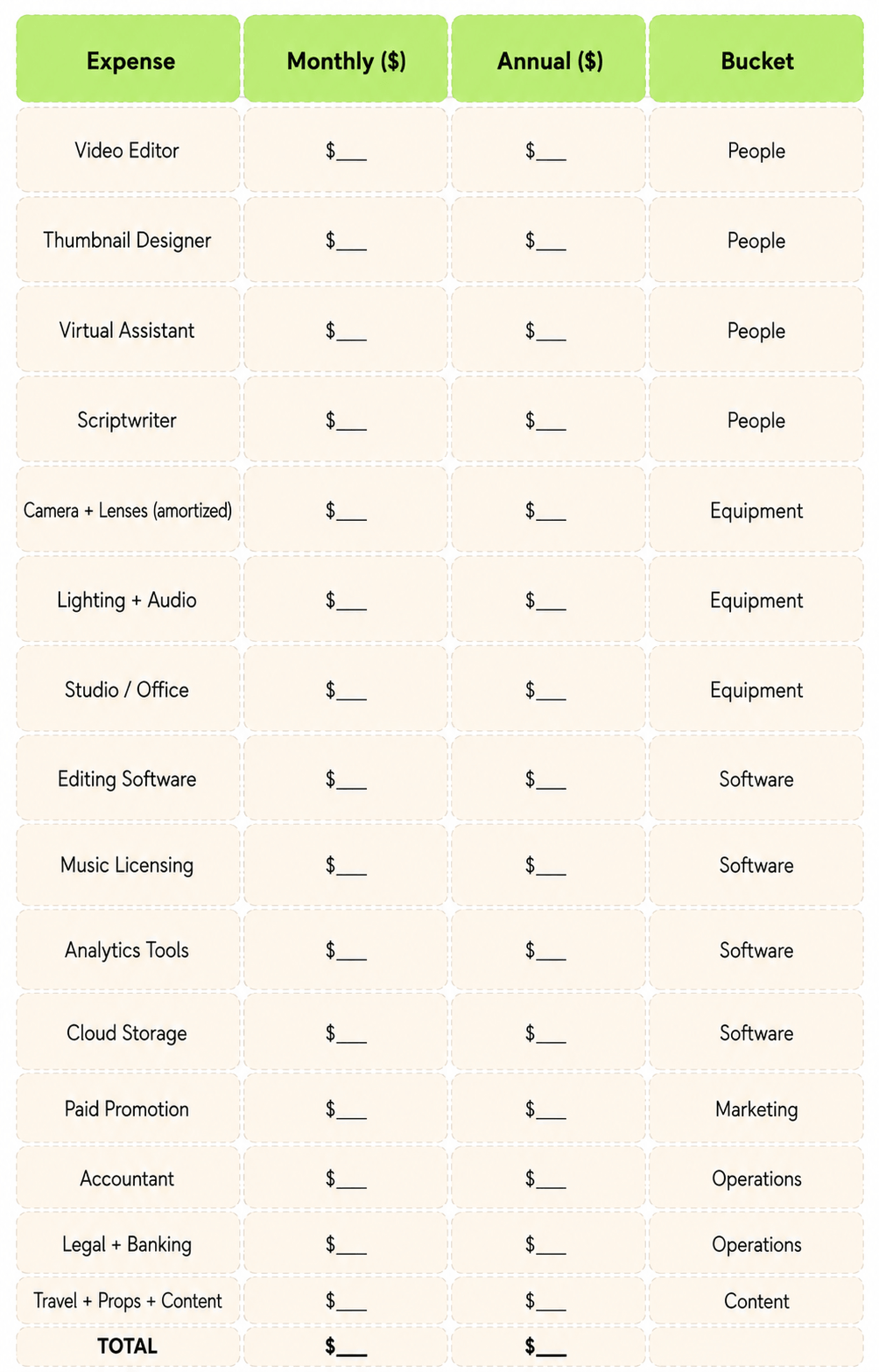
Every creator business has six cost buckets. Most creators are aware of two.
Understanding all of them is the foundation of creator profitability, because you can't improve margins you can't see.
- People cost is almost always the highest once you start growing: editor, thumbnail designer, scriptwriter, VA, social media manager. These costs compound fast when hiring happens in reaction to burnout rather than financial logic.
- Equipment needs to be amortized, not expensed in a lump. A $3,000 camera over three years is $83 a month. That's the number that belongs on your monthly expense tracker, not $3,000.
- Software accumulates faster than anyone expects. Editing suite, design tools, analytics, project management, cloud storage, music licensing, and email platform. Add these up right now. Most creators are surprised by the total.
- Marketing - paid promotion, SEO tools, collaboration costs - is an expense, even if it doesn't feel like overhead.
- Operations is the bucket most people skip: accounting, legal, and banking. Skipping it doesn't save money. It converts those costs into problems that are more expensive to fix than they would have been to prevent.
- Content-specific costs: travel, props, stock footage, guest fees. They vary by niche but belong in your numbers.
When you add it all up, the actual cost of content production (editing, music, equipment, and content-specific expenses combined) is almost always significantly higher than creators expect when they first sit down and do the math.
Unlock Your Future YouTube Income
Content creation often requires upfront spending. Editing, thumbnails, and promotion all cost money long before the next payout arrives. MilX Active Funds allows eligible creators to access up to six months of upcoming YouTube monetization today. Instead of waiting for the next cycle, you can reinvest in your channel immediately.
Tracking your creator business expenses properly is the difference between knowing your business and guessing at it. Here's a complete creator expenses breakdown you can copy into a spreadsheet and fill in monthly:
Track Every Dollar. Every Month. Use this:
Build a P&L: Your YouTube Business on One Page
A Profit & Loss statement is just a structured view of money in, money out, and what's left. Every startup builds one immediately. Most creators never build one at all.
The point is that it forces a monthly conversation with yourself about where the money is going while you can still do something about it.
Here's what one looks like for a creator doing $15,000 a month:
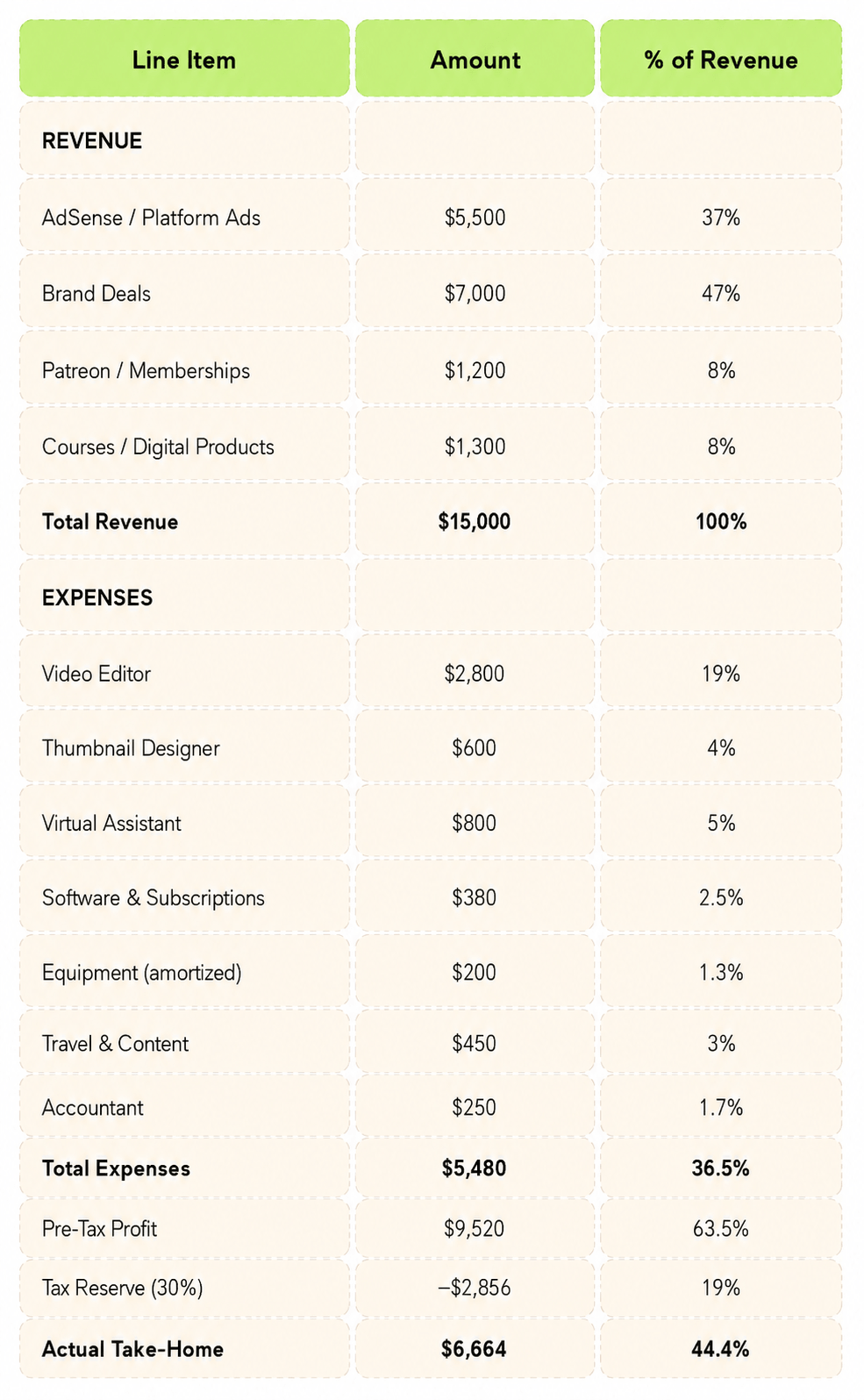
That 44% take-home is genuinely healthy. Most creators at this revenue level are taking home 15–25% because they've never run these numbers. First Round Capital's research on early-stage operators says that the founders who build financial habits early are consistently better at running their businesses when the numbers get large.
Six steps to build yours:
- List everything paid this month.
- List everything paid out.
- Subtract to get pre-tax profit.
- Move 30% to a tax account the same day.
- Treat what's left as your take-home.
- Divide by revenue and write down that margin.
Do it every month.
Cash Flow: Why Profitable Creators Go Broke
You can be profitable on paper and out of money at the same time. This surprises people. It's one of the most important things to understand about running any business.
The mechanism is timing. Consider a $10,000 brand deal signed in January. You start producing immediately: editor costs, revisions, thumbnail work. The video publishes in March after two months of brand approvals. Payment terms are Net-30 from the live date. Money arrives in April. Three months after the work started, you finally get paid.
Your editor wanted their retainer in February. And March.
That gap between when money goes out and when it comes back in is called a cash flow gap. It's what turns a profitable month on paper into an empty account in practice.
When Each Income Stream Pays
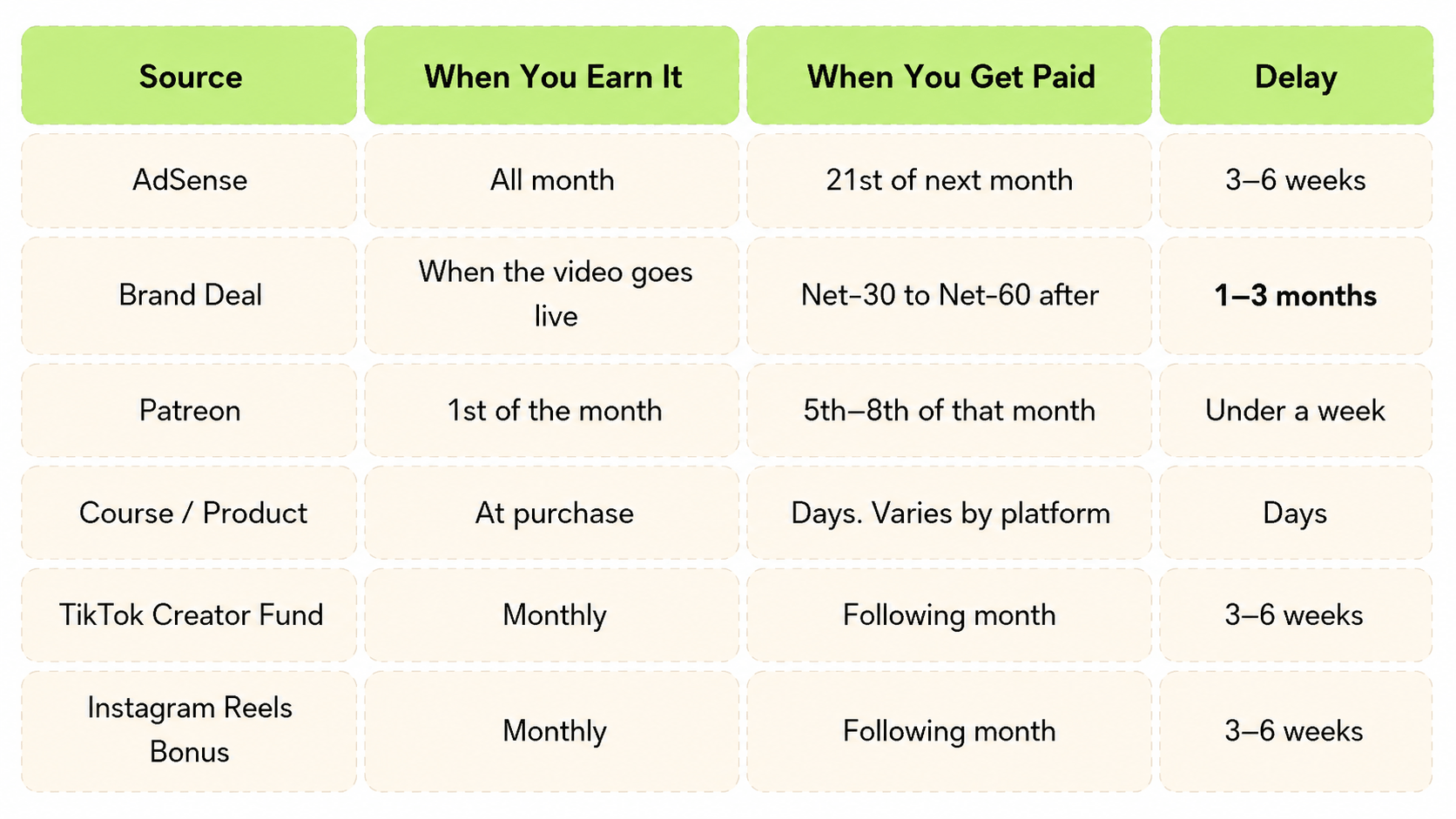
Fix this structurally.
- Ask for 50% upfront on brand deals. Most brands will say yes.
- Access the AdSense revenue upfront with a MilX finance app for creators.
- Keep a cash buffer of at least two months of expenses in an account you don't touch for operations.
- Invoice the moment a deliverable is done.
- Build income streams that pay fast: Patreon and digital products pay in days, not months, and that structural difference matters when your team needs to be paid.
And never hire someone full-time until their first three months of salary are sitting idle in your account. If that feels uncomfortable, you're not ready.
10+ Ways to Transfer Your YouTube Earnings
AdSense limits how creators withdraw their revenue. MilX expands those options. Transfer your YouTube earnings using 10+ payout methods, including bank transfers, cards, e-wallets, and crypto. Send funds to your own account or distribute payments to collaborators worldwide. One platform, multiple payout options designed for the creator economy. More flexibility, faster access, and full control over how your creator income moves.
Hiring: Do It Later Than It Feels Necessary
Hiring too early is the most reliable way to damage a healthy creator business. We say this from experience, because we've watched it happen repeatedly from close range.
The motivation is almost always burnout, not strategy. The workload builds, and adding someone feels like relief. Sometimes it is. But hiring before the revenue can support ongoing costs doesn't solve the problem. It creates a new one: now you're exhausted and financially obligated to another person whose income depends on your channel's consistency.
Before any hire, answer three questions honestly:
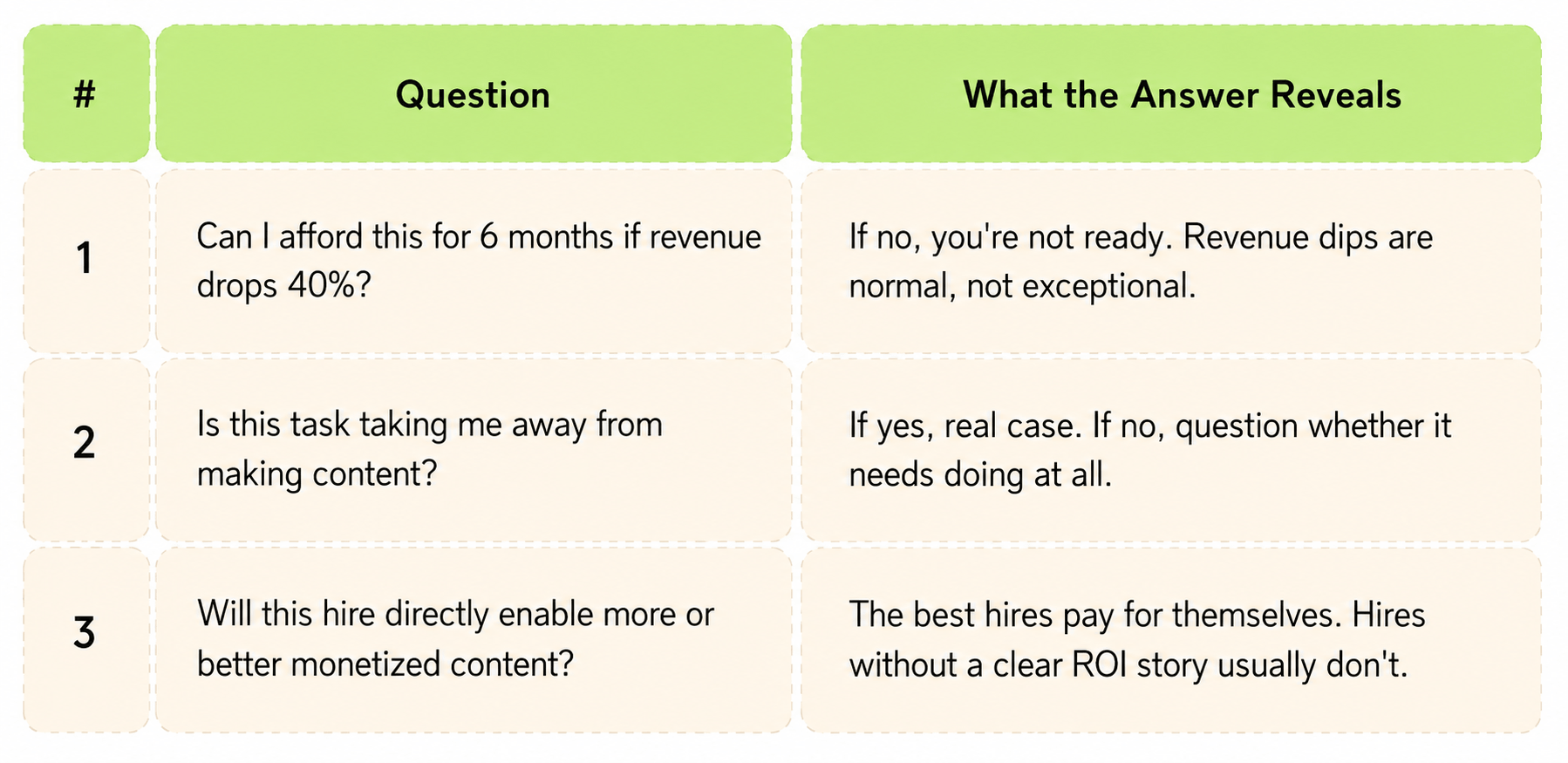
This is adapted from YC's framework on early hiring, and it holds at every stage.
Who to Hire First: What Creators Say
It depends on where you lose the most time. But the pattern that emerges consistently across creators who have built eams points to one role above everything else.
Ali Abdaal - who grew his YouTube channel to 6M subscribers - is direct about it: outsource editing as early as financially possible. His reasoning is ROI-based. If editing takes 10 hours a week and those hours could be spent filming more videos or closing brand deals, the math favors paying an editor. The first hire should remove the most expensive friction from your workflow.
Ali Kaplan of Jason Vlogs - a 46M subscriber kids' channel - put it differently at the 1 Billion Followers Summit 2026.
For them, two roles defined everything:
A good editor is the difference between 1M and 100M views. - Ali Kaplan, Jason Vlogs (46M subscribers)
From there, as Jason Vlogs scaled, the sequence was: writers, production, translation and dubbing, post-production QA. That's a channel that hired when a specific bottleneck was provably costing them output quality or volume.
The Hiring Sequence for YouTube Creators
The creator team structure that works is built in a deliberate sequence, one role at a time, tied to revenue milestones.
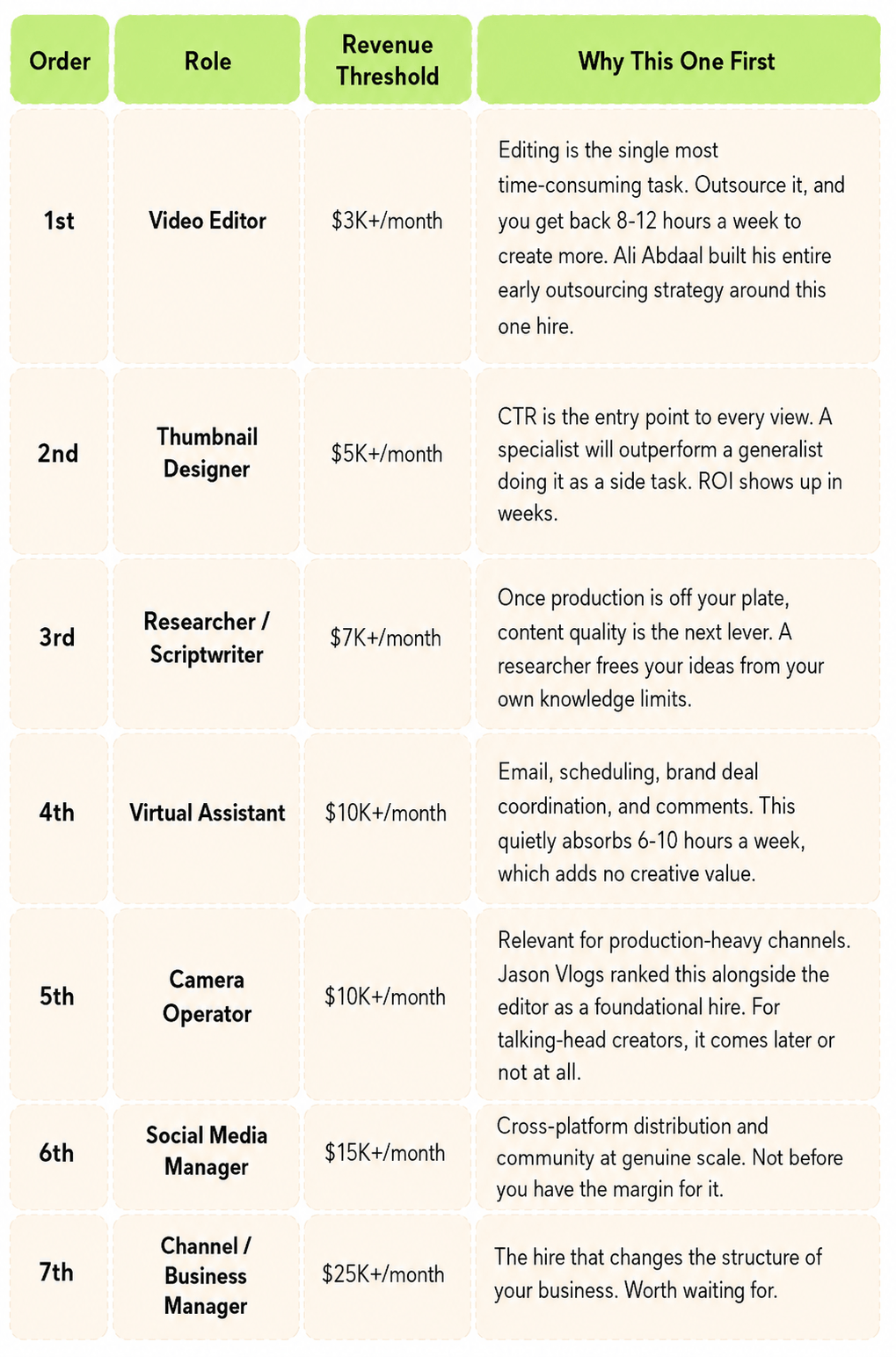
The right first hire isn't universal. The principle is to identify where you lose the most irreplaceable time and hire to eliminate that bottleneck first.
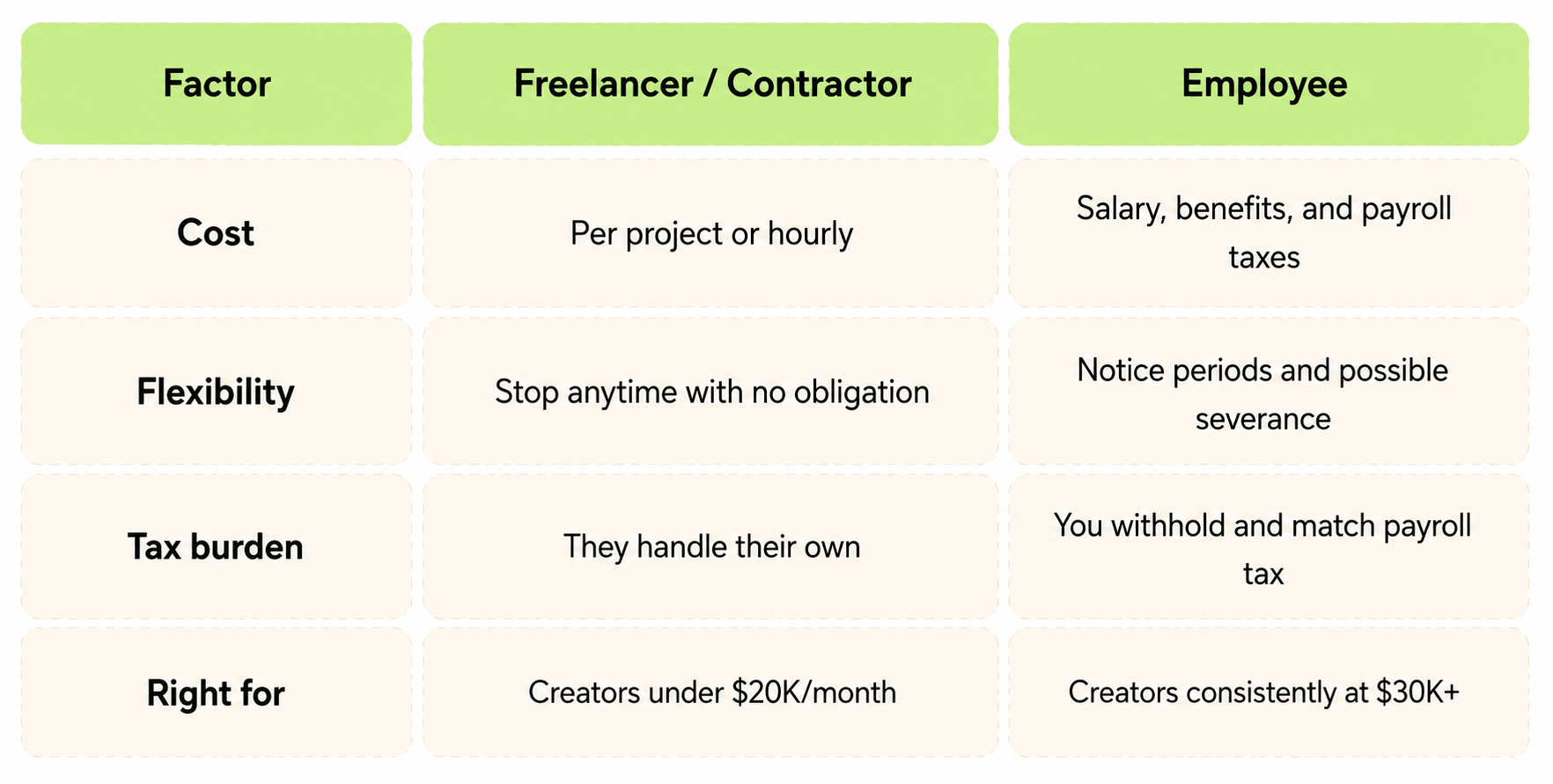
Freelancer vs. Employee
Stay with freelancers until you're consistently above $25,000-$30,000 a month. The flexibility is worth more than the cost difference.
ROI: Every Spend Decision Needs a Hypothesis
Every dollar you spend should carry a specific claim: this will return X because Y. Not a feeling, but a claim you could verify in 60 days.
The formula:
ROI = (Revenue Gained − Cost) ÷ Cost × 100
Applied concretely: you hire a thumbnail designer at $500 a month. CTR moves from 3.1% to 5.8%. Monthly views increase by 40,000, adding $800 in AdSense. ROI is 60%. Worth continuing. The value of running this calculation isn't the arithmetic. It's that it forces you to specify what you expected to change, and then go check whether it did.
The Metrics Chain That Drives Everything
Revenue is always downstream of something. Understand the chain, and you know where to focus.
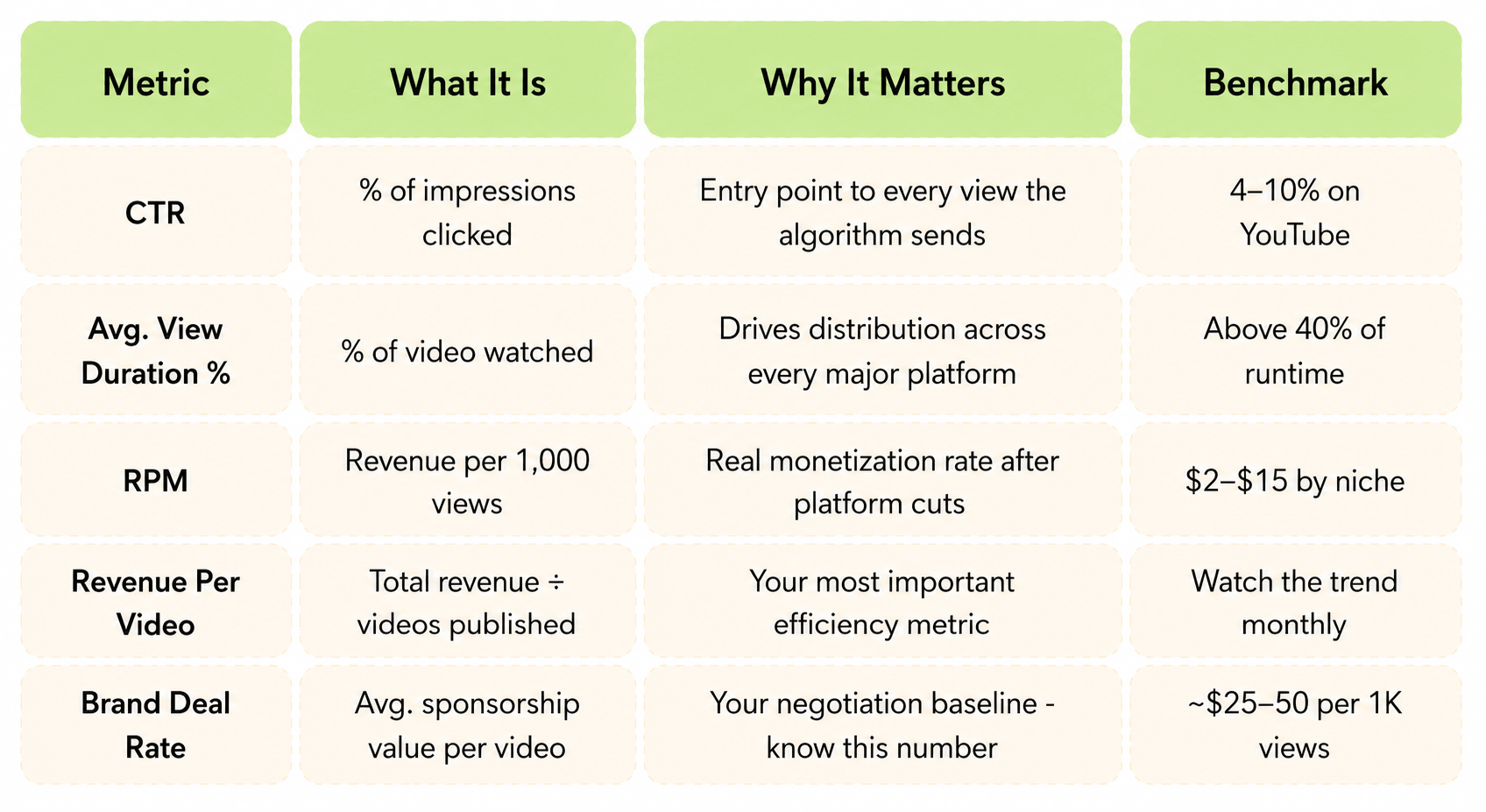
A16z's research on the creator economy makes a point worth sitting with: the durable businesses are built on audience depth (watch time, return viewership, direct revenue), not subscriber count. Subscriber count is a lagging indicator of those things, not a driver of them.
Your Weekly Dashboard: 10 Numbers, Every Monday
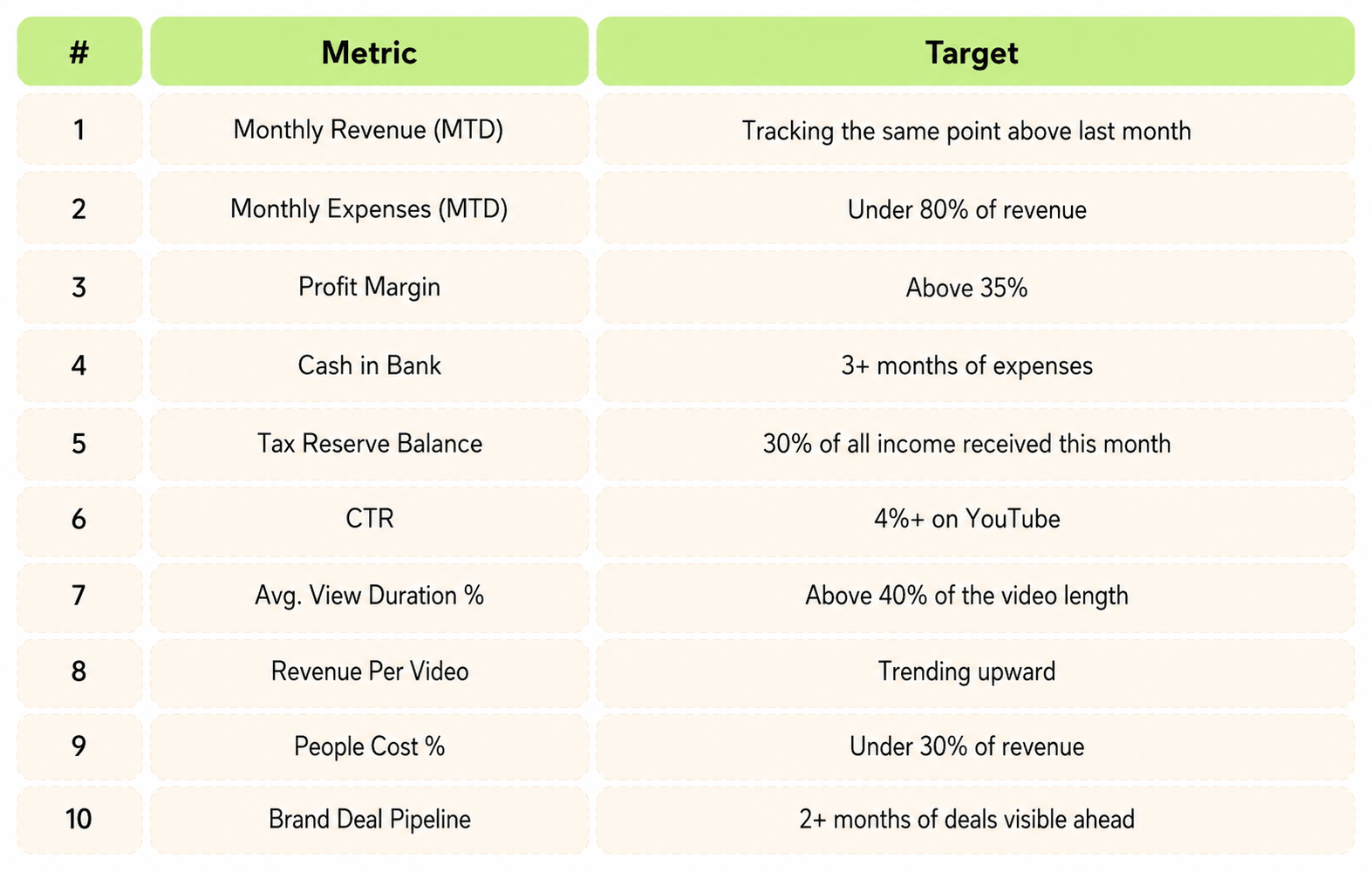
When Hiring Makes Sense
Scaling a team is justified when your hire frees up your most valuable time. If hiring an editor lets you write three more scripts a month, and each script generates $5,000 in lifetime revenue, the editor pays for themselves twice over.
Scaling is justified when a teammate opens revenue streams you cannot reach alone. A producer who books brand deals worth $30,000 a quarter pays for a full salary, with room to spare.
Scaling is justified when content quality has hit a ceiling that only specialization can break. A documentary-style channel needs cinematic production that solo work cannot match.
The Scaling Readiness Checklist: 8 Questions Before Any New Hire
8 tactical YES/NO questions:
- Tried solving with software, automation, or a freelancer first?
- Success metric written in one sentence with a real number in it?
- Margin still positive if your top three videos this quarter underperform by 30%?
- 30-day exit clause in writing?
- Do I have a stable income that can cover the salary for the next 6 months?
- Have I calculated the real cost of hiring (salary + taxes + other deductions)?
- Have I already purchased the necessary equipment and software for the new team member?
- Have I accounted for training costs, tools, and subscriptions that may be needed?
If the answer to most of these questions is "no", then you are clearly not ready to expand your team.
Control When and How You Get Paid
Creator income should not feel locked behind a fixed payout cycle. With MilX, you can withdraw YouTube revenue whenever you choose and receive it in more than forty currencies. Setup is free, and the entire process stays in your control.
Growth Without Hiring: What AI Can Do
YouTube creators often think that the only way to scale is by hiring a team. In reality, modern tools enable you to do much more without additional employees.
- Content generation. AI tools can do for you what used to take hours. ChatGPT or Claude can help write scripts, develop ideas, and even edit text. Tools like Opus Clip or Captions generate subtitles automatically. Design assistants like Canva Pro let you create thumbnails and transitions without a designer.
- Video production. Tools like Descript automate editing - you remove failed takes by simply deleting text. Adobe Premiere Pro with AI features can automatically generate transitions. CapCut works for free and does what used to take two days of editing. AI-powered video tools like Synthesia create professional videos from text in minutes, while HeyGen generates videos with AI avatars that look remarkably human. Runway handles advanced video editing with AI features like object removal and background replacement.
- Image creation. Tools like Midjourney and Nano Banana generate stunning custom visuals from text descriptions in seconds. Adobe Firefly integrates directly into your workflow, generating background images, filling in details, and expanding compositions with a single click.
- Sound and voice. ElevenLabs creates natural-sounding voiceovers in multiple languages and accents, eliminating the need for expensive voice actors.
- Automation of routine tasks. Zapier or Make connects your tools. Publishing schedules automatically go to social networks. Collaborations are distributed across platforms with one click. Analytics are gathered in one place automatically.
- Time management. Calendar assistants like Calendly save hours on coordination. AI helpers like Notion AI organize ideas and to-do lists. Buffer or Later schedule posts months in advance.
AI agents represent the next frontier for YouTube creators looking to scale without sacrificing quality or authenticity. Rather than automating individual tasks, they handle entire workflows, researching trending topics, proposing content ideas based on audience data, drafting scripts and thumbnails, scheduling uploads, tracking performance, and suggesting optimization strategies.
Instead of hiring a person for $500-1000 per month, you pay $50-200 for tool subscriptions - and they work 24/7 without days off. Scaling becomes a matter of choosing the right technologies, not filling staff positions.
But remember: Automate responsibly, keep the human touch.
Discover how to boost your income with AI tools.
Scaling: the Fast Version Almost Always Costs More Than It Returns
Paul Graham wrote about this in the context of startups, but the mechanism is identical for creators.
- A strong month arrives.
- Revenue jumps.
- Decisions get made that are calibrated to the peak: new hires, upgraded gear, expanded operations.
- The following month is normal.
- Revenue returns to its actual average.
- The cost structure built for the exceptional month now has to be sustained by the ordinary one, and it can't.
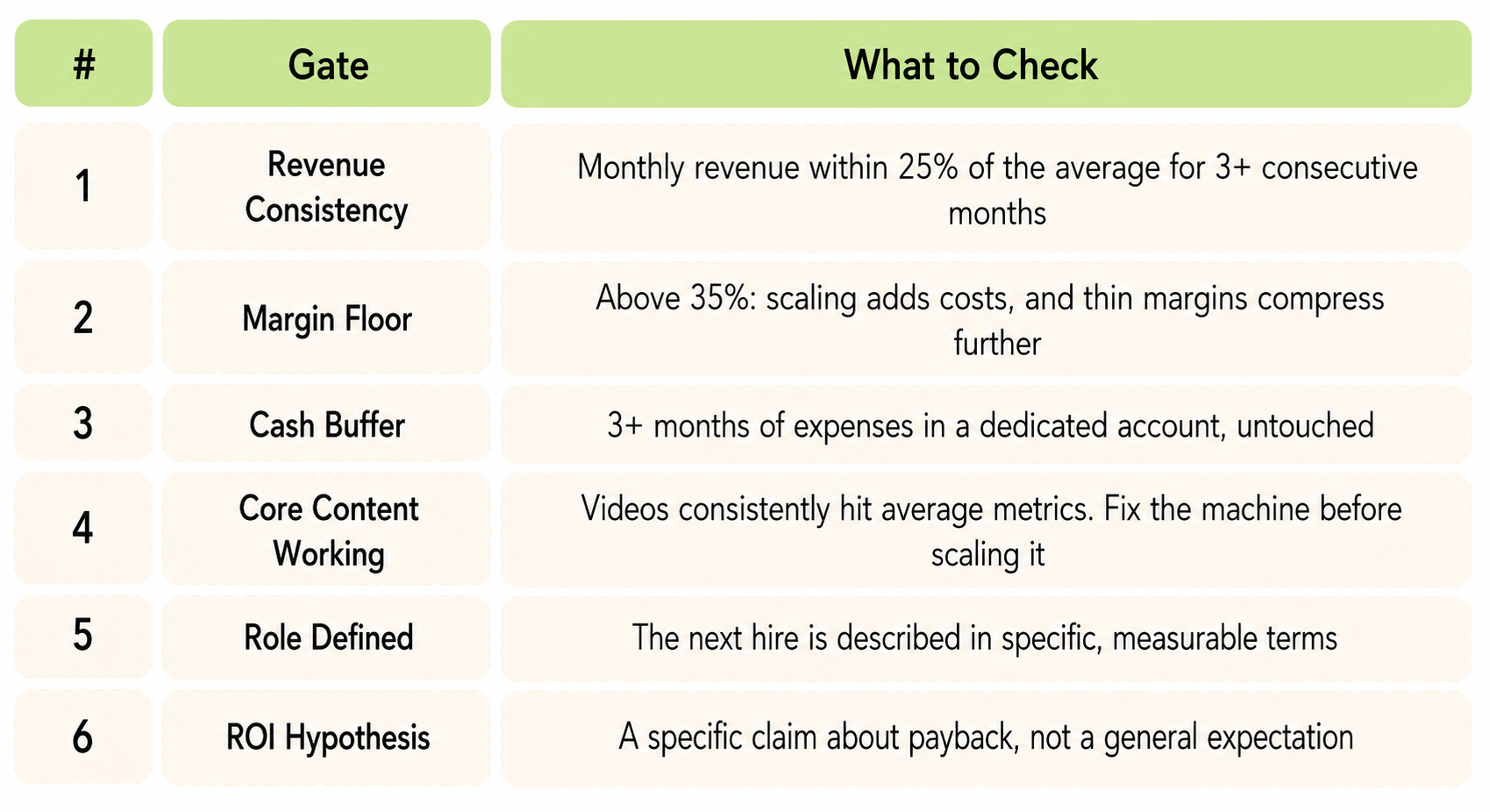
Treat peak months as an opportunity to build reserves, not as permission to expand. Scale based on your rolling average. When revenue significantly exceeds your average, the right question is whether this represents a genuine new baseline and how long you need to observe it before you're confident.
Before You Scale Anything, Run This Checklist
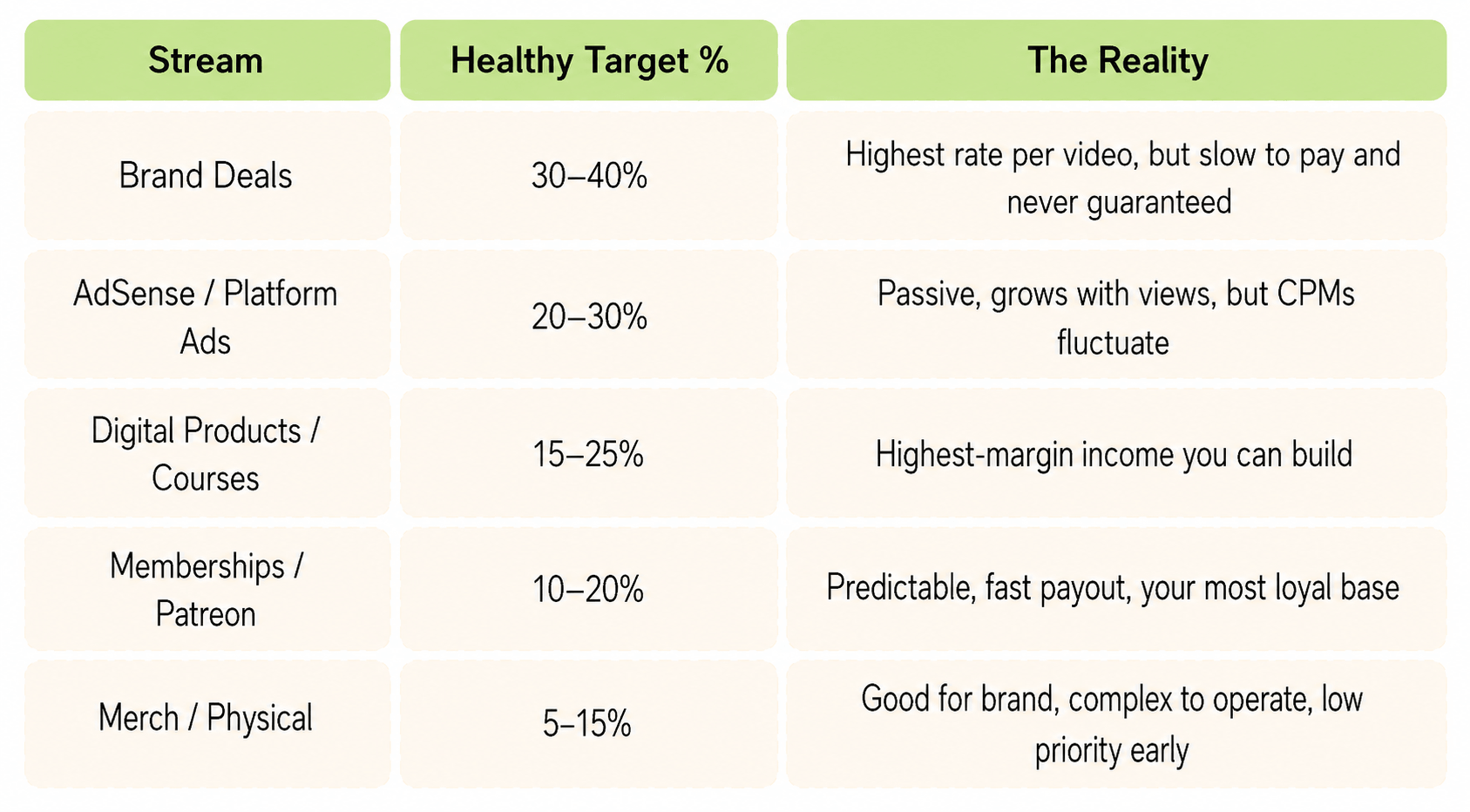
The strongest YouTube business model is on several streams that pay at different speeds and with different levels of predictability.
On revenue concentration: if any single income stream is more than 40% of your total, the business is fragile when that stream has a bad month, and every stream has bad months eventually.
Funding: What's Available, and What We Built
Most creators think about funding in one of two ways: grow from revenue, or land bigger brand deals. Neither is a capital strategy.
There's a real range of options between bootstrapping and institutional investment:
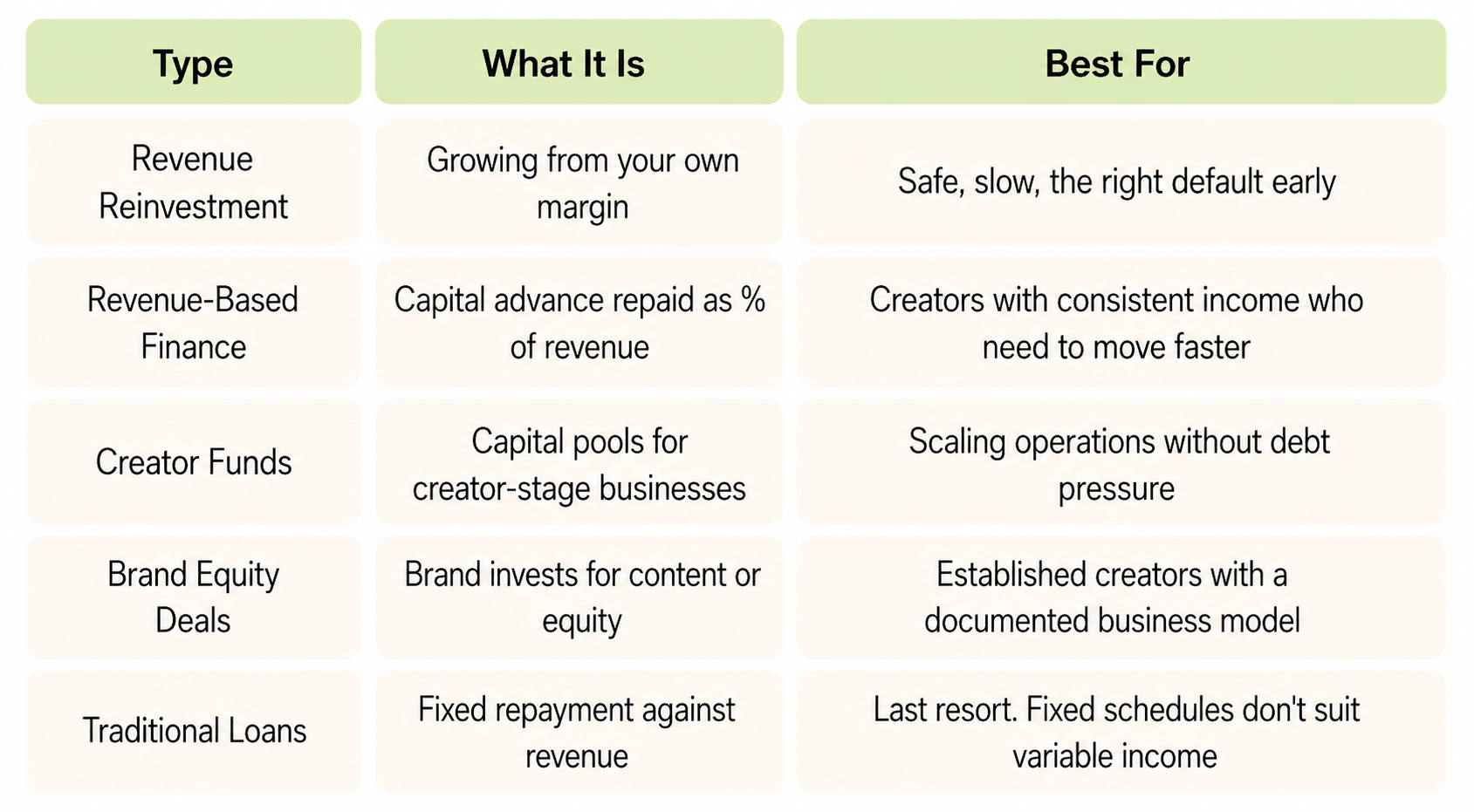
A creator with healthy margins and consistent revenue is running a genuinely good business, but standard financial infrastructure often doesn't recognize it as such.
MilX provides a solution.
Funding Your YouTube Business With MilX
MilX is a finance app for creators. It treats your channel's performance history as what it actually is - a financial asset - and uses it to unlock capital based on your projected revenue.
If you have a monetized channel with consistent earnings, you can access up to 6 months of your revenue upfront, in one lump sum, before the platforms pay it out. That money can go toward anything that grows the business: a new editor, a production upgrade, a content push you'd otherwise have to wait months to save for.
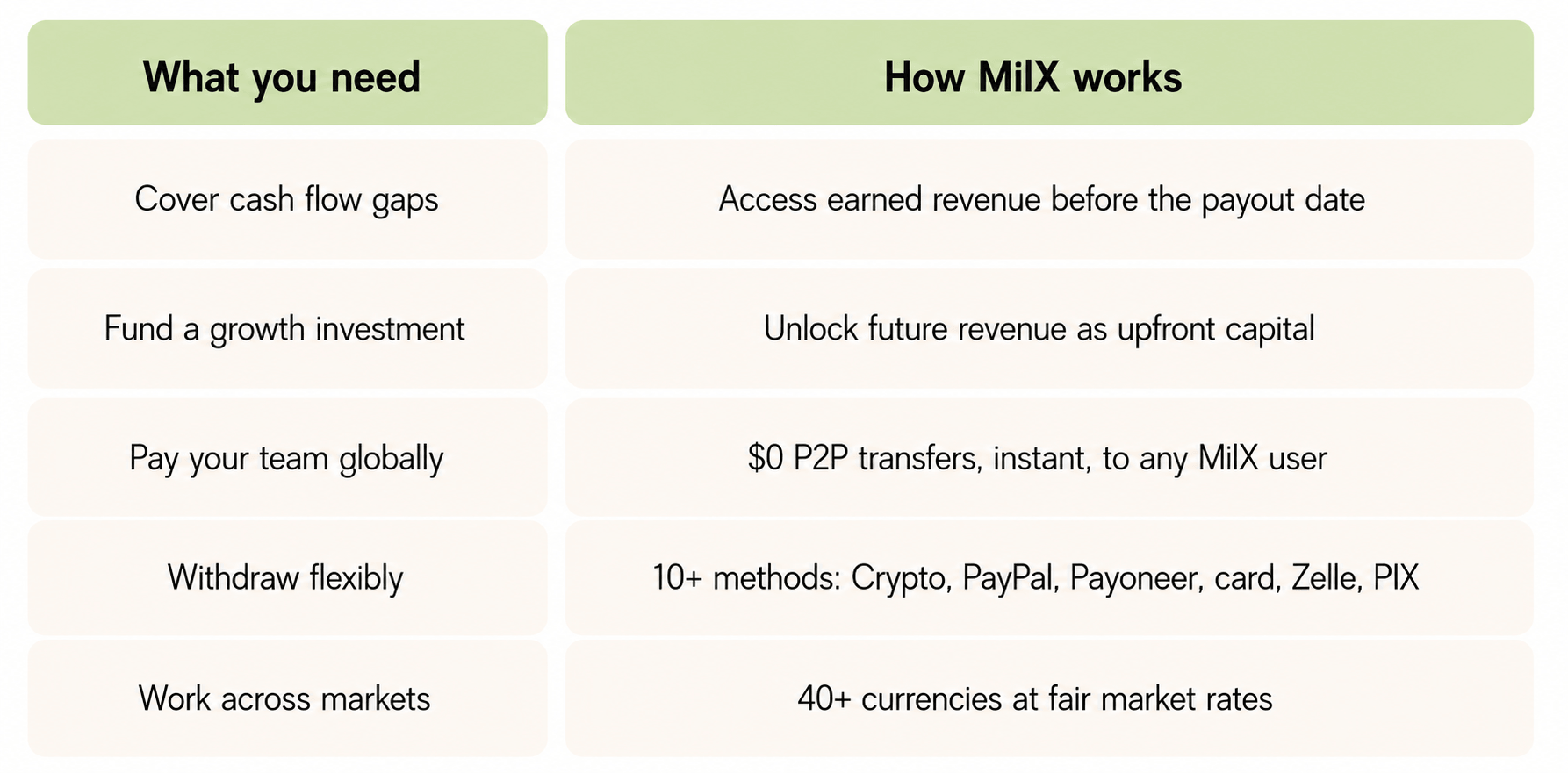
The minimum bar to qualify: a monetized channel, 1,500+ subscribers, 5,000+ watch hours in the past 12 months, and consistent earnings from $70/month.
If your channel meets those numbers, your track record speaks for itself.
MilX has processed over $500M in creator revenue, is an officially recognized YouTube partner, and is rated 4.6/5 on Trustpilot.
Taxes Will Surprise You If You Let Them
The self-employment tax situation is straightforward once you know it, and genuinely alarming if you encounter it for the first time at scale without having accounted for it.
As a self-employed creator, you pay both halves of Social Security and Medicare - 15.3% - before your income tax bracket enters the picture. Combined effective rate for most creators: 28–38% of profit. If you've been treating everything that lands in your account as spendable, that number will eventually be a serious problem.
The rule is simple enough to be almost mechanical: every time money arrives, move 30% to a dedicated savings account the same day. Don't calculate your exact rate, don't wait for a clearer picture of the year, just move 30% immediately. True it up with an accountant at tax time. You can't un-spend money that's gone.
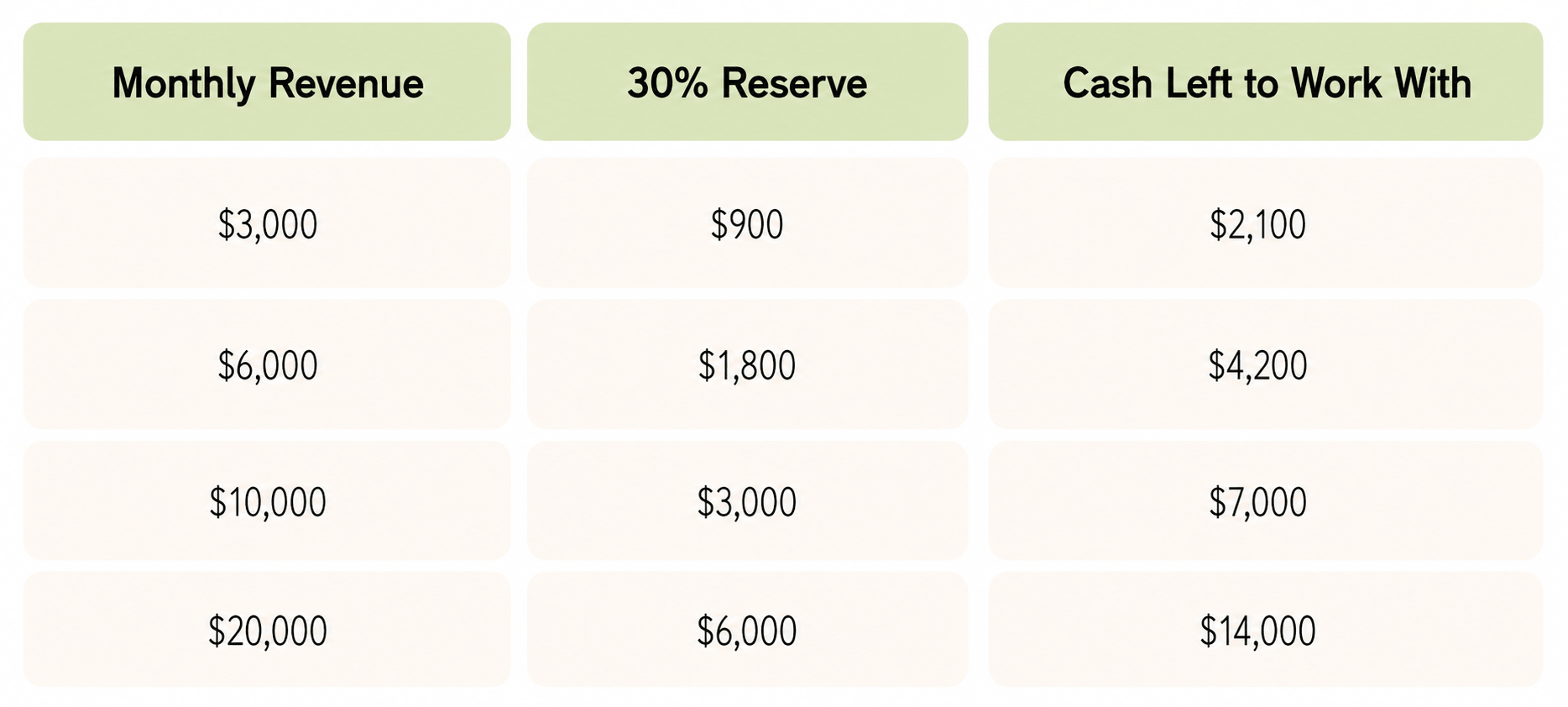
Quarterly Tax Deadlines - Put These In Your Calendar
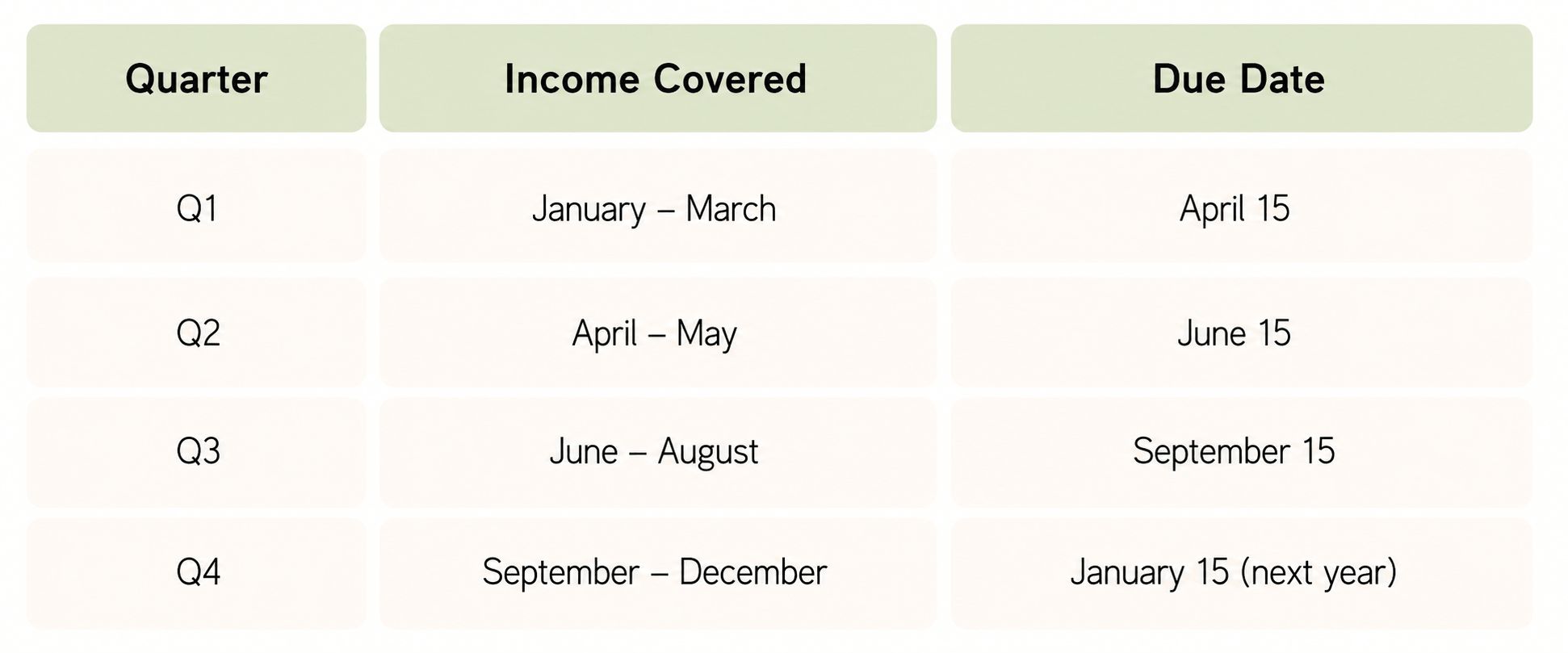
Missing these generates compounding interest. There is no upside.
The other side of the tax equation is deductions. Every legitimate business expense reduces your taxable income, which is why tracking your costs carefully pays back more than just the margin clarity.
Deductible expenses include:
- All software subscriptions.
- Equipment is amortized over its useful life.
- Music licensing, stock footage, travel for shoots, and creator events.
- Accountant and bookkeeper fees, every contractor payment you can document with a contract.
- home office space, if you have a dedicated workspace, and professional education, like courses and industry conferences.
All of it lowers the bill. Learn more about the creator taxes here.
On structure: sole proprietorship works below $5,000 a month. A single-member LLC makes sense at $5,000–$15,000. Above $15,000 consistently, an LLC taxed as an S-Corp is worth a proper conversation with a CPA. The self-employment tax savings at that level are meaningful.
Checklists to Save
Rules that hold at every revenue level:
- Profit margin stays above 35%.
- People costs under 30% of monthly revenue.
- Cash buffer at 3+ months of expenses, separate account, untouched.
- 30% of every payment to tax reserve the same day it arrives.
- Freelancers before employees; test before committing to retainers.
- No single income source above 40% of total revenue.
- Write the role description before hiring for it.
- Monthly P&L, every month.
- Quarterly taxes paid on schedule.
- 10-number dashboard every Monday before you open any platform.
Fix these before anything else:
- Unknown profit margin → first priority, everything else depends on it.
- People costs above 40% → cut or renegotiate before adding anyone.
- No cash buffer → stop non-essential spending until there is one.
- 80%+ of income from one source → build a second stream before scaling.
- No quarterly taxes paid → pay now, the interest compounds.
The formulas:
- Profit = Revenue − All Expenses.
- Profit Margin = Profit ÷ Revenue × 100.
- ROI = (Revenue Gained − Cost) ÷ Cost × 100.
- Max People Budget = Monthly Revenue × 30%.
- Tax Reserve = Monthly Revenue × 30%.
- Cash Buffer = Monthly Expenses × 3 minimum.